Yes, you can see ads in a supported market when using Free or Go. Standard ads appear below the answer with an ad label. Testing began in the US on February 9, 2026. Plus, Pro, Business, Enterprise and Edu remain ad-free.
OpenAI says ads don’t influence answers or give advertisers access to your conversations. If you ask how to choose a bike, you might see a bike ad below ChatGPT’s advice. One system generates the answer. A separate system selects the ad.
This guide explains how to manage your ad settings and how to advertise on ChatGPT through OpenAI’s Ads Manager, including budgets, billing, launch steps.
ChatGPT ads at a glance
Where: Standard ads appear below ChatGPT’s answers.
Countries: See the rollout by region.
What’s changed: On October 21, OpenAI announced expansion to 89 countries. On October 30, creative enhancements became the default for self-serve campaigns, with existing opt-outs kept in place.
Last verified: November 5, 2026.
| Plan | Ads? | Notes |
|---|---|---|
| Free | May show ads | Eligible accounts can go ad-free with lower usage limits and fewer tools. |
| Go | May show ads | Switch to Free to use the reduced-access Ads-Free option. |
| Plus, Pro, Business, Enterprise and Edu | No | Ad-free by default. |
For differences beyond ads, see our ChatGPT Go vs Plus comparison. For heavier workloads, compare Plus and Pro.
What ChatGPT ads look like
A standard ad includes the advertiser’s identity, headline, description, image, destination. Look for the sponsored label before treating a product mention as part of the answer.
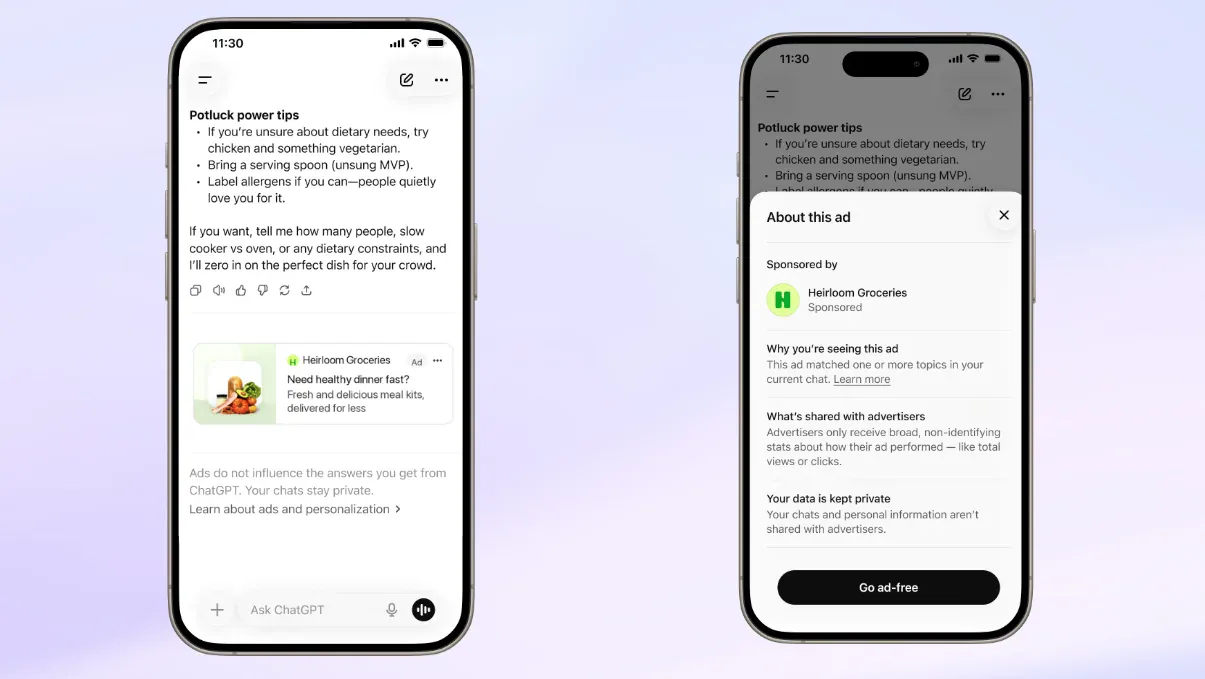
Screenshot: ChatGPT (OpenAI). Source: Ads in ChatGPT, OpenAI Help Center.
OpenAI also tests a separate multi-image placement during image generation. That ad stays distinct from the image you requested.
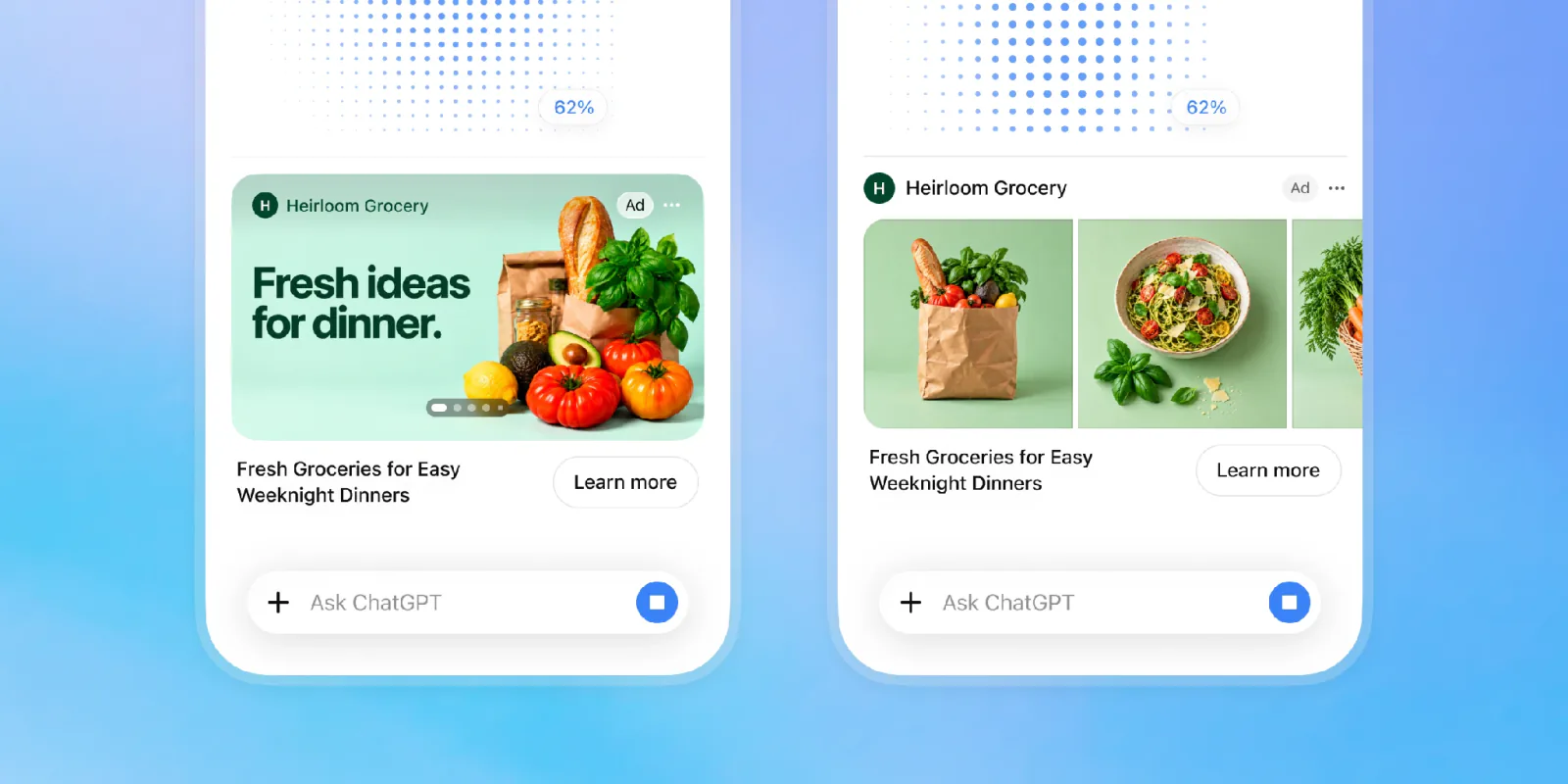
Screenshot: ChatGPT (OpenAI). Source: Building advertising for the way people use AI, OpenAI.
Countries where users may see ChatGPT ads
OpenAI says ChatGPT Ads has expanded to 89 countries. Its announcement names the following markets by region, but does not provide a complete list of all 89:
North America: Canada, Mexico and the United States.
South America: Argentina, Brazil, Chile, Colombia and Peru.
Europe: Austria, Denmark, France, Germany, Italy, the Netherlands, Norway, Serbia, Spain, Sweden, Ukraine and the United Kingdom.
Africa: Nigeria and South Africa.
Asia: Bangladesh, Cambodia, India, Indonesia, Japan, Malaysia, Pakistan, the Philippines, Singapore, South Korea, Taiwan, Thailand and Vietnam.
Oceania: Australia and New Zealand.
A launch in your country does not mean every eligible account will see an ad. OpenAI says it does not show ads to accounts identified as belonging to users under 18.
Privacy: control how ads are selected
If ads are available to you, you may want to know how ChatGPT selects them and what information advertisers receive. You can also review the ad settings available on your account.
OpenAI says it doesn’t sell your data or share your conversations with advertisers. OpenAI can use the current chat to select an ad. If you turn on ad personalization, OpenAI may also use recent chats and memories, depending on your settings. OpenAI excludes sensitive topics such as personal health, mental health and politics from ad placement.
OpenAI says ad controls are available to eligible Free and Go users in regions where ads are available or will soon be available. You may not see them on your account; if they are missing from the mobile app, update it to the latest version. Personalized ads are not initially available in the EEA or Switzerland.
If these controls are available to you, use the following steps on a laptop or desktop browser:
Open your account menu and select Settings.
Select Data controls, then look for Ads controls. You can also try searching for Ads controls in Settings.
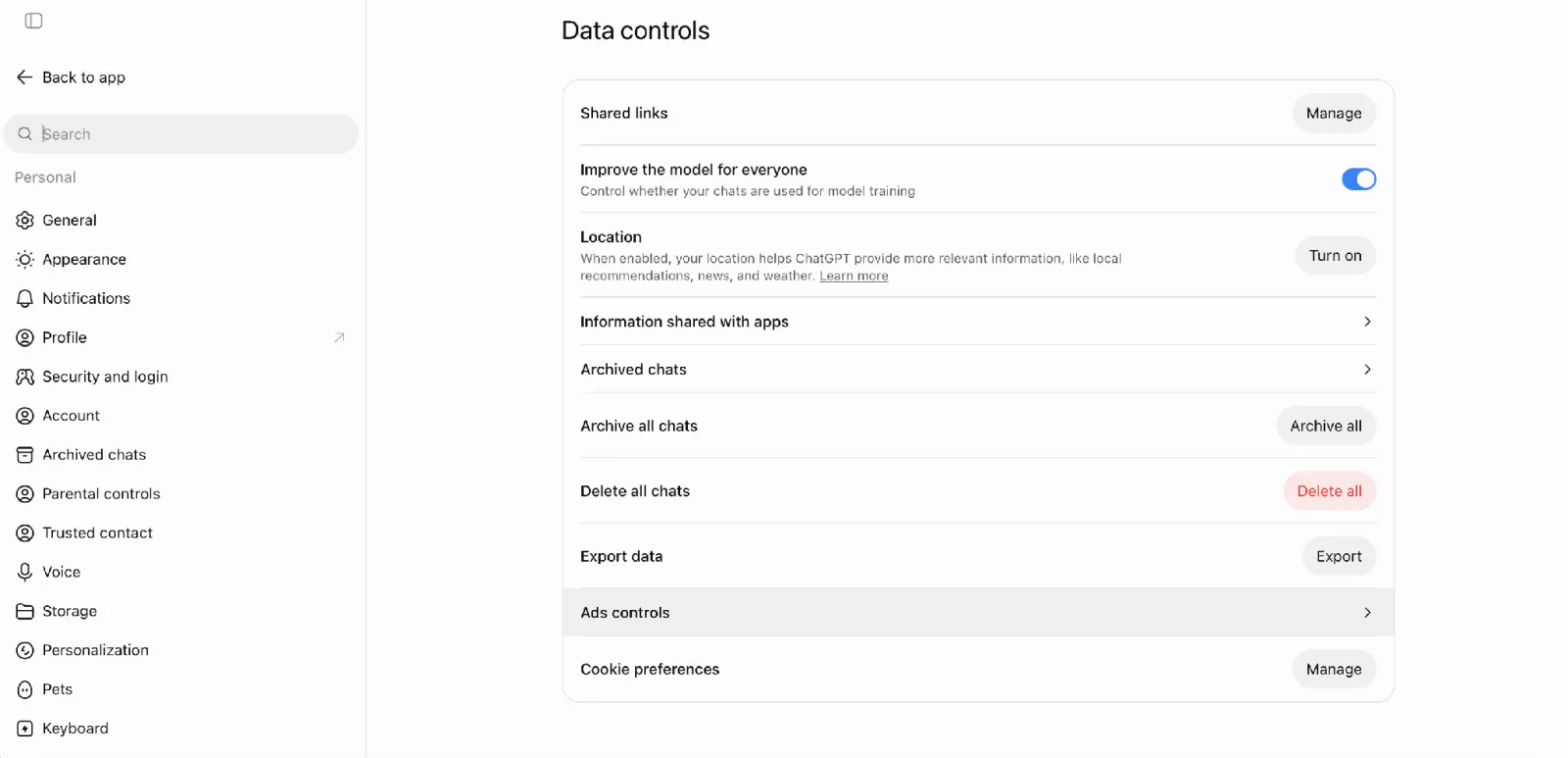
Screenshot: ChatGPT (OpenAI)
- Turn off Personalize ads if you prefer current-thread contextual ads.
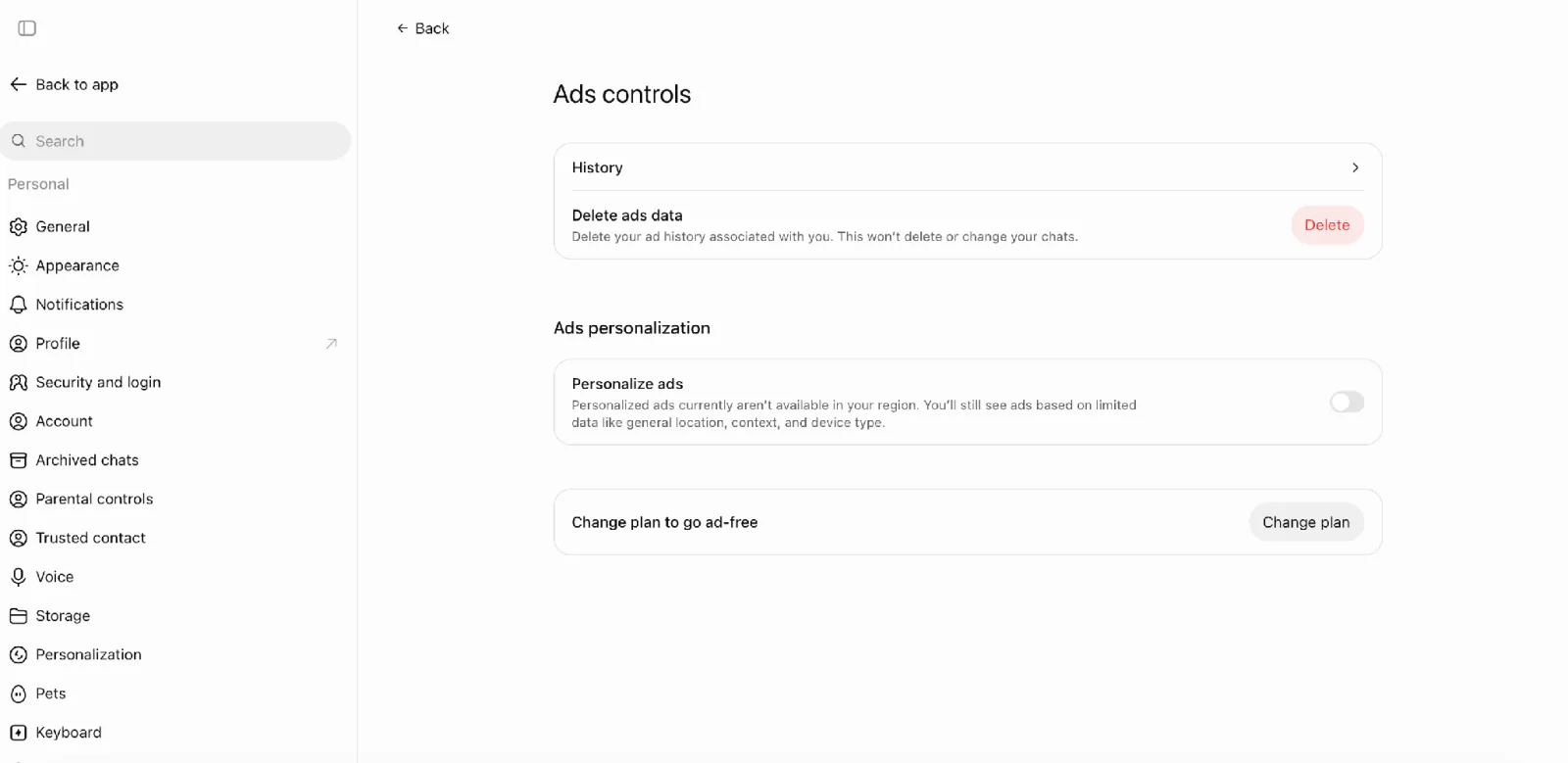
Screenshot: ChatGPT (OpenAI)
- Use Delete ads data to clear ad history and topics. Server removal can take up to 30 days; your chats remain separate.
On mobile, OpenAI describes the path as Settings → Ads controls.
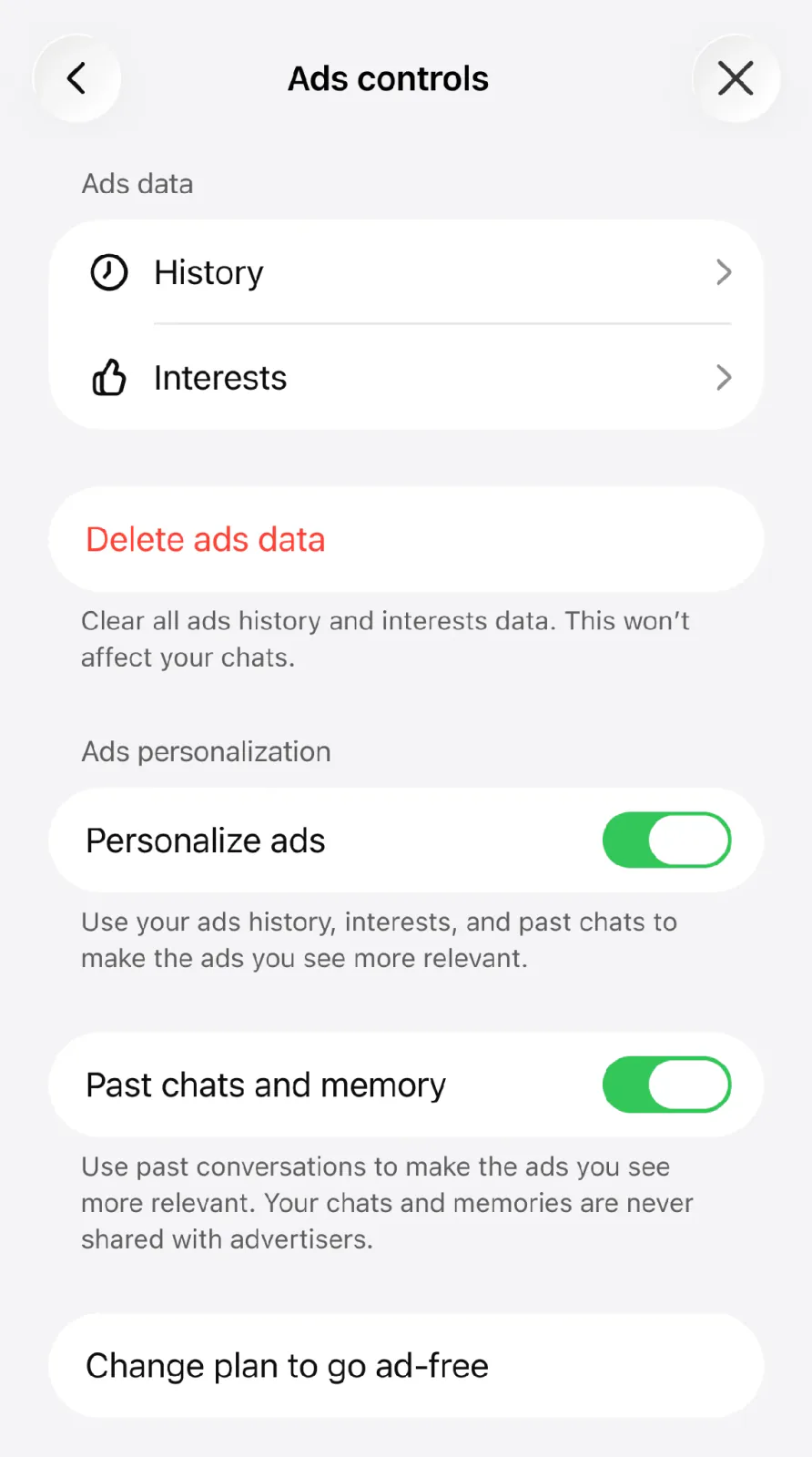
Screenshot: ChatGPT (OpenAI). Source: Ads in ChatGPT, OpenAI Help Center.
Labels and available controls can vary by account and platform.
For broader confidentiality and accuracy habits, read whether ChatGPT is safe to use.
How to remove ads in ChatGPT
An ad-free subscription is one way to avoid ads, though other options are available. Check OpenAI’s current plans for Plus and Pro, and read our Plus value guide to decide whether Plus is right for you.
On eligible Free accounts, you can also choose Ads-Free with reduced access. Open Settings → Ads controls → Change plan to go ad-free → Reduce message limits, then confirm. Expect fewer messages and reduced tool access.
Note: Go subscribers need to return to Free plan first.
In an August 2026 TechRadar test, a writer tried the free Ads-Free option and found that message-limit warnings varied between sessions. Your experience may differ, so try the option with your own typical usage before relying on it.
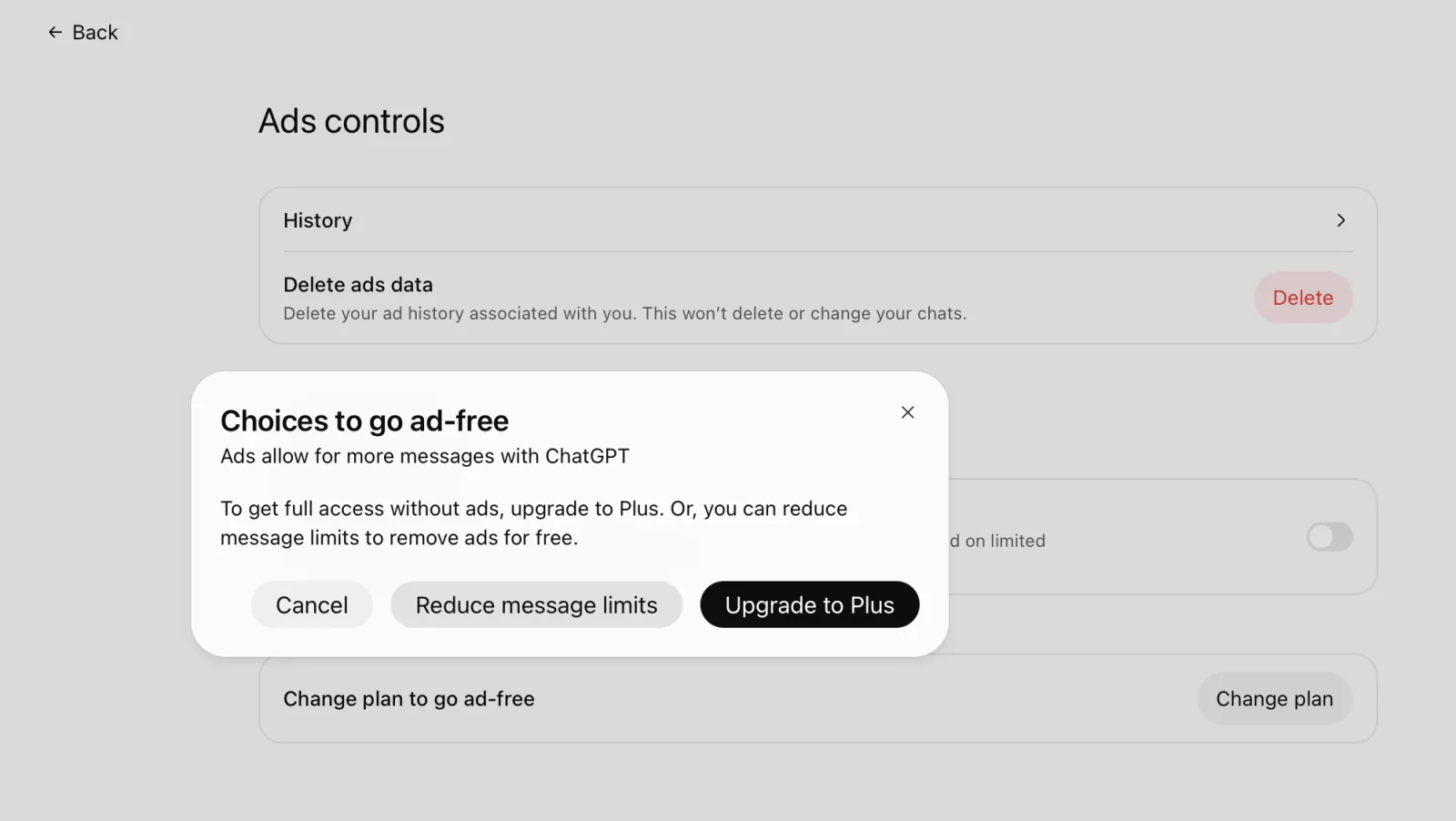
Screenshot: ChatGPT (OpenAI)
For a single conversation, use Temporary Chat. Open a new chat, select Temporary, then choose Personalized or Unpersonalized before messaging. OpenAI says temporary chats have no ads; choose Unpersonalized if you also want to exclude existing memory, custom instructions, plugins.
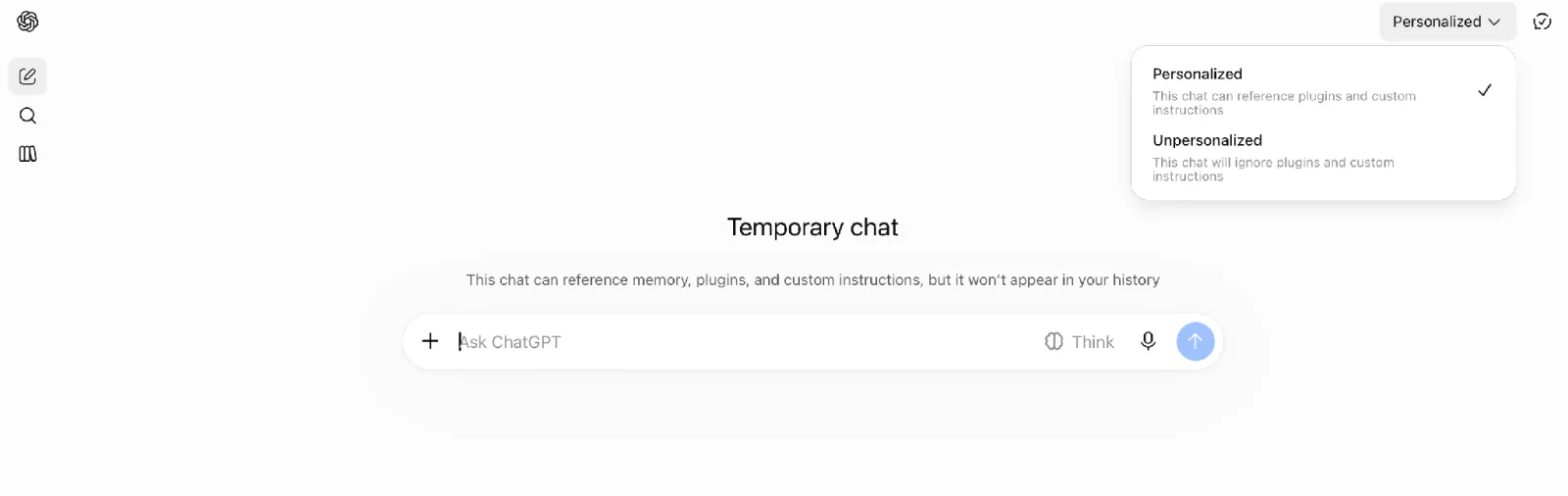
Screenshot: ChatGPT (OpenAI)
How ChatGPT advertising works for marketers
ChatGPT Ads lets you pay to show a sponsored message to people whose conversations may be relevant to your offer. Here’s what happens between creating an ad and seeing its results:
You create a campaign. In Ads Manager, you provide your ad and describe situations where it could be relevant. For example, a business selling herb kits could describe people looking for ways to start a small balcony garden.
OpenAI matches the ad to a conversation. Its system considers the conversation, the ad’s content, factors such as general location and language. If several ads are eligible, it considers relevance and advertiser bids when selecting an ad.
An eligible user may see the ad. Standard ads appear below ChatGPT’s answer with an ad label. Your ad could include one image or, in the multi-image open beta, several images. If you sell multiple products, you can also upload a product catalog and create ads using details such as product names, images, prices. This product-feed campaign is currently in beta.
You pay for delivery and review results. Depending on the campaign’s billing option, charges may be based on impressions or clicks. Ads Manager reports how many times your ad was shown and clicked. If you set up conversion tracking, it can also report actions attributed to your campaign, such as purchases or sign-ups.
What ChatGPT ads cost: budgets and bids
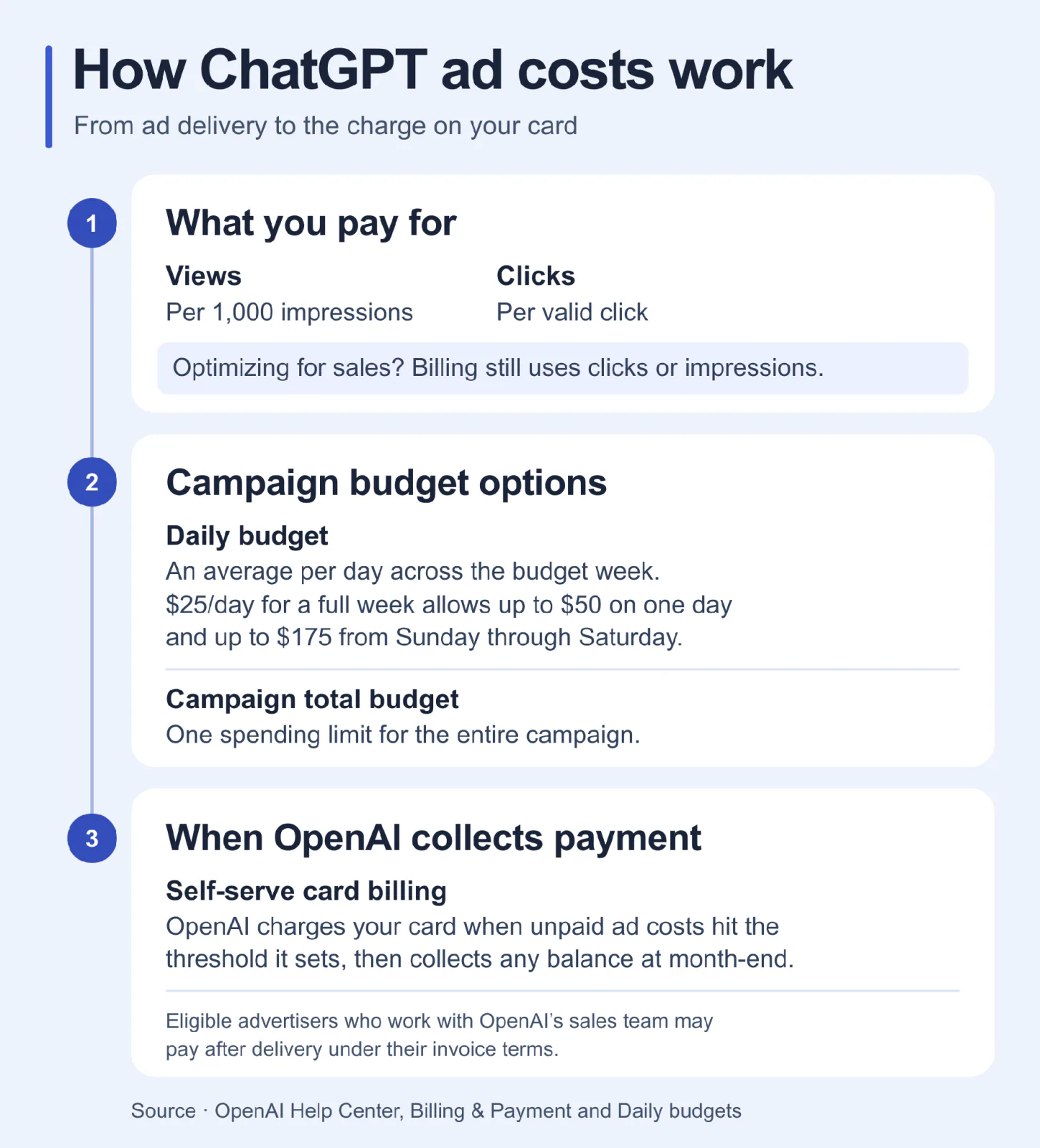
Your campaign objective tells OpenAI what result to aim for. Your billing option determines what you pay for. A conversion is an action such as a purchase, registration, or enquiry.
OpenAI’s billing guide describes these options:
| Campaign objective | What the system aims for | What you pay for |
|---|---|---|
| Views | Ad views | Impressions, priced per thousand (CPM) |
| Clicks | Clicks on your ad | Valid clicks (CPC) |
| Conversion optimization | A selected action, such as a purchase | Valid clicks or impressions, depending on the billing option selected |
With Conversion optimization, OpenAI tries to show your ad to people likely to take your selected action. You still pay for clicks or impressions even when they produce no purchase. Set up tracking for that action before you choose this objective. Step 5 shows how to connect your website to Ads Manager.
For example, if you spend $100 and Ads Manager attributes five purchases to the campaign, your calculated cost per purchase is $20.
Ads Manager offers two ways to set a campaign budget.
- Daily budget. You set an average amount to spend per day across the budget week. This works well for ongoing campaigns you plan to adjust. For instance, if you sell a product all year round, you can review results weekly and adjust the daily budget accordingly.
As of November 5, 2026, OpenAI lists minimum daily budgets per campaign of USD 25, EUR 15, GBP 15, depending on the billing currency.
Ads Manager can use money left over from quieter days later in the same week. If you keep a $25 daily budget for a full week, the campaign can spend up to $50 on one day and up to $175 from Sunday through Saturday, in your account’s time zone.
If you change the budget midweek, Ads Manager recalculates the limit for the rest of the week. On the day of the change, the limit is twice the highest daily budget you had set that day.
- Campaign total budget. You set one spending limit for the full run of the campaign. This works well when you know how much you can spend on a promotion. For example, if you have $350 to advertise a two-week sale, you can set $350 as the limit for both weeks combined.
Ads Manager uses the remaining budget and campaign schedule to spread spending over time. OpenAI’s Ads Manager guide gives no universal minimum for this budget type.
OpenAI’s advertiser basics recommends a starting maximum CPC bid of USD 3 to USD 5 for Clicks, checked November 5, 2026. That recommendation establishes neither your actual CPC nor an average market price.
For self-serve accounts that pay by card, ad costs add up as your ads run. OpenAI sets a payment threshold for your ad account. Once your unpaid ad costs reach that amount, OpenAI charges your card. The threshold may increase automatically based on your payment history and other factors. For example, with a $100 threshold, OpenAI charges your card when you’ve spent $100 on ads. If you spend another $35 before the month ends, OpenAI charges that $35 at the end of the month. When you first add a card, OpenAI may also place a temporary hold to verify it.
Some advertisers who work with OpenAI’s sales team can pay by invoice after their ads run. Payment follows the terms agreed for that account.
How to launch your first ChatGPT ad campaign
Use OpenAI’s documented Ads Manager Beta workflow below. Available fields and eligibility vary.
Before you start, decide what one campaign should tell you about your offer. Keep the landing page, approved product details, measurement goal beside you so each setting has a concrete input.
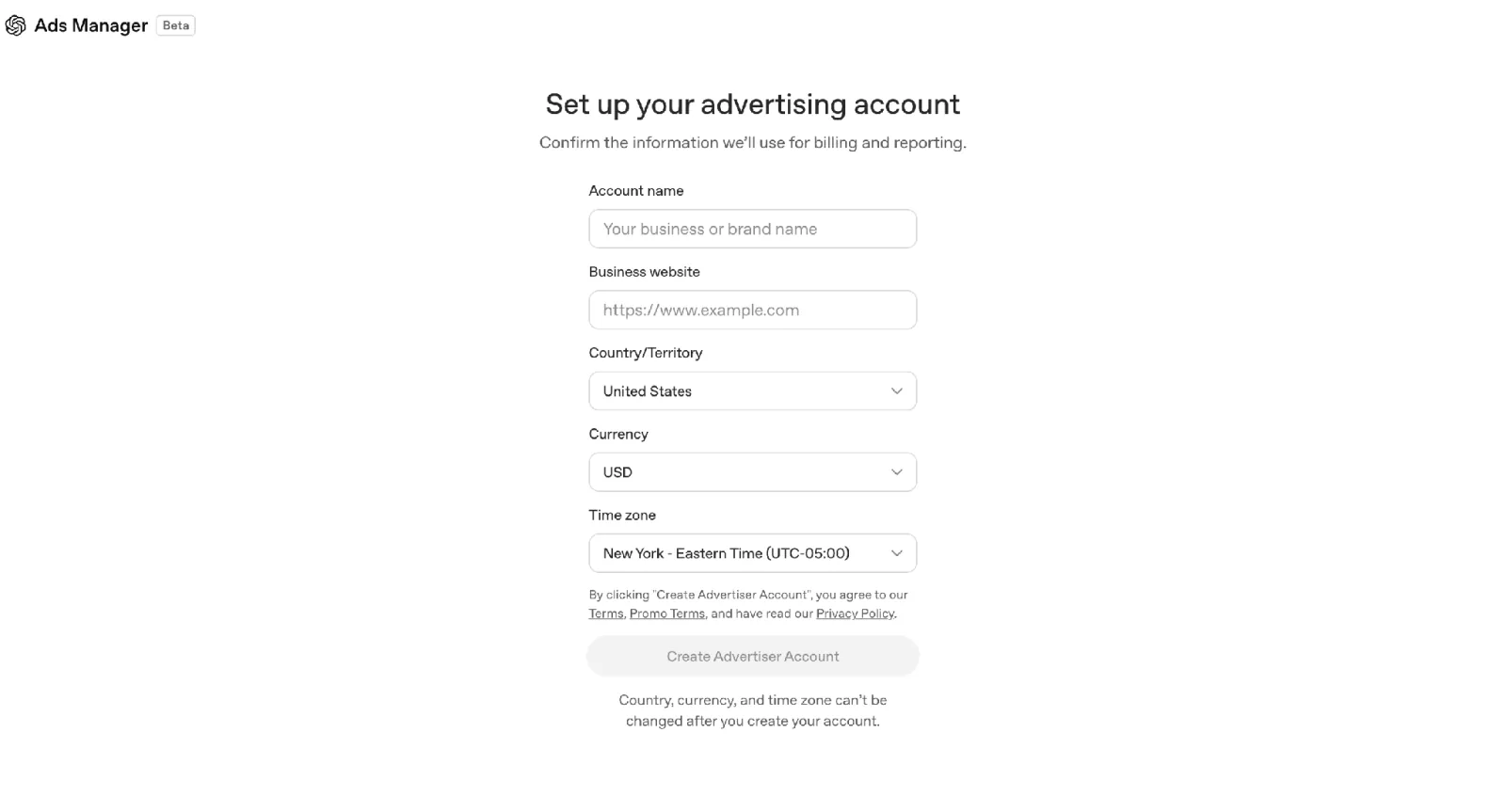
- Check access and create your account. Start at OpenAI Ads Manager. Self-service eligibility depends on where the advertising and billed legal entity is based. Check the list of countries where your business can use self-service Ads Manager, then sign in or create an account. Enter your website URL during signup. Ads Manager uses the site to help create your first ad.
Confirm brand and legal names, country, currency, time zone; the last three cannot be changed after creation. Complete billing and required verification.
If you submit your first ad during signup, it can start running and using your budget once OpenAI approves the ad, your account and billing are ready, and your campaign settings allow it to run.
Screenshot: ChatGPT (OpenAI)
Ads Manager in ChatGPT (optional). If you see an offer to connect the ChatGPT Ads Manager plugin, you can continue setup directly in Ads Manager. The plugin lets you draft ads and review campaign performance in ChatGPT. Billing and identity verification still take place in Ads Manager. Our ChatGPT connectors guide explains how to review an app’s permissions before you connect it.
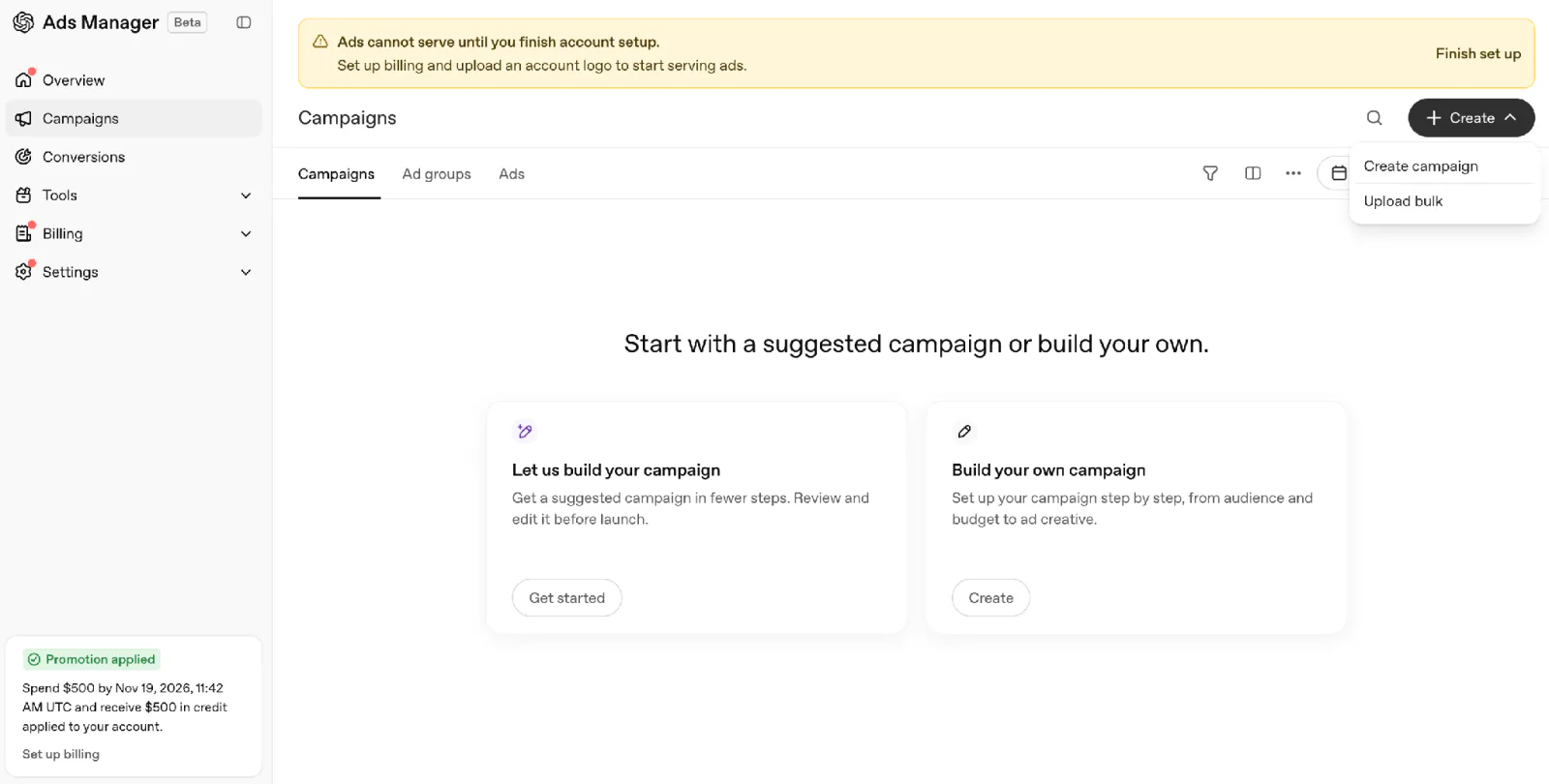
- Create the campaign. Select Create → Create campaign.
In the same menu, Upload bulk lets you create multiple campaigns, ad groups, ads at once by uploading a completed CSV template. Product-feed campaigns use a separate setup flow.
Screenshot: ChatGPT (OpenAI)
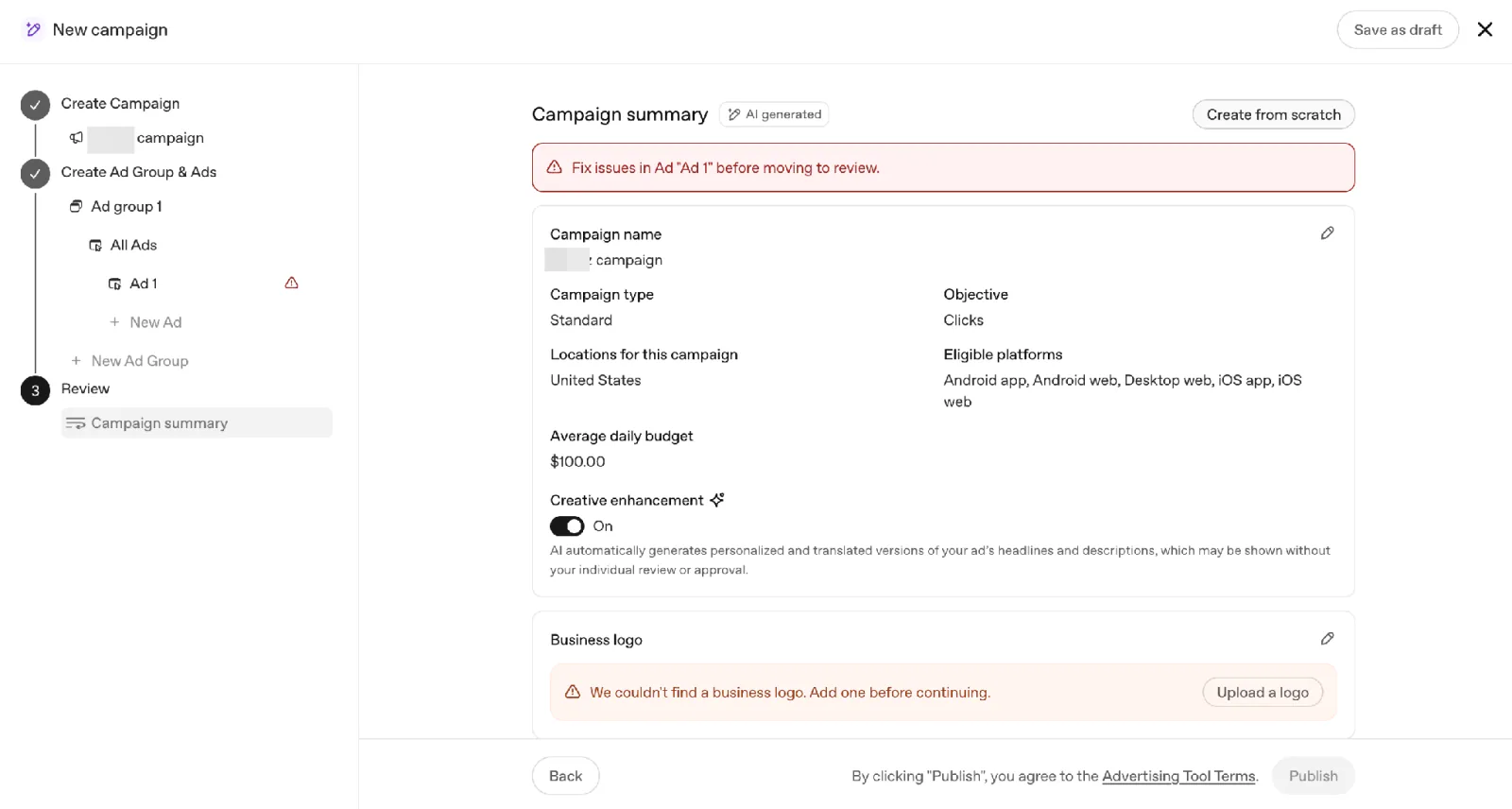
After you select Create campaign, Ads Manager may open a Campaign summary with suggested settings already filled in. Review the objective, budget, locations, and edit them as needed before publishing. To set up the campaign yourself, select Create from scratch at the top of the summary.
Screenshot: ChatGPT (OpenAI)
Follow the bid controls Ads Manager shows for your chosen campaign setup. Some options use automated bidding.
Some new accounts initially advertise only in their home country; finer location options vary, and new product-feed campaigns use country-level targeting. For affected accounts, international eligibility requires approved identity verification and actual home-country ad spend; creating a budget alone doesn’t unlock it.
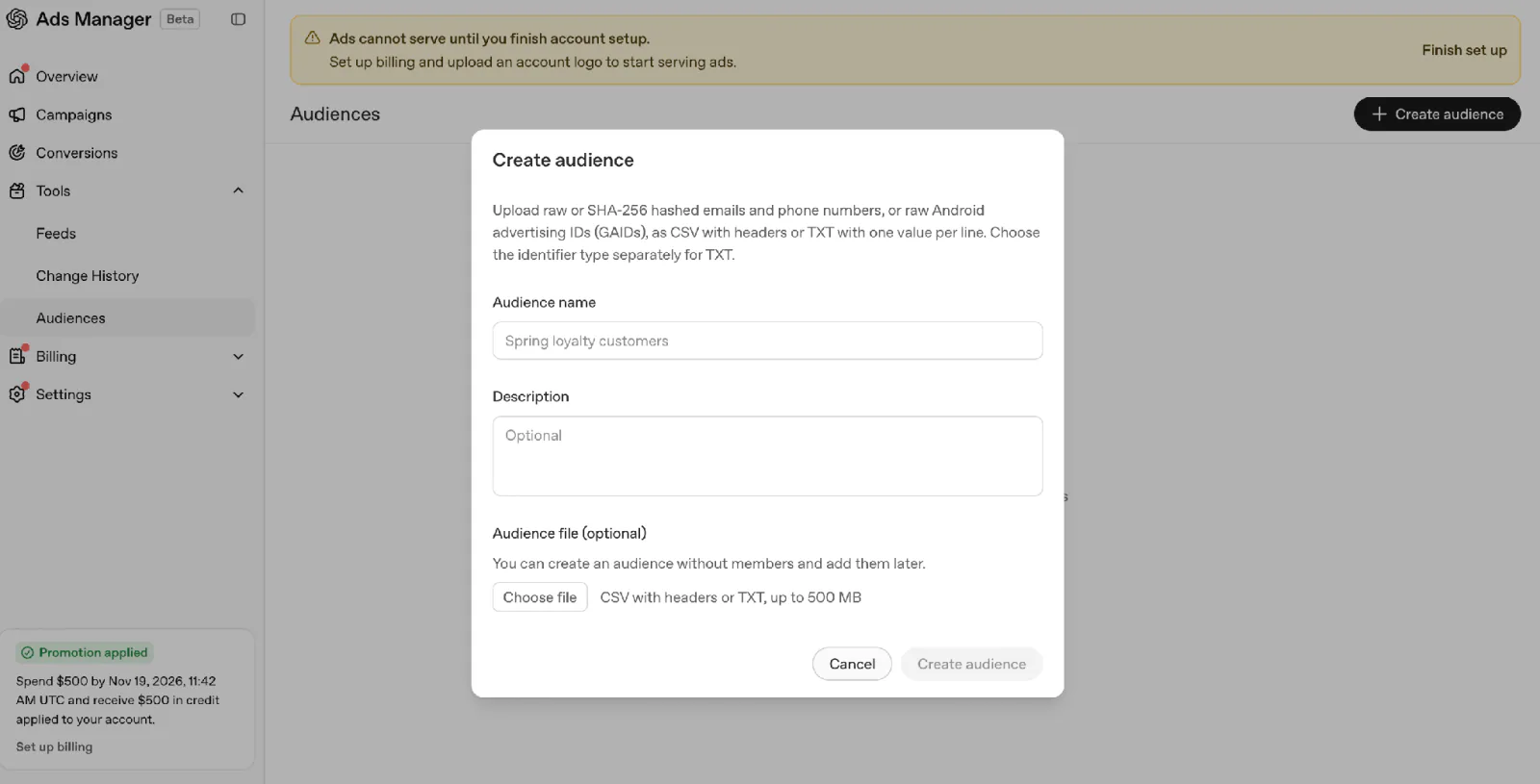
Custom audiences (optional). To create a reusable audience from a customer or prospect list, go to Tools → Audiences → Create audience in the main Ads Manager sidebar. You can name the audience and upload a contact list later. Inclusion requires at least 25,000 matched users. OpenAI advises against using custom audiences for campaigns targeting the EEA or Switzerland while ad personalization is unavailable there.
Screenshot: ChatGPT (OpenAI)
If Custom audiences doesn’t appear when you first set up the campaign, select Save as draft. In Campaigns, open the draft’s three-dot menu (⋯) and choose Edit campaign. Under Targeting → Custom audiences, select Include audience or Exclude audience and choose a list marked Ready.
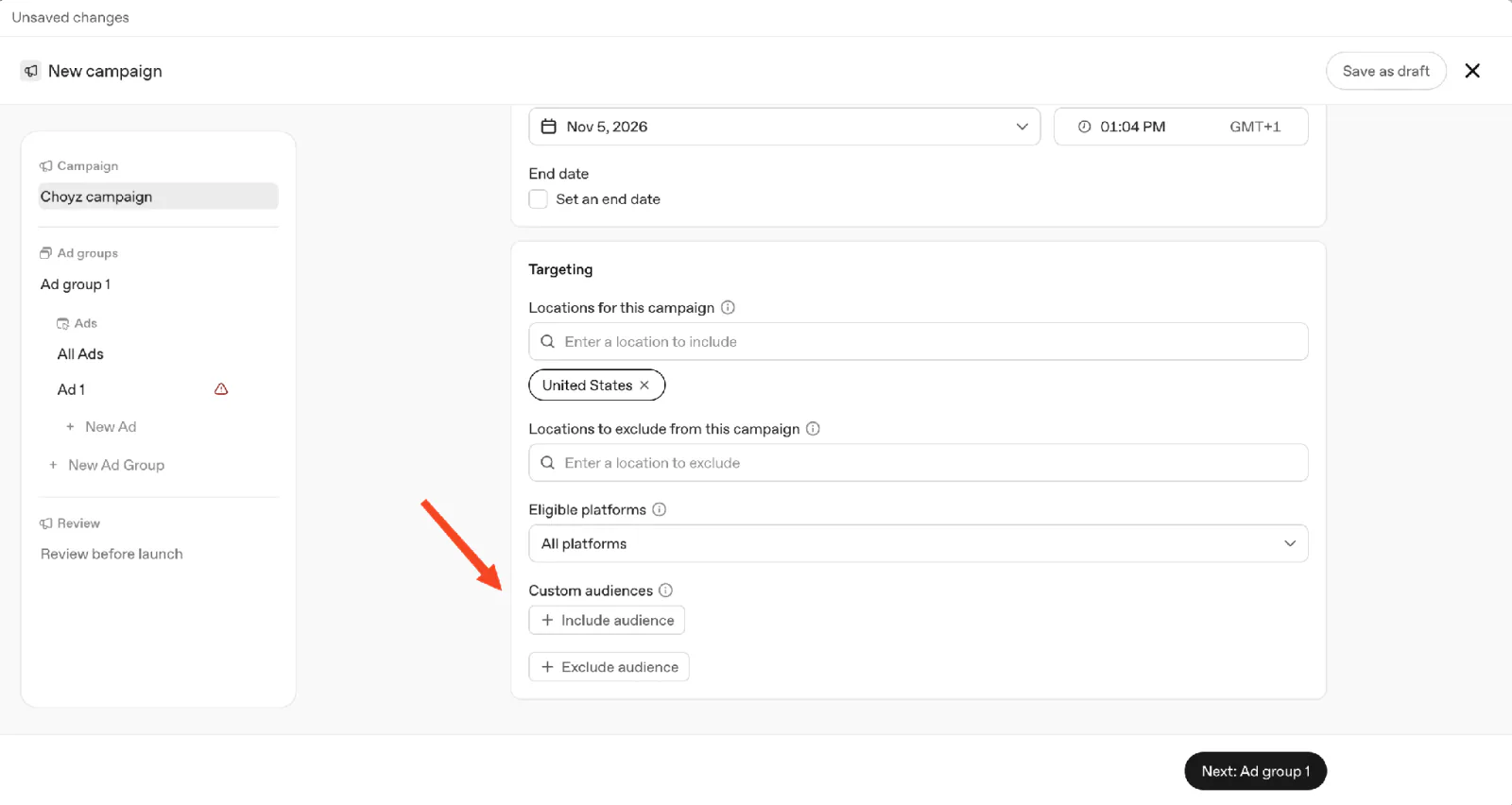
Screenshot: ChatGPT (OpenAI)
- Add an ad group. Give each group a clear focus, such as an emergency plumbing repair. In the optional Context hints field, describe when the ad may be relevant, for example, when someone asks how to find a plumber for a burst pipe. Create a separate group for offers that need different ad copy or a different landing page.
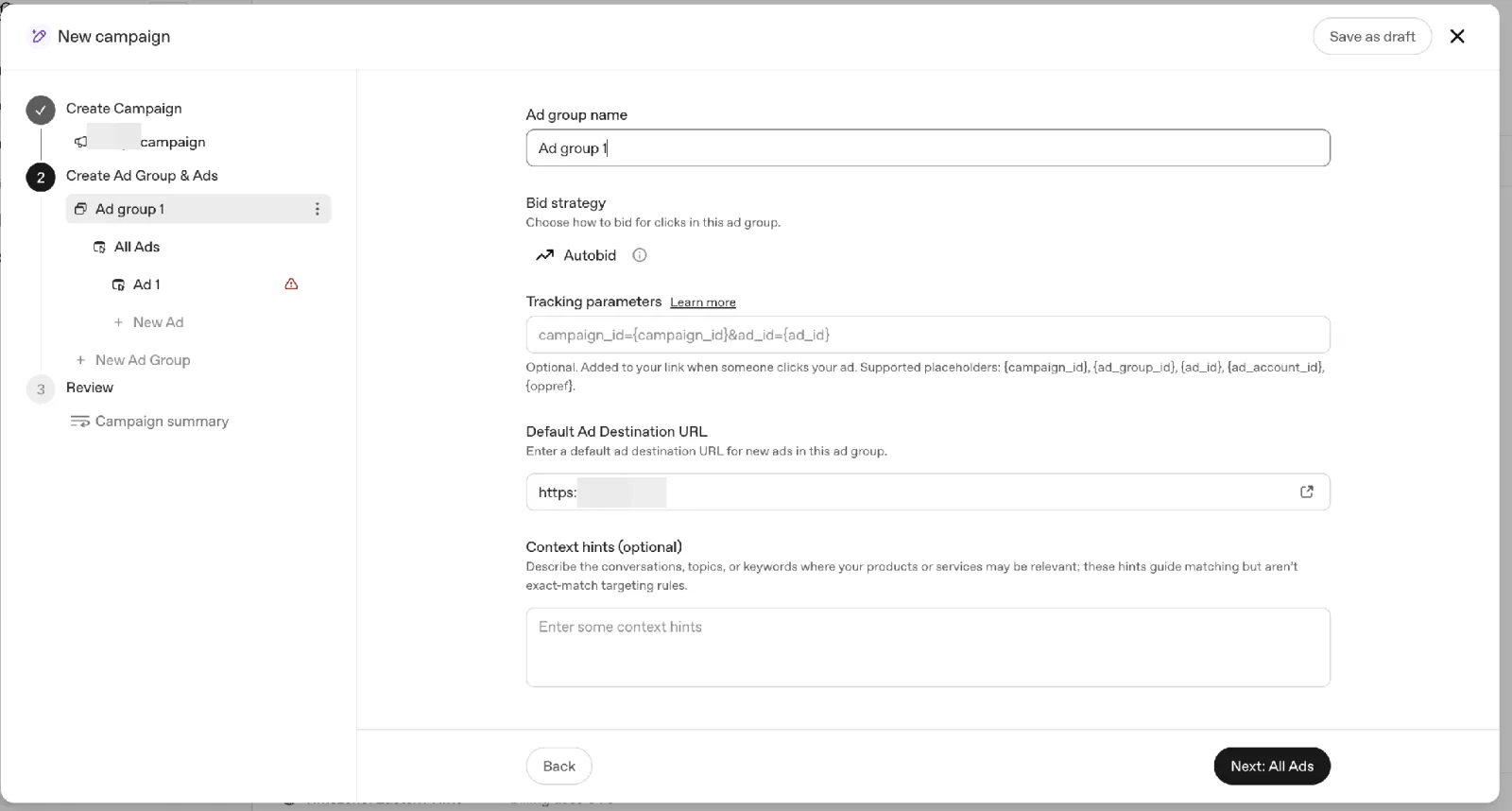
Screenshot: ChatGPT (OpenAI)
- Build the ad. Enter the landing page URL, write the title and description, and upload an image. Add tracking parameters if you need them. Use the preview to check how the ad will look.
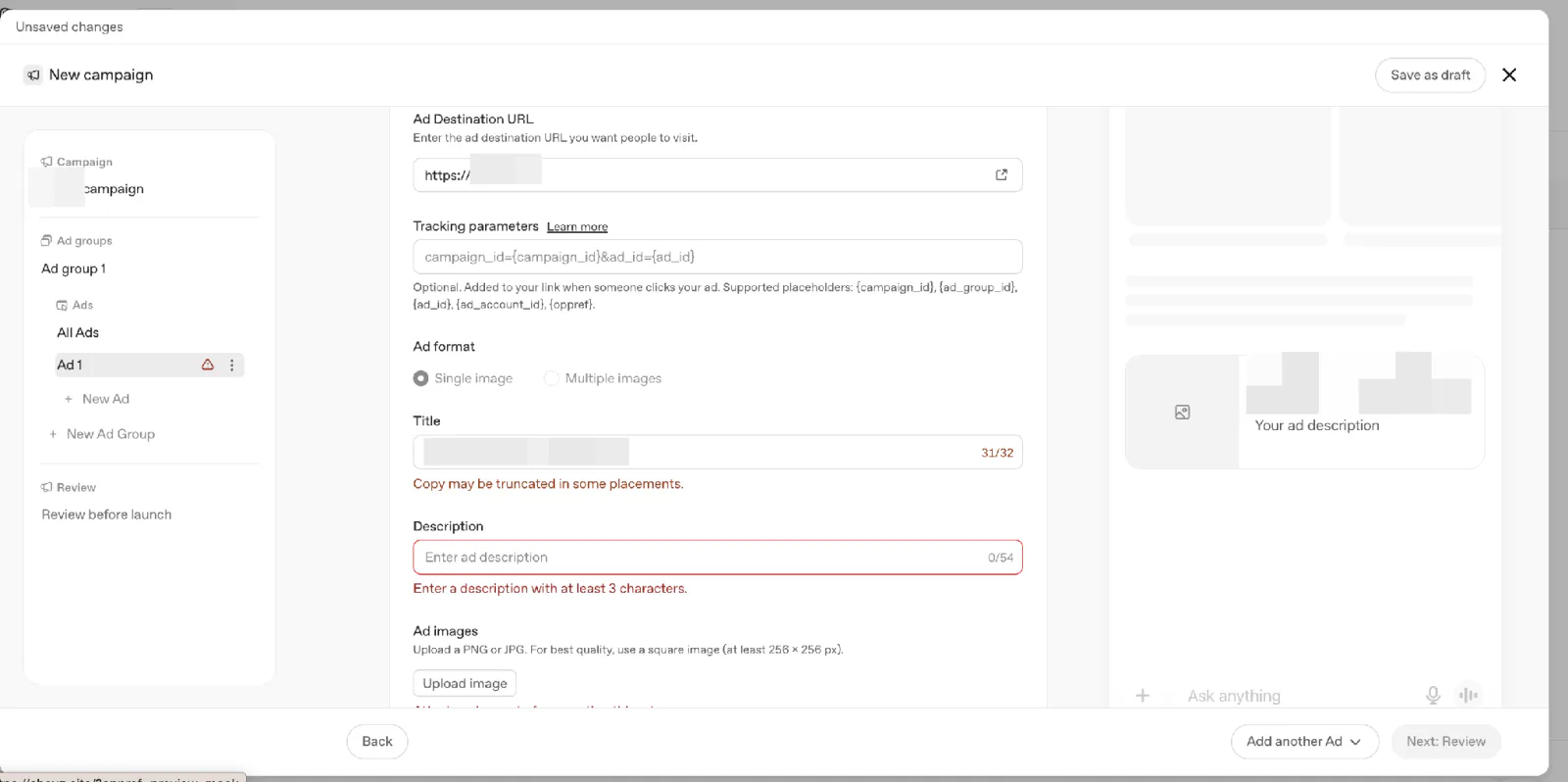
Screenshot: ChatGPT (OpenAI)
If you need tools to prepare copy, images, or reports, compare our AI marketing tools by use case.
Creative enhancement lets Ads Manager use your ad and landing page to automatically adapt the ad to a conversation. It can rewrite or translate the text, resize the image, or change the destination URL. These versions can run automatically. The setting is on by default for self-serve campaigns.
To turn it off for your ad account, open Settings → General in the Ads Manager sidebar. Scroll down to Creative settings and switch Creative enhancement off.
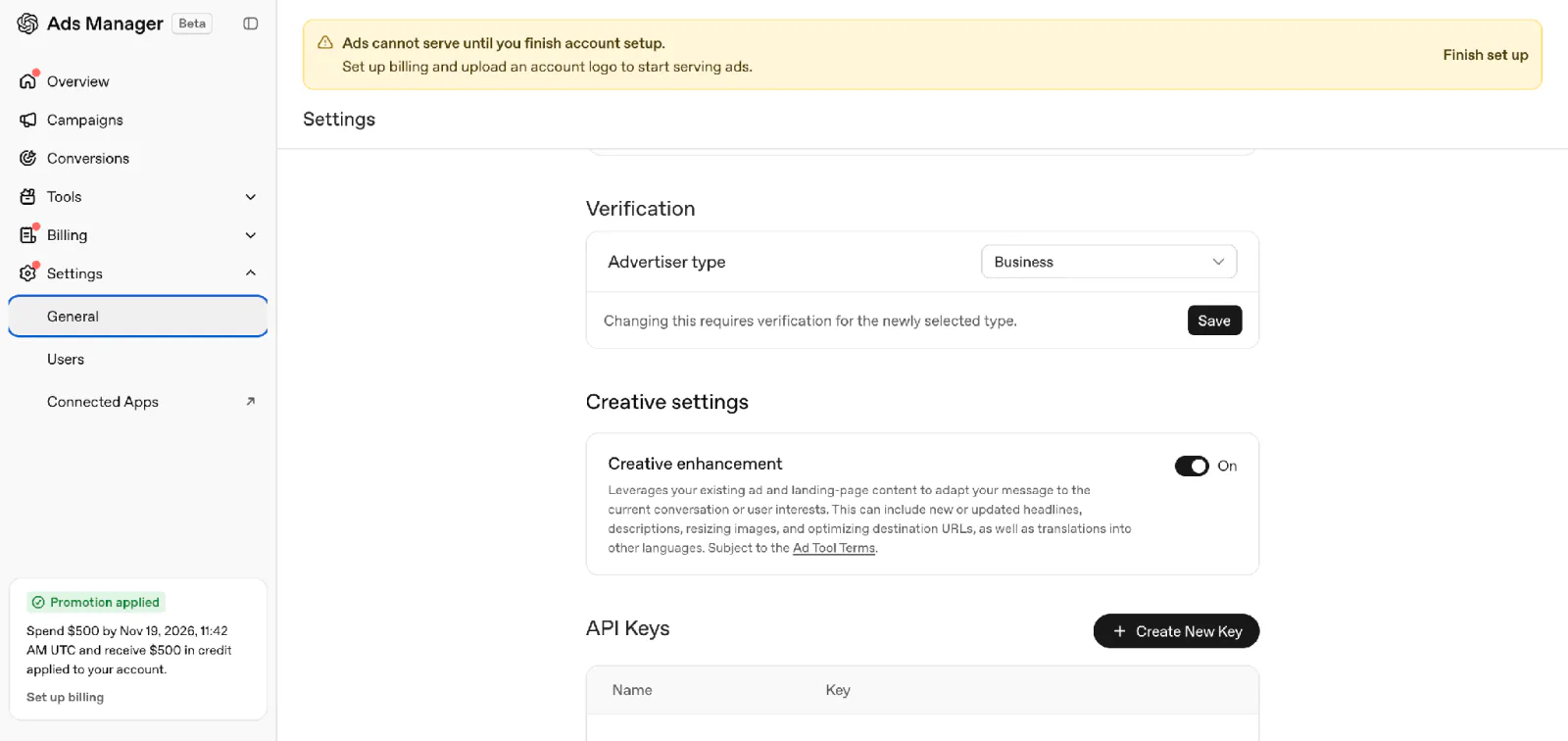
Screenshot: ChatGPT (OpenAI)
- Set up conversion tracking (optional). If you plan to use Conversion optimization, first check that the action you want to optimize for is one of OpenAI’s standard events, such as a purchase, sign-up, or lead submission.
In Ads Manager, open Conversions and select Create data source to set up a source for your website. Copy its Pixel ID so the events your site sends reach the right source. Next, select Create a conversion event and choose the action you want to track, such as a purchase.
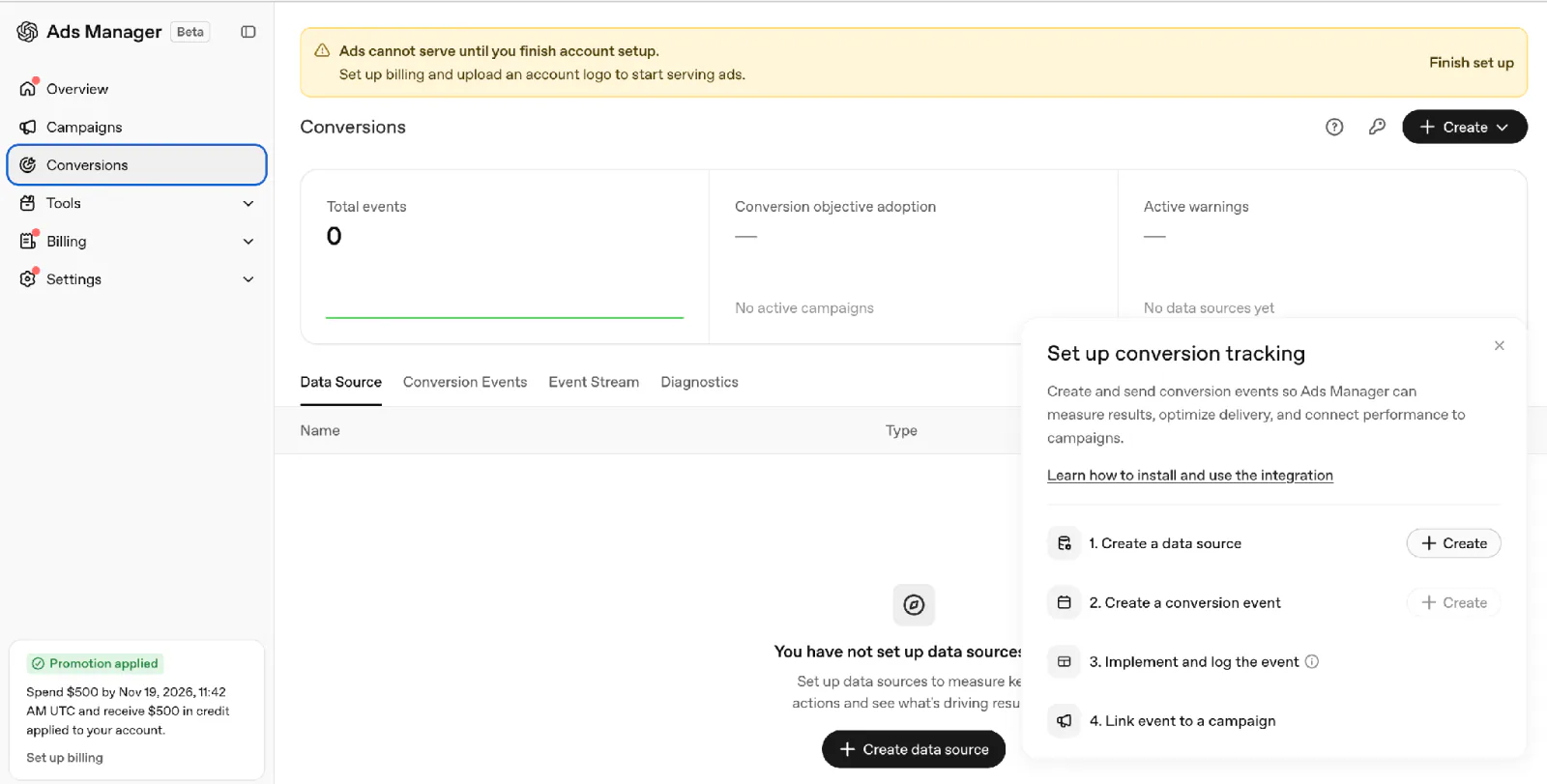
Screenshot: ChatGPT (OpenAI)
Then set up your website to send those events. Choose the method based on where the action is recorded.
JavaScript Pixel. Add OpenAI’s tracking code to your site and configure it with your Pixel ID. Use it for actions the browser can detect, such as a successful form submission.
Conversions API. Have your developer connect your server using the same data source’s Pixel ID and a Conversions API key. Use this for actions your server records, such as a confirmed order.
Both. Use both if you need to track some actions in the browser and others on the server. If both send the same purchase, use the same Pixel ID, event name, event ID so OpenAI counts it once.
To test before launch, open your website directly and place a test order. On the Pixel, enable debug mode and look at the browser console for the purchase event. Have your developer send a test event with validate_only enabled to validate the format using the Conversions API. A purchase shows up as an ad conversion only when OpenAI can match it to an eligible ad click or impression.
Once tracking works, you can create a campaign with the Conversion optimization objective. In the Conversion event field, select the event you tested. Ads Manager uses that event to guide who sees your ads.
- Submit when ready and confirm delivery. Review the offer, budget, schedule, account readiness, status before activation.
If your first campaign needs to start on a specific date, look for Start date under Budget & schedule before you publish. Ads Manager may show the scheduling fields only after you create the first campaign. If the start-date field is missing, hold off on publishing. The ads could start running after approval if billing and account setup are complete.
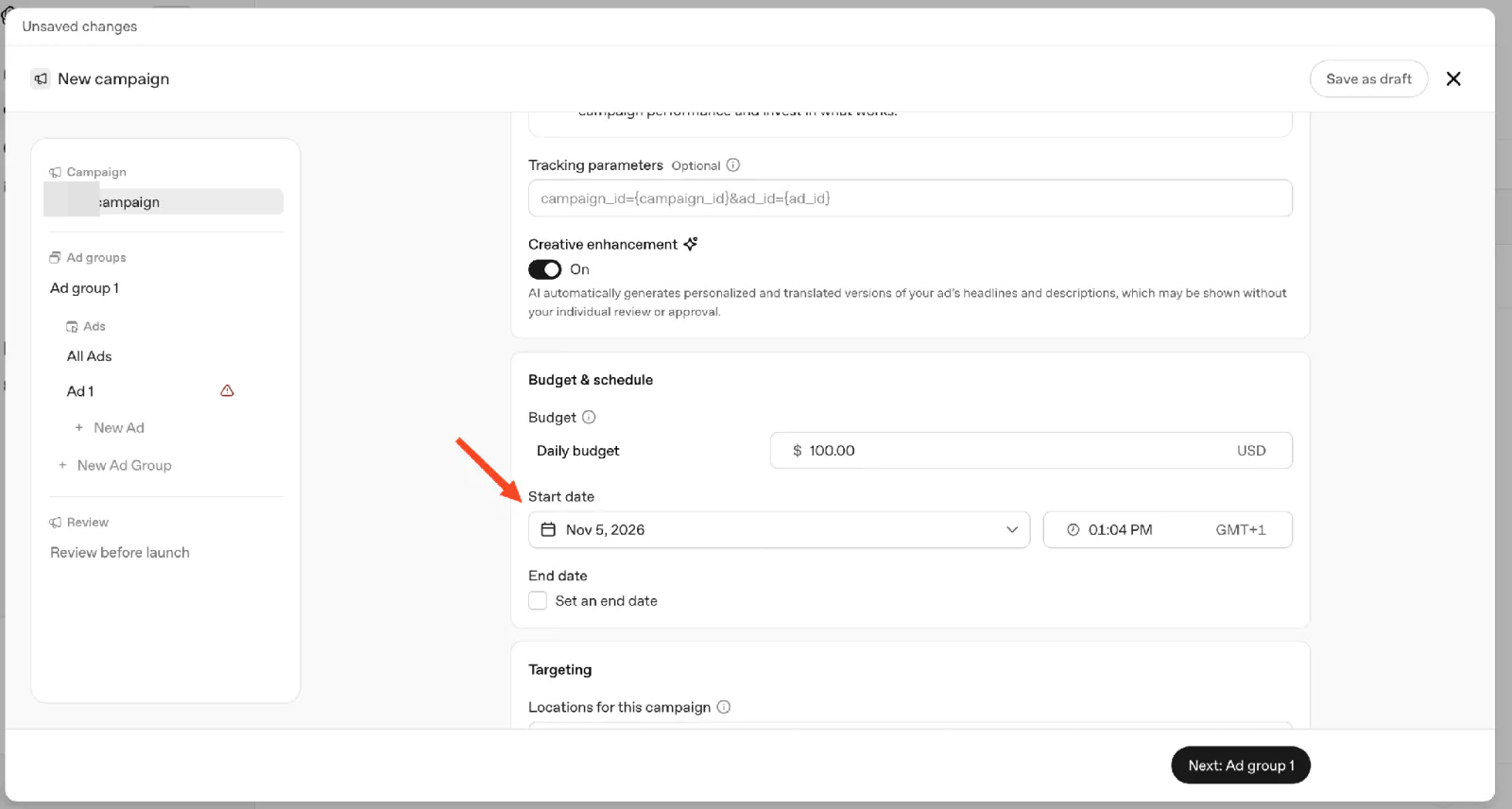
Screenshot: ChatGPT (OpenAI)
Once your campaign is live, review impressions, clicks, spend, any conversions you’re tracking. When you look at these numbers, keep in mind that they update at different speeds. Spend can take about seven to eight hours to appear, so costs may already be adding up even if the report shows $0. Conversions that OpenAI credits to your ads can take 24 to 48 hours to appear.
Five practical tips for your first campaign
These are editorial starting points based on the documented controls. Test them against your own offer and results.
- Check where you can advertise and what you can promote. Before you write the ad, confirm that your account can target the country you want to reach. Then check OpenAI’s rules for your offer. OpenAI prohibits political ads and considers certain US financial services ads from approved advertisers case by case.
Review your headline, description, image, landing page. OpenAI checks all four when it reviews your ad.
Test one change at a time. Try two headlines for the same offer while keeping the image and landing page the same. That makes it easier to compare how the two messages perform.
Answer the purchase question in your brand voice. Explain who the offer suits and its practical value. Keep the ad distinct from ChatGPT’s voice or interface. Use our ChatGPT marketing prompts to draft alternatives, then check their claims.
Continue the decision on the landing page. Check that the destination still matches the offer when automated enhancements are enabled. For example, a starter-kit ad should lead to the kit’s contents, price, suitability details.
Define the action you’ll count. Decide which supported event represents your goal, validate it, and compare attributed actions with business records. Review a submitted form before classifying it as a qualified enquiry.
When Ads Manager and analytics disagree, compare the same event, date range, time zone first. Analytics sessions also depend on page loads and consent settings.
This check is important, as early advertiser experience has shown. In October 2026, one small business owner posted on Reddit that their analytics showed clicks in Ads Manager that didn’t match visits. Separately, agency Online Ads Cafe reported conversions in client tests while cautioning that tracking and attribution were still evolving.
ChatGPT ads vs Google Ads vs Meta ads
If you already run Google or Meta ads, you might want to test the same offer in ChatGPT. The table shows where people see each type of ad, how each platform decides which ads to show, and when you might test each channel. The Google column covers Search ads.
| Dimension | ChatGPT ads | Google Search ads | Meta ads |
|---|---|---|---|
| Placement | Sponsored units below responses | Search results | Surfaces including Feed, Stories and Reels |
| Relevance inputs | Conversation context and hints | Search query, keyword matching and auction factors | Recommendation and objective signals across Meta surfaces |
| When to test it | When your offer helps someone decide what to buy in a chat | When people search for the product or service you sell | When an image or short video can show your product in use |
For organic visibility alongside paid ads, read our ChatGPT for SEO guide. Our Google vs ChatGPT search comparison covers the organic research experience, and how AI changes SEO tasks looks at the longer-term content-work question.
What’s next for ChatGPT ads
OpenAI is testing Sponsored Agents with a small group of US advertisers. If you see one of these ads, you can open a separate, clearly labeled chat with an AI representative of the business and ask about its products or services.
OpenAI also plans to add more ad formats, campaign objectives, ways to buy ads and tools to measure results. Its October 21 announcement gave no release dates for those additions.
Keep building your AI skills
Start with your ad controls, or one campaign with an overall test ceiling and a defined action to measure. For a campaign, review processed results against business records; expand only when your own criteria are met. For the broader AI skills question, explore how AI changes marketing work and compare AI courses for marketers by format and time.
Try Coursiv’s 28-Day AI Certificate Program for guided practice. Short lessons fit a busy schedule and come with built-in practice. Review the program syllabus and assessment, with a certificate of completion after meeting the program requirements.
FAQ
Does ChatGPT have ads now?
Which ChatGPT plans don’t have ads?
Are ChatGPT ads available in my country?
Do ads affect ChatGPT’s answers?
Can I turn off ads in ChatGPT?
How much do ChatGPT ads cost?
How do I advertise on ChatGPT?
ChatGPT and OpenAI are trademarks of OpenAI. This article is not affiliated with or endorsed by OpenAI.