The best AI tools for teachers in 2026 are not just generic chatbots. The winning stack combines one general assistant for planning, one education-specific platform for classroom-safe workflows, and one source-grounded tool for readings, research, and differentiation.
Quick answer: start with ChatGPT for Teachers or Gemini if your school approves them, MagicSchool for lesson plans and classroom templates, Khanmigo or SchoolAI for guardrailed student-facing tutoring, Canva or Adobe Express for visuals, and NotebookLM-style tools for working with source materials.
| Teaching workflow | Best AI tool type | What to verify first |
|---|---|---|
| Lesson plans and rubrics | Teacher assistant | School approval and FERPA posture |
| Parent emails and admin drafts | General chatbot | No identifiable student data on consumer plans |
| Differentiated materials | Education-specific AI platform | Grade-level and standards alignment |
| Quizzes and checks for understanding | Assessment generator | Export to your LMS or Google Classroom |
| Student tutoring | Guardrailed student AI | Teacher visibility, moderation, and logs |
| Slides, posters, worksheets | Visual design AI | Copyright and district policy |
| Research and reading packets | Source-grounded assistant | Citations and source quality |
Source check — June 4, 2026: education AI requires stricter verification than normal productivity software. This guide checks official sources such as ChatGPT for Teachers, MagicSchool pricing, Khanmigo pricing, and Google’s Gemini education account guidance, then flags consumer-account privacy risk instead of treating every AI tool as classroom-ready.
For student-side tools, compare best AI tools for students, ChatGPT for students, and Claude AI for students. For broader school procurement, use best AI tools for education.
How Generative AI Differs From Traditional Educational Software
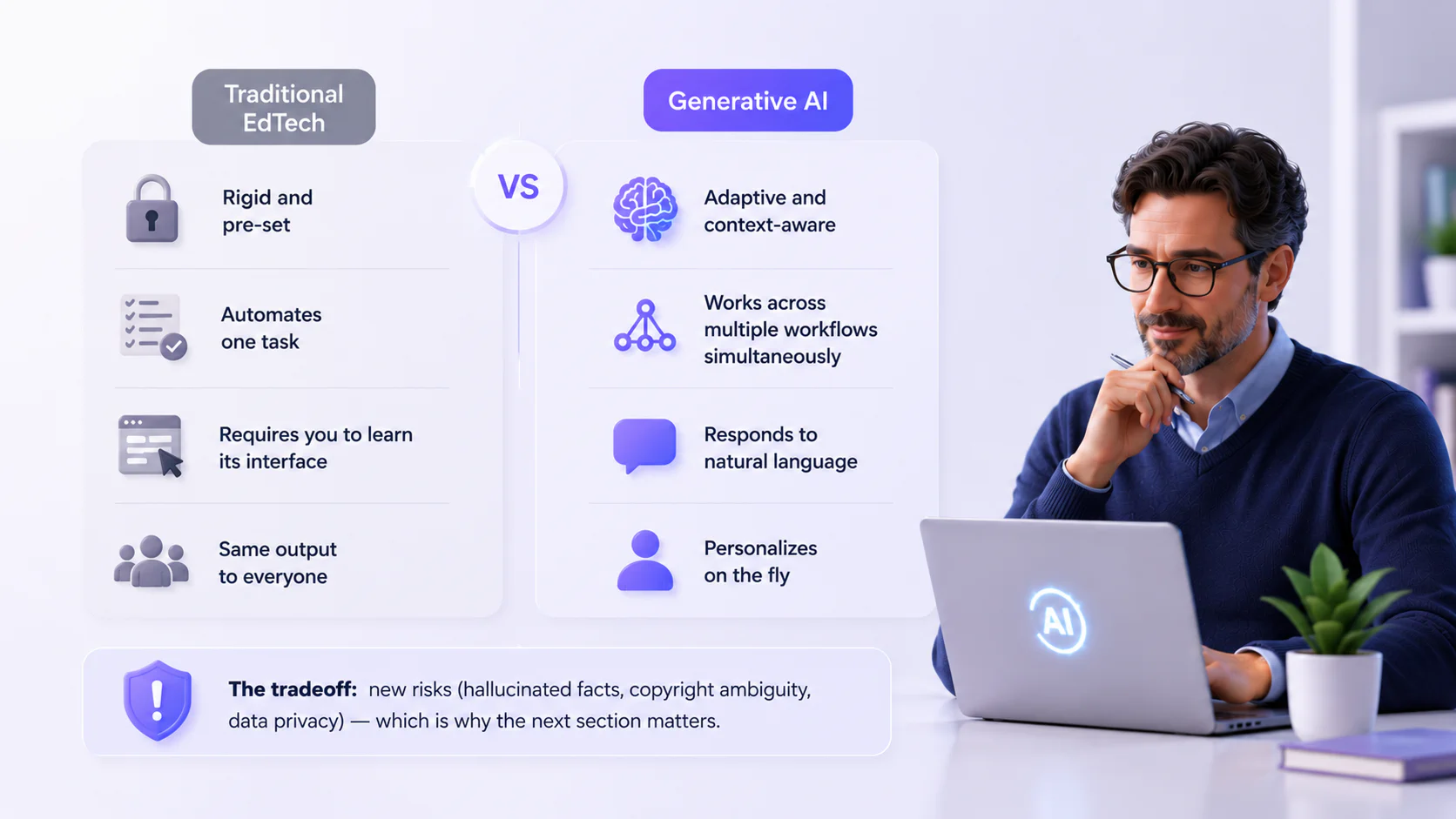
What makes these tools different from the edtech you already know? The distinction goes beyond “newer” or “smarter.”
- Traditional edtech is rigid and pre-set; generative AI is adaptive and context-aware
- Traditional tools automate one task (quizzing, grading, organizing); generative AI works across multiple workflows simultaneously
- Traditional software requires you to learn its interface; generative AI responds to natural language
- Traditional tools give the same output to everyone; generative AI can personalize on the fly
The tradeoff: generative AI introduces new risks (hallucinated facts, copyright ambiguity, data privacy), which is why the next section matters.
Choosing AI Tools That Comply With FERPA, GDPR, and School Policies
The practical checklist before adopting any AI tool:
- Does the vendor use student data to train its models? (If yes, it fails the FERPA test.)
- Does a signed Data Processing Agreement exist?
- Does the tool hold SOC 2, COPPA, or Common Sense Privacy certifications?
- How long does the vendor store data, and will they delete it within a defined window (typically 60 days) after contract termination?
- Does the tool meet ADA/Section 508 requirements, especially given DOJ deadlines for school web accessibility in April 2026–2027?
- Has your district IT team approved it?
Education-specific tools (MagicSchool, Khanmigo, FlintK12, SchoolAI) typically build compliance into their architecture. General-purpose tools (ChatGPT, Claude, Perplexity) require more caution.
The cardinal rule: never input identifiable student information into any general-purpose AI tool on a consumer account.
Cost Models: Free Versions vs. Subscriptions
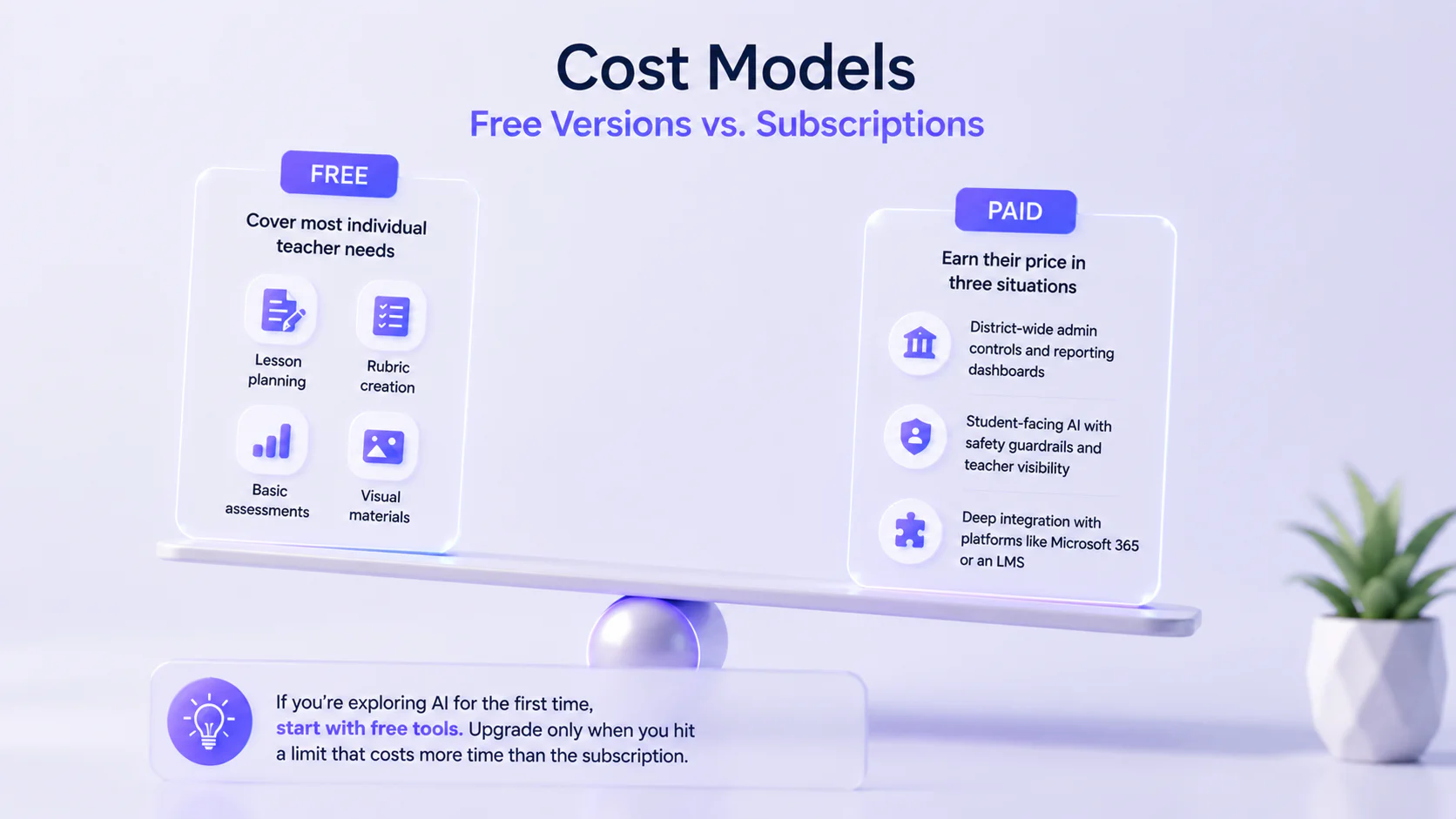
Free tiers cover most individual teacher needs: lesson planning, rubric creation, basic assessments, and visual materials.
Paid plans earn their price in three situations:
- When you need district-wide admin controls and reporting dashboards.
- When you want student-facing AI with safety guardrails and teacher visibility (FlintK12, SchoolAI, Khanmigo district plans).
- When your workflow depends on deep integration with specific platforms like Microsoft 365 or an LMS.
If you’re exploring AI for the first time, start with free tools. Upgrade only when you hit a limit that costs more time than the subscription.
Summary: Top AI Educational Tools for Teachers in 2026
| Tool | Category | What It Does for Teachers | Free Tier? | FERPA-Friendly? |
|---|---|---|---|---|
| ChatGPT | General assistant | Lesson plans, rubrics, parent emails, brainstorming | Yes (Teachers plan, free through 2027) | Yes (Teachers/Edu plans only) |
| Microsoft Copilot | General assistant | Drafts in Word, presentations in PowerPoint, data in Excel | Limited free tier | Yes (M365 ecosystem) |
| Claude | General assistant | Socratic learning mode, essay feedback, rubric creation | Limited free tier | Enterprise/Education plans only |
| Perplexity | Research assistant | Cited research, lesson prep, source evaluation | Limited free tier | Enterprise Pro only |
| Google Gemini | General assistant | Lesson planning, Classroom integration, Deep Research | Yes | Yes (strongest free compliance) |
| Canva AI | Visual design | Worksheets, infographics, posters, student projects | Yes (100% free for K-12) | Yes (FERPA, COPPA, NDPA) |
| Adobe Express | Visual design | Multimedia projects, video, and responsible AI education | Yes (free for K-12 via IT admin) | Yes (when deployed by school IT) |
| Microsoft Designer | Visual design | Quick graphics, AI image generation, slide design | Yes | No (consumer tool, no EDU DPA/FERPA) |
| Gamma | Presentations | AI-generated slide decks from prompts in seconds | Yes | No (no FERPA compliance) |
| Google Vids | Video creation | Instructional videos, flipped classroom content | Yes | Yes (Google for Education) |
| MagicSchool.ai | Lesson planning | 80+ teacher tools, 50+ student tools | Yes | Yes (FERPA, COPPA, SOC 2) |
| Khanmigo | Tutoring and planning | Socratic AI tutoring, lesson plans, writing coach | Yes (teacher tools free) | Yes (FERPA, COPPA) |
| Eduaide.ai | Lesson planning | Standards-aligned plans, differentiated materials | Yes | Yes (FERPA, COPPA) |
| Google NotebookLM | Research and study | Source-grounded Q&A, audio overviews, flashcards | Yes | Yes (via Workspace for Education) |
| Curipod | Assessment and feedback | Interactive slides with polls, word clouds, and prompts | Yes | Yes (FERPA, COPPA, GDPR) |
| QuestionWell | Assessment and feedback | Auto-generated questions from any source material | Yes (multiple-choice only) | 1EdTech certified |
| Formative | Assessment and feedback | Real-time student response monitoring, Luna AI | Yes | Yes (FERPA, COPPA) |
| Brisk Teaching | Assessment and feedback | Writing feedback in Google Docs, quiz creation | Yes | Yes (93% Common Sense rating) |
| FlintK12 | Student AI tutoring | Adaptive tutoring, teacher visibility, safety controls | Yes (up to 80 users) | Yes (FERPA, COPPA, GDPR) |
| SchoolAI | Student AI tutoring | Custom AI learning environments, safety alerts | Yes (200,000+ premade Spaces) | Yes (FERPA, COPPA, SOC 2) |
General-Purpose AI Assistants for Teachers
These five tools handle the widest range of teaching tasks: lesson drafting, rubric building, parent emails, differentiation, brainstorming, and document analysis. None of these were designed with classrooms in mind, but once you learn how to prompt them well, they’re genuinely useful.
ChatGPT
OpenAI launched ChatGPT for Teachers in November 2025, and it changed the equation. Verified U.S. K-12 educators get free access through June 2027, including image generation and connectors for Canva, Google Drive, and Microsoft 365.
This is the strongest free education offering available. The Teachers plan is FERPA-aligned (data never used for training) and already serves 150,000+ teachers in major districts, including Dallas, Houston, and Fairfax County.
One caveat: the free tier is U.S. K-12 only. International and higher-ed educators don’t qualify, and consumer accounts (Free/Plus/Pro) create FERPA liability if used with student data.
Best for: One versatile tool for lesson planning, rubric creation, email drafts, and brainstorming.
Pricing: Free (Teachers plan) | $8/month (Go) | $20/month (Plus) | $25/user/month (Business)
Microsoft Copilot
Copilot integrates AI directly into Word, Excel, PowerPoint, Outlook, and Teams. Its dedicated “Teach” module walks you through lesson planning, quiz creation, and standards alignment without leaving the apps you already use. LMS integration covers Canvas, Schoology, Brightspace, Blackboard, and Moodle.
The limitation: it requires the Microsoft ecosystem. Google-based schools won’t benefit, and licensing across multiple Copilot products gets confusing fast.
Best for: Schools already running Microsoft 365 who’d rather not add another platform to manage.
Pricing: Free (Copilot Chat with M365 Education) | $18/user/month (full Copilot)
Claude
Claude for Education rolled out in April 2025 — Northeastern University and the London School of Economics were among the first institutions to sign on.
Its Learning Mode stands out: instead of handing students answers, it uses Socratic questioning to guide them toward their own reasoning. Strong writing and analysis capabilities pair with Canvas LMS integration.
The gap for K-12: there’s no free teacher-specific tier, and the Education plan targets higher ed.
Best for: Higher education faculty who want an AI that coaches students to think.
Pricing: Free (limited) | $20/month (Pro) | Custom (Education/Enterprise)
Perplexity
Every Perplexity answer includes linked sources, which makes it uniquely valuable for teaching information literacy. Students see where information comes from, not just what the AI says.
Study Mode generates flashcards and quizzes from uploaded materials, and real-time web search keeps everything current.
Worth noting: FERPA compliance applies only to Enterprise Pro ($30/seat/month), and Perplexity is less capable of creating complete lesson plans or differentiated materials.
Best for: Teachers who prioritize research skills, source evaluation, and current information.
Pricing: Free tier with daily limits | $10/month (Education Pro) | $20/month (Pro)
Google Gemini for Education
Gemini offers the strongest FERPA compliance at the free tier among all general-purpose AI tools. It comes included with Google Workspace for Education Fundamentals and covers Gemini chat, Gems, Deep Research, and NotebookLM, all with under-18 student protections built in.
Full Gemini inside Docs, Slides, and Gmail requires the paid Google AI Pro add-on. The 2025-2026 licensing changes are also creating some district confusion around what’s included and what costs extra.
Best for: Google Workspace schools that want compliant AI across their existing ecosystem at zero cost.
Pricing: Free (with Workspace for Education) | Custom (Google AI Pro add-on)
Visual and Design Tools for the Classroom
These five tools cover presentations, classroom materials, posters, graphics, and video. For teachers who spend Sunday nights building slides, this category delivers immediate time savings.
Canva AI
Canva for Education gives K-12 teachers and students 100% free access to what would otherwise be a premium subscription. That includes Magic Studio AI tools (Magic Write, Magic Design, Magic Edit, text-to-image), 1TB storage, and LMS integrations with Google Classroom, Canvas, Schoology, and Blackboard. FERPA, COPPA, and NDPA compliant.
Best for: Teachers who regularly create visual materials.
Pricing: Free for K-12 teachers and schools | Custom (Canva for Campus, higher ed)
Adobe Express
Free for K-12 when deployed by school IT. Includes Adobe Firefly AI with classroom safeguards, Content Authenticity tools for teaching media literacy, and Guided Activities (10-minute scaffolded lessons). All student and teacher work is automatically excluded from AI training.
Firefly AI generates images, videos, audio, and designs using top AI models from Adobe, Google, OpenAI, and more.
Best for: Schools teaching professional creative skills alongside core subjects.
Pricing: Free for K-12 (via IT admin) | from $34.99 user/month for other Education plans | $9.99/month (individual Premium)
Microsoft Designer
Includes DALL-E 3 image generation (roughly 15 boosts/day) and integrates with PowerPoint. No dedicated education program exists, so it lacks the classroom management features of Canva and Adobe.
Note: Designer is a consumer tool with no EDU DPA/FERPA posture.
Best for: Quick visual creation within the Microsoft ecosystem.
Pricing: Free (basic, with personal Microsoft account) | Higher credit limits when bundled with Microsoft 365 Personal/Family
Gamma
Generates complete presentations in 30 to 60 seconds from a simple prompt. Free tier includes 400 one-time credits (roughly 10 presentations). Exports to PowerPoint, PDF, and Google Slides.
Note: No FERPA compliance; avoid using with student data.
Best for: Rapid first-draft presentations when polish matters less than speed.
Pricing: Free (400 credits) | $12/month (Plus) | $25/month (Pro)
Google Vids
The basic video editor is free for all Google Workspace for Education users. AI features (voiceovers, text-to-image, storyboards, teleprompter, background removal) are available to Education Plus and Teaching & Learning add-on users. AI features are limited to users 18+.
Best for: Teachers already in the Google ecosystem who want a simple way to build instructional videos.
Pricing: Free (basic editor) | AI features included with Education Plus (~$6/user/year) or Teaching & Learning add-on
Lesson Planning and Content Creation Tools
All four are purpose-built for lesson planning — they’ll generate differentiated materials, study guides, and content that lines up with your curriculum standards.
MagicSchool.ai
The largest education-specific AI platform with 80+ purpose-built tools covering virtually every teacher’s need and 50+ student tools. The free tier includes all tools (lesson planning, differentiation, rubric creation, IEP writing, quiz generation).
FERPA, COPPA, and SOC 2 compliant with a 93% Common Sense Privacy rating.
Best for: Teachers who want one platform covering lesson planning, differentiation, assessments, and IEP writing.
Pricing: Free | $12.99/month (Plus) | Custom (Enterprise, roughly $3 to $4/student)
Khanmigo
Khanmigo is an AI tutor and teaching assistant created by Khan Academy. It integrates generative AI into the Khan Academy learning platform to help students learn and help teachers prepare lessons.
Teacher tools are free for all U.S. teachers, while student tutoring requires a district partnership or parent subscription.
Best for: Schools that want Socratic-style AI tutoring tied to Khan Academy’s content library.
Pricing: Free (teacher tools) | $4/month (learner/parent) | $10/student/year (District subscription)
Eduaide.ai
Generates lesson plans aligned to national standards across 110+ resource types, grounded in frameworks like UDL, Bloom’s Taxonomy, and 5E models.
Eduaide.ai is both FERPA and COPPA-compliant.
Best for: Teachers who plan lessons around specific pedagogical frameworks (UDL, Bloom’s, 5E).
Pricing: Free (limited monthly generations) | $5.99/month (Pro)
Google NotebookLM
Upload your source materials (PDFs, slides, articles, YouTube videos), and NotebookLM creates Audio Overviews (podcast-style summaries), flashcards, quizzes, study guides, and mind maps grounded exclusively in your uploaded content.
That grounding in source material almost eliminates hallucinations, making it one of the most reliable AI tools for classroom use.
Best for: Turning dense readings into accessible study resources.
Pricing: Free (100 notebooks, 50 sources each) | $7.99/month (Google AI Plus) | ~$6/user/year (Education Plus)
Assessment and Feedback Tools
These four tools focus on creating assessments, collecting student responses, and providing feedback. They plug into workflows teachers already use (Google Docs, Google Forms, LMS platforms) rather than requiring a new environment.
QuestionWell
Generates assessment questions from any source material (textbook chapters, articles, videos, websites) and exports directly to Kahoot, Quizizz, Canvas, and Google Classroom. Multi-format input, including documents, images, slides, websites, and videos.
Best for: Quickly building assessment banks from existing class materials with direct LMS export.
Pricing: Free (only multiple-choice questions) | $7/month (Premium) | Custom for districts
Formative
Formative is an online classroom assessment platform used by teachers to check student understanding in real time. It allows teachers to assign questions, watch student responses live, and adjust instruction based on results.
Luna is the built-in AI assistant inside Formative. Luna adds AI assistance by generating hints and answer explanations, parsing PDFs into activities, translating content, guiding student feedback, and helping teachers configure assessments through chat.
Best for: Teachers who need to monitor student understanding in real time during a lesson.
Pricing: Free | $20.75/month paid annually
Brisk Teaching
Works where teachers already teach. The Chrome extension integrates directly into Google Docs, Slides, YouTube, and PDFs. Provides differentiated writing feedback (Glow & Grow, Rubric Criteria, Next Steps), quiz creation in Google Forms, text leveling across 58+ languages, and IEP goal generation. 93% Common Sense Privacy Rating.
Best for: Google Workspace teachers who want AI feedback and grading without leaving their existing tools.
Pricing: Free (usage limits) | Custom for districts
Curipod
Creates interactive slide decks in seconds with embedded polls, word clouds, drawing prompts, and open-ended questions. Students join via PIN code (no accounts required), which minimizes data collection and removes friction. FERPA, COPPA, and GDPR compliant.
Best for: Quick formative checks where students join anonymously via PIN.
Pricing: Free (core features, limited AI usage) | Custom for districts
Student-Facing AI Tutoring and Engagement
These two put the AI in front of students directly. Teachers set the guardrails, watch sessions in real time, and get safety alerts.
FlintK12
An AI tutoring platform where the AI adapts to each learner’s knowledge level and pushes them to explain their reasoning. Teachers get complete visibility: live session monitoring, full chat transcripts, and automatic flagging of inappropriate messages. Meets FERPA, COPPA, and GDPR requirements.
Best for: Schools ready to give students their own AI tutor, but only with a teacher watching what’s happening.
Pricing: Free (up to 80 users) | $3,000 to $6,500/year (school licenses)
SchoolAI
With SchoolAI, teachers build out their own AI environments, called “Spaces”, where they define the goals, set what the AI can discuss, and pick which standards to target. A “Mission Control” dashboard gives you a live view of what every student is doing, including mastery signals and wellness indicators. The platform automatically flags messages related to bullying, abuse, or neglect. FERPA, COPPA, SOC 2 compliant.
Best for: Teachers who want to design custom, guardrailed AI learning environments for students.
Pricing: Free (200,000+ premade Spaces) | Contact for Pro/Scale pricing
Getting Started: Your First Week With AI Tools
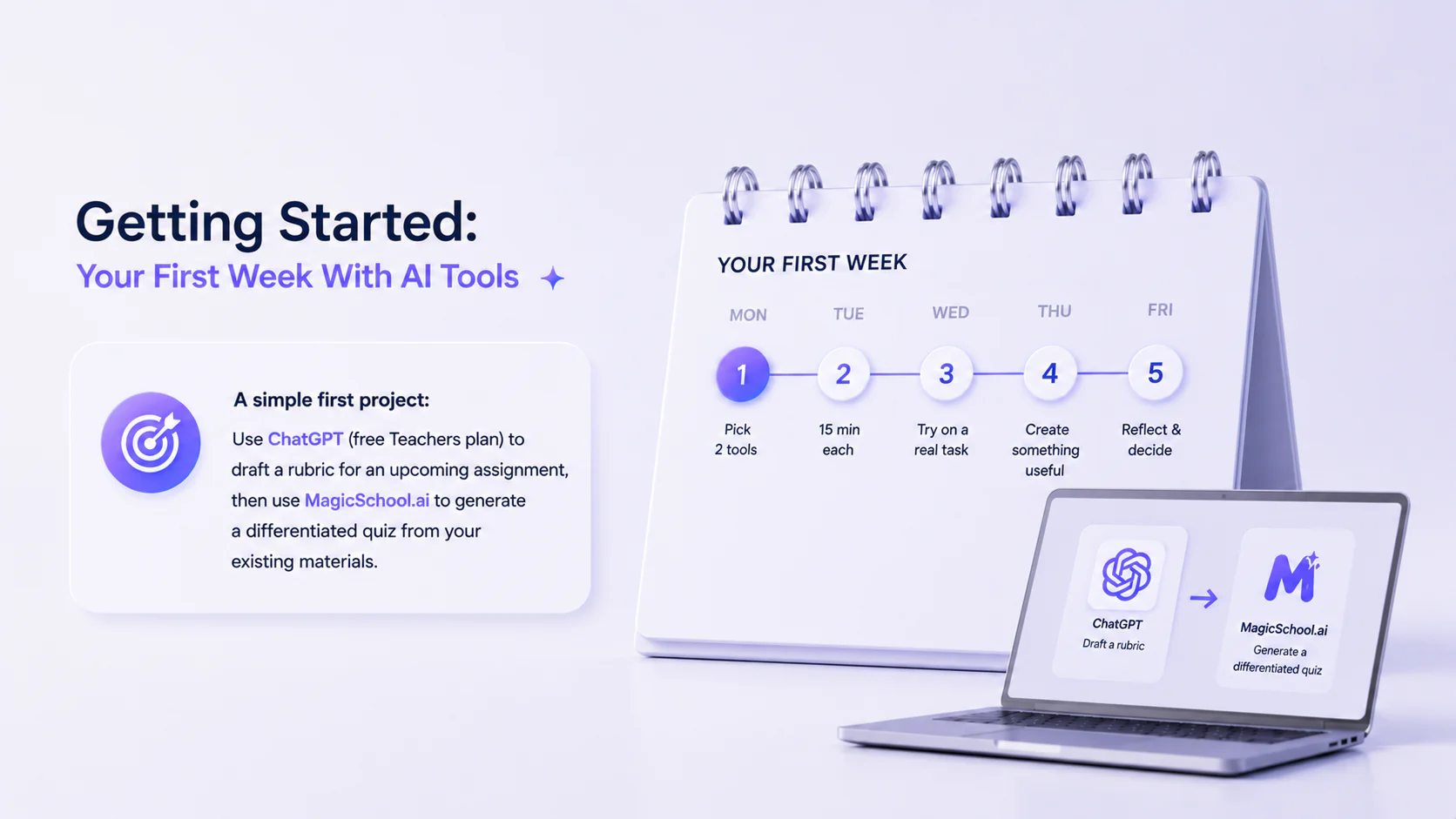
Don’t try all 20 at once. Pick one general-purpose tool and one education-specific tool. Spend 15 minutes with each on a real task this week.
A simple first project: use ChatGPT (free Teachers plan) to draft a rubric for an upcoming assignment, then use MagicSchool.ai to generate a differentiated quiz from your existing materials.
Frequently Asked Questions About AI Tools for Teachers