Lovable turns a plain-English description into a working web app or website. You change it by chatting and publish it with a link. To get something that works:
- Plan before you prompt: who uses it, what it stores, its 3-5 screens.
- Build one feature at a time.
- Test after every change.
- Add login and a database only when you actually need them.
Lovable is great for prototypes, internal tools and simple sites. Anything that handles payments, personal data or many users needs a security review, and often a developer. This guide walks through a first build, prompts that work and the limits to know before you share your app.
To begin with, Lovable vibe coding simply means building software by describing what you want and steering the result instead of writing the code yourself. If you want the wider picture first, start with our explainer on What is Vibe Coding?
What you can and can’t build with Lovable
Think of the Lovable app builder as the fastest route from an idea to something people can click. It produces web apps and websites, not native iPhone or Android apps, because publishing always ends at a web address. Here is how common projects compare.
| Project type | Good fit for Lovable? | What to watch |
|---|---|---|
| Personal or portfolio site | Yes | Use real copy instead of placeholder text, check it on a phone |
| Small business or studio website | Yes | A custom domain needs a paid plan, review the page titles and descriptions Lovable generates |
| Landing page or waitlist form | Yes | Collect only the details you need and say what happens to them |
| Prototype to test an idea | Yes | Great for feedback, don’t mistake it for a finished product |
| Internal tracker or request form | Usually | Needs login and access rules so private records stay private |
| Booking app or client portal with accounts | With care | Stores personal data, so check access rules and get a review before real users sign up |
| Online store or paid subscriptions | Only with expert review | Use the built-in Stripe or Paddle integration, never handle card details yourself |
| Health, financial or ID data | Not on standard plans | Lovable’s terms don’t allow this data unless your plan or a separate agreement permits it |
| Product for many simultaneous users | Prototype only | Scaling, monitoring and testing usually need a developer |
| Native mobile app for an app store | No | Lovable publishes to the web, an installable web app is the closest built-in route |
The rule of thumb: the more personal data, money or traffic a project involves, the less you should rely on the AI’s output alone. Lovable’s own security documentation says its built-in checks cannot guarantee complete security and recommends a professional review for apps that handle sensitive data or critical functions.
Before you prompt: a one-page app spec
Lovable’s docs suggest settling four questions before you open the tool: what you’re building, who it’s for, why they’ll use it and the one key action a user should take. A one-page spec covers those and a little more. Copy this template into a note:
App name:
Users: who opens this, and on what device?
Problem: what can’t they do today? One sentence.
[3-5 screens]
Data stored: what you save per record, and what you will not collect
Must-haves: the two or three things that must work
Not now: features you are parking (login, payments, email…)
The “Not now” line does the most work. It stops you asking for everything in one prompt, which is the quickest way to a broken app.
Step by step: your first build
This Lovable tutorial follows a single example from start to finish: a booking-request app for a small pottery studio called Abby & Co. Visitors browse three classes and send a request and the owner reviews what comes in. Every name and detail below is made up.
Create an account. Sign up free with email, Google, GitHub or Apple. You get a Free workspace with five build credits a day, up to 30 a month. Unused daily credits don’t roll over, so work in focused sessions.
Fill in the spec. For Abby & Co.:
- Users: one studio owner; visitors on phones
- Problem: class requests arrive as direct messages and get lost
- Screens: class list, request form, thank-you page, owner’s request list
- Data stored: name, email, class, preferred date, message. Nothing else
- Must-haves: the form checks required fields; the owner sees every request; it works on mobile
- Not now: payments, reminders, calendar sync
- Send the first prompt. Pick Build in the mode picker and paste Prompt 1.
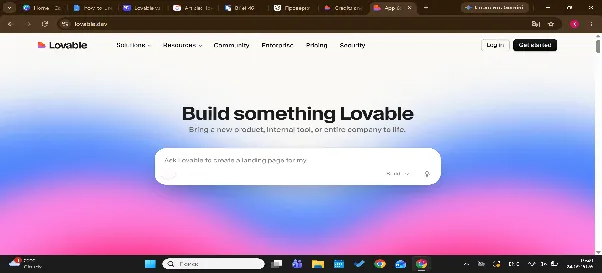
Build a booking-request website for Abby & Co., a small pottery studio. Screens: 1) a home page listing three classes (Wheel Basics, Handbuilding, Glaze Day) with a short description and duration each; 2) a request form with name, email, class, preferred date and an optional message; 3) a thank-you screen after submitting; 4) an owner page listing requests. Use realistic sample content and made-up sample requests. Warm, earthy design that works well on mobile. No login or database yet: keep everything as sample data for now.That last line matters. Keeping version one free of login and database means less can go wrong, and Lovable’s own quick start uses the same trick.
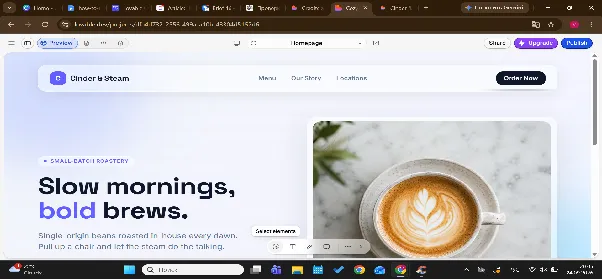
Explore the preview. The first version takes a few minutes. Then click everything: submit the form, open every screen, and switch the preview to mobile view. Fix typos with the Edit text inline option in the preview toolbar rather than a prompt.
Save a known-good version. Every change is saved automatically. Bookmark this one in version history so you always have somewhere safe to return to.
Prompting patterns that work
Build one change per prompt. Each prompt layers onto the code that already exists, so early mistakes compound. Lovable’s docs also note that small, focused edits usually cost fewer credits than large multi-step generations. Prompt 2 shows the shape:
Add a “Preferred time” dropdown (morning, afternoon, evening) to the request form, below the date field. Only change the request form. Keep the existing styling and leave the other screens unchanged.Describe what the app should do, not the code. “When someone submits the form without an email, show a message under that field” works better than “add a validation function”. You are the product owner, Lovable is the developer.
Use screenshots and point at things. Attach a screenshot or sketch to show a layout you like. In the preview toolbar, Select elements lets you click the thing you want changed, and Draw annotation lets you circle it. Each inline text edit is free up to a daily limit; selecting and drawing are normal build requests that use credits.
Prompt 4 is a polish pass that leaves function alone:
Polish the interface without changing any functionality: add more space between form fields, make buttons larger on mobile, use one consistent font pairing, and add a visible focus outline to every input. Do not change text, screens or data.Say what must not change. A good change prompt names what to build, where it goes and what to leave alone. Without that last part, a small request can ripple into screens that already work.
Pick the right mode. The project chat has three. Chat discusses your app without touching code. Plan investigates and writes a plan you can edit and approve before any code changes. It costs one credit per message plus any research it runs. Build makes the changes. Use Plan for bigger or riskier work, and try ending a prompt with “Ask me any questions you need before you start” so Lovable fills the gaps first. For the general craft of writing instructions any AI tool can follow, see our guide to writing better AI prompts.
Adding data and login: when you need them
Your first version stores nothing: refresh the page and the sample requests reset. You need a database when the app must remember things between visits or share them between people, like the booking requests. You need login when different people should see different things, like an owner page that visitors must not open.
Lovable’s built-in backend, called Cloud, provides a database, sign-in, file storage and backend functions, and it is built on open-source Supabase. Lovable either turns it on automatically or asks your approval when a feature needs it. One decision to make deliberately: you pick the data region (Americas, Europe or Asia Pacific) when Cloud is enabled, and it can’t be changed afterwards. Existing projects can also keep using a Supabase project you connect yourself to.
Ask for the two features separately, one prompt each:
Save each booking request in a database table: name, email, class, preferred date, preferred time, message, and a status (new, confirmed, declined)
Add sign-in for the studio owner only. The owner page must require login; the request form stays public
Sign-in options include email, Google, Apple, Microsoft and phone. Once data and login exist, four things change:
- You now hold real personal data. Test with made-up names and emails only.
- Access rules matter. Row-level security decides which user can read or edit which rows. Lovable sets up basic rules automatically, but the docs say to review them early, because they’re easier to change before real data exists.
- Your app costs credits to run. Lovable now uses a unified credit balance for building, running Cloud, and powering AI features in deployed apps. Chat mode also has a separate daily chat allowance, which is used first. Free, Pro and Business plans include small monthly grants for backend and AI usage.
- Testing gets harder. Every feature now has a logged-in and a logged-out version.
Testing and fixing
After every change, click through the flow that changed and one that didn’t. Submit the form empty, submit it with a very long name, and open the app in mobile view using the device toggle above the preview. Lovable can also run browser tests that click buttons and fill forms – ask it to check a specific flow.
Describe bugs so they get fixed. “Nothing works, fix it” gives Lovable nothing to work with. Say what is broken, where, what you expected and what happened. Attach a screenshot and paste any error text. Prompt 3 shows a good report:
On the request form, clicking “Send request” with the date field empty shows a blank screen. Expected: a message under the date field saying “Please choose a date”. The browser console shows: TypeError: Cannot read properties of undefined. Fix only this problem and keep everything else as it is”.Follow an order when fixes fail. Use Try to fix once or twice – each account gets 10 free fixes, and each one returns 24 hours after use. If the error survives, switch to Plan mode and ask for the root cause before anything else changes. Blind retries tend to pile up code that hides the real problem.
Revert when things tangle. Open version history, preview an earlier version and restore it, or edit an earlier message and choose Revert and resend. Afterwards tell Lovable what you reverted, so it has the context: “I reverted to before the notifications feature. Let’s rebuild it in smaller steps”.
Publishing and sharing
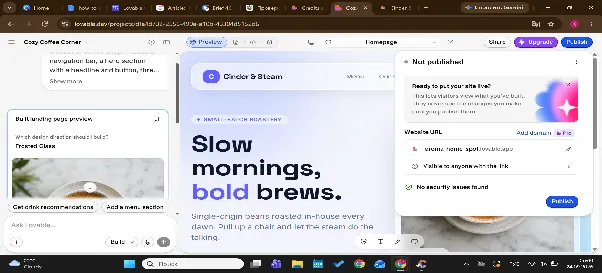
Whether you use it as a Lovable AI website builder or for a small app, publishing takes two clicks: Publish in the top right, then Publish again. Lovable suggests a lovable.app address you can edit, and a basic security scan runs in the background while the dialog is open.
Security checklist before real users
The browser part of your app is always public, so anything security-related has to be enforced by the backend. Before real people sign up, work through this list:
- Never paste API keys or passwords into prompts. Lovable detects keys pasted into chat and steers you to store them in Secrets, but don’t rely on that safety net.
- Check row-level security on every table with personal data under More → Cloud → Database → RLS policies.
- Collect only the personal data you need. For bookings, a name and email are enough. Skip phone numbers and addresses.
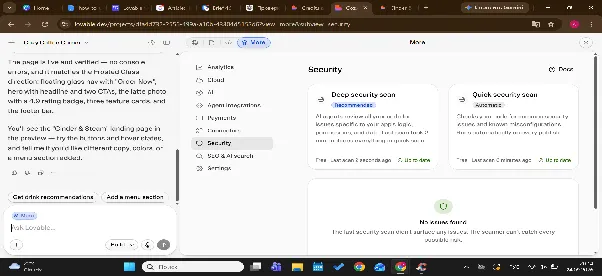
- Run the Quick scan and the Deep scan from the Security view and fix critical findings before publishing. Scans are free, the Deep scan takes a few minutes.
- Enforce login on the server side. Hiding a button isn’t access control – private records must be protected by backend rules.
- Turn on leaked-password protection if you use email and password sign-in.
- Test with two fake accounts. Sign in as one and try to reach the other’s records.
- Keep sensitive categories out entirely: health records, government IDs, financial account numbers and payment card data.
Prompt 5 turns the checklist into a conversation. Run it in Chat or Plan mode so nothing changes:
Review this app's security before I publish. In plain language, list which tables hold personal data, who can read and change each one, whether any secrets or API keys appear in frontend code, which pages should require login but don't, and what a stranger could see if they opened the published link. Do not change any code. Give me a prioritized list”.Treat the answer as a starting point, not an audit. A conversational review uses credits, and Lovable is clear that its tools cannot guarantee complete security.
When to bring in a developer
Call one when:
- you want to take payments or subscriptions
- the app touches health, financial or other regulated data
- more than a handful of people will use it at once, or it feels slow
- the same bug returns after two or three fixes
- you need to connect to internal systems or meet data-residency rules
You don’t lose your work by doing so. Git sync keeps your project code in your own GitHub, GitLab or Bitbucket repository, with changes flowing both ways, and it works on every plan. A developer can clone the repository and work in their own editor. If the process makes you curious about the code underneath, it is also worth checking out our practical guide Should I Learn to Code?.
Common mistakes
- Asking for everything in one prompt. Ask for one screen or feature, check it, then continue.
- Skipping the data plan. If you don’t know what you’ll store, Lovable will guess.
- Adding login and a database on day one. Add them once the screens work.
- Retrying the same fix blindly. After two failures, move to Plan mode or revert.
- Ignoring the credit cost. Open the More options menu under any reply to see its cost. Long Build runs pause and check in with you at 20 credits by default.
- Publishing before testing on a phone. Most people will open your link on one.
- Treating “it looks finished” as “it’s safe”. A working interface says nothing about access rules.
30-day practice plan
Week 1: spec and first build. Write the one-page spec for a small app you actually want. Send Prompt 1 with no login or database. Click through everything and bookmark the first good version.
Week 2: refine. Make one change per prompt, five or six times. Add one feature, run a polish pass with Prompt 4, and practise fixing a deliberate bug with a proper description, like Prompt 3.
Week 3: data and login. Add one table and owner-only sign-in. Test with two fake accounts, review the access rules and run both security scans.
Week 4: check, publish, share. Work through the security checklist, run Prompt 5, then publish. Send the link to three to five people, watch where they get stuck, and fix the top issue. You finish with one shareable app and a spec you can reuse.
Interfaces change quickly, so when you follow any Lovable AI tutorial, including this one, compare it with the current docs. If you would like structure and feedback beyond a plan on a page, the AI Certificate Program trains the same skill of describing what you want precisely.
Practice the skill behind Lovable
The skill behind Lovable is describing what you want precisely, and it carries over to every AI tool you use next. Coursiv’s 28-Day AI Certificate Program builds that habit day by day, and you finish with a certificate of completion. If you would rather go deep on this one tool, Coursiv also offers a Lovable course.