In short: ChatGPT is often the better choice for writing, coding, file-based workflows, custom automation, and third-party integrations. If you’re in the Google ecosystem, using Gmail, Docs, Sheets and Drive, and need native video understanding and instant search, Gemini can be the better fit. Both have multiple pricing plans, and the best choice depends on your tasks, region, and current plan limits.
For adjacent reading, see DeepSeek vs ChatGPT, Gemini for students, and ChatGPT for teachers.
Gemini vs ChatGPT: Quick Verdict
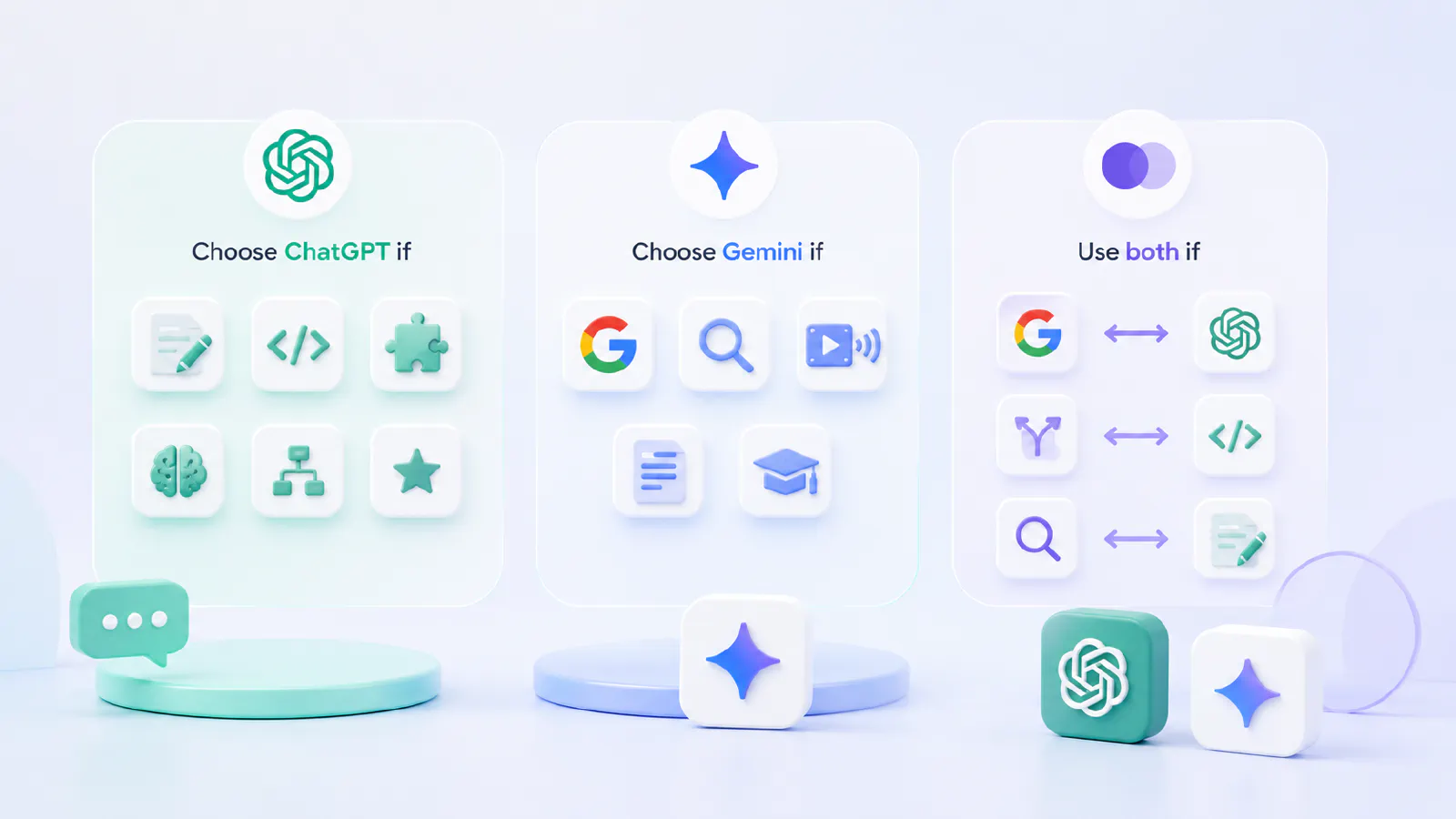
Choose ChatGPT if you write, code, manage projects, use custom workflows, or need the broadest ecosystem of integrations. It remains the more polished all-purpose assistant.
Choose Gemini if you live in Google Workspace, need AI inside Gmail or Docs without extra steps, process video or audio natively, or want real-time Google Search integration baked in.
Use both options if you work with both Google tools and other third-party tools. Using two different chatbots is also beneficial if your tasks are highly varied and diverse, and you want to route different types of tasks to different AI models.
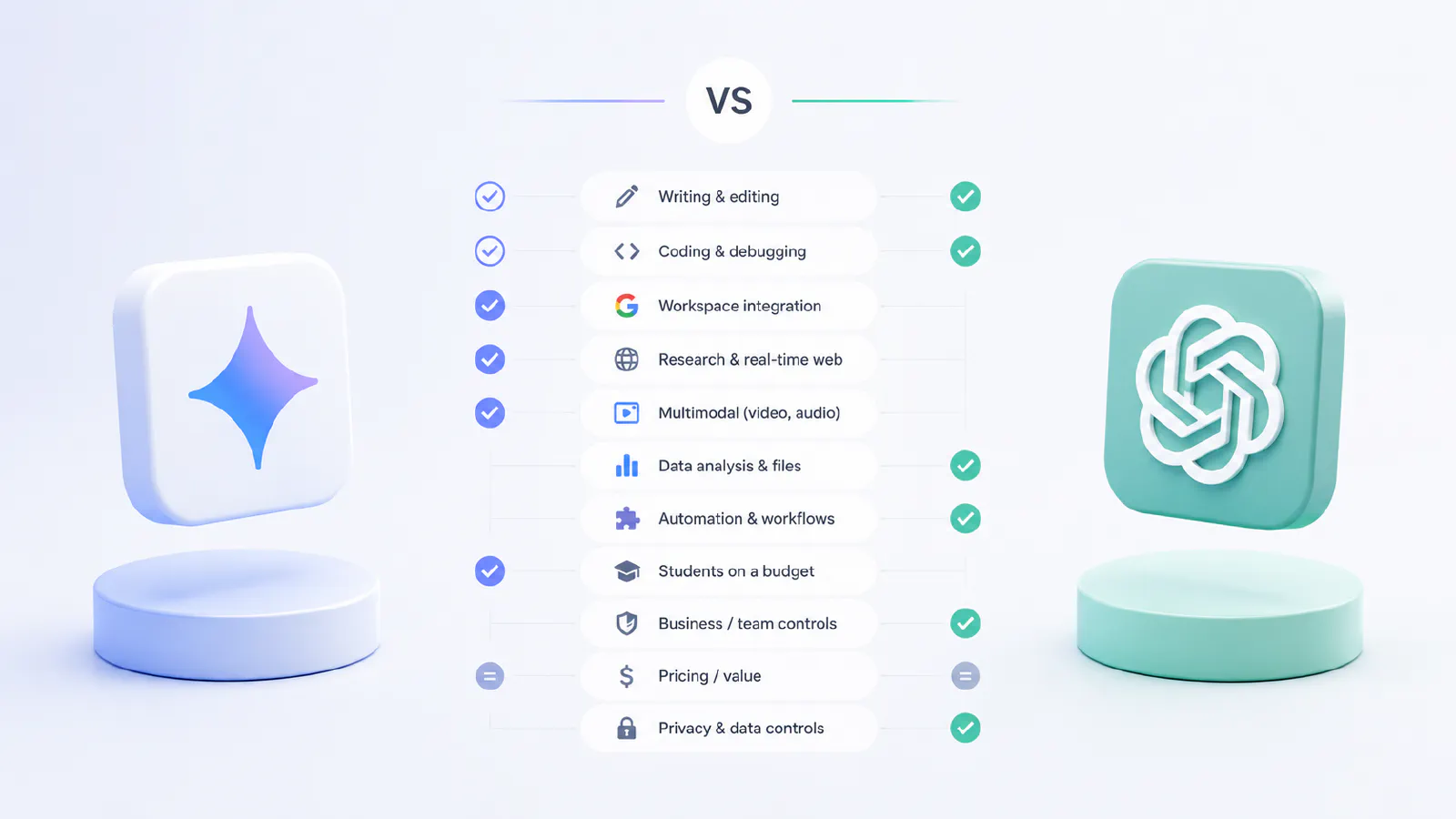
Gemini vs ChatGPT Quick Comparison Table
| Category | Better Choice | Why It Matters |
|---|---|---|
| Writing & editing | ChatGPT | More polished drafts, better instruction-following on tone and structure |
| Coding & debugging | ChatGPT | Cleaner code across Python, TypeScript, Rust; better agentic coding with Codex |
| Google Workspace (Gmail, Docs, Sheets) | Gemini | Native in-app integration |
| Research & real-time web | Gemini | Grounded in Google Search, more accurate source links |
| Multimodal (video, audio, images) | Gemini | Native video/audio processing in one prompt; ChatGPT lacks native video |
| Data analysis & file work | ChatGPT | Stronger file-based workflows, better at spreadsheet tasks and repeatable pipelines |
| Custom workflows & automation | ChatGPT | Broader third-party integrations, GPT Store, Codex, Agent Mode |
| Students on a budget | Gemini | Free tier is generous |
| Business / team controls | ChatGPT | More mature admin features, enterprise security options, SSO support, broader app connectors |
| Pricing / value | Tie | Mid-tier pricing is broadly comparable, but exact prices, quotas, and regional offers change. Check current plan pages before choosing. |
| Privacy & data controls | ChatGPT (Business+) | Business and enterprise plans generally provide stronger data controls; verify the current terms for your account. |
What ChatGPT Is Best at in 2026
Writing, Editing, and Structured Drafts
ChatGPT remains one of the top tools for creating high-quality written content. It performs equally well across a variety of tasks – from marketing emails and editing research reviews to creating structured articles in various formats and consistently produces high-quality, well-organized text that follows instructions.
Canvas functionality lets you work together on documents inside the chat window by making changes to paragraphs, tones, and ordering without needing to restart. This makes it truly useful for iterative writing, which is repeating actions multiple times and improving each new step is essential for ensuring the best possible result.
For content teams and authors, the combination of user instructions, Canvas, and memory creates something like a permanent writing partner who knows your style and default settings.
One limitation to keep in mind: ChatGPT can hallucinate and invent facts and quotes. It’s important to double-check information in primary sources, especially if the work is going to be published.
Coding, Debugging, and Technical Workflows
ChatGPT is one of the top coding tools in 2026. Thanks to Codex – its autonomous coding agent and its high performance in programming benchmark tests, it handles Python, TypeScript, SQL, Rust, and most other languages with ease. Codex’s command-line interface, available in Plus and higher plans, lets you plan, write, and execute multi-step coding tasks with fewer step-by-step instructions than alternative solutions.
For debugging, ChatGPT is particularly good at explaining the causes of failures rather than just fixing errors – this can be very useful if you’re learning or need to justify a fix.
If you’re in the process of comparing different coding tools, Claude from Anthropic is also considered one of the best right now, so for pure coding work it’s worth checking out Claude vs ChatGPT too.
Files, Projects, Data Analysis, and Repeatable Work
One of ChatGPT’s best features is that its projects function allows you to save files, instructions, and overall context across conversations. Once you’ve uploaded a spreadsheet, a PDF describing a project, or a set of recommendations, you can reuse all of this in future sessions related to that project.
When it comes to data analysis, ChatGPT handles CSV file analysis, formula generation, and chart creation quite well. It won’t replace specialized business analytics tools, but it’s truly effective for one-off data queries or a quick analysis of an uploaded file.
Limitations and drawbacks: ChatGPT can generate formulas that look plausible but are actually incorrect, especially in complex nested logical structures. Always verify the results against your data before using them in a real spreadsheet or report.
Custom Workflows and Everyday Productivity
In the GPT Store, you can find thousands of community-created custom workflows designed to tackle a wide range of tasks – from drafting legal documents to SEO analysis, from data cleaning to customer support templates. By 2024, more than three million variations of the chat were developed and posted by ChatGPT users. You’re sure to find something that suits your needs among them. Users can create their own workflows as desired.
Combined with Agent Mode, which can autonomously perform multi-step actions, and business-level integration with Slack, Google Drive, GitHub, and Microsoft Teams, ChatGPT boasts a broader ecosystem of third-party platforms than any other AI assistant currently available. This ensures improved efficiency as the usual chores take the back seat due to the process of automation. Using the chatbot will ensure that it remembers your preferences, background, and behavior, making it increasingly relevant every time you use it.
What Gemini Is Best at in 2026
Google Workspace and Google Ecosystem Tasks
The main advantage of Gemini is that it isn’t a standalone app you have to switch to, but rather an AI assistant integrated into existing Google tools. This allows Gemini to work directly within Gmail, Docs, Sheets, Slides, and Drive, with basic features included in all Google Workspace plans.
So you can ask Gemini to write a reply right in Gmail, or summarize a long Docs file without having to paste it anywhere, or ask it to build a formula in Sheets without having to tab away. Therefore, for those who work entirely within the Google ecosystem, this is an ideal solution, as it eliminates the hassle of switching between tools.
Gmail, Docs, Drive, and Search-Adjacent Workflows
When working in Gmail, Gemini suggests draft replies right within the interface, based on the context of the email and your conversation history. In Google Docs, it can write drafts, rephrase sentences, and condense text – all without leaving the web. When using Drive, Gemini can search for information across all your files at once. For example, you can issue a query like “find all documents that mention Project X” and get results without having to search manually. Gemini’s built-in integration with Google Search means it can use up-to-date information from the real world in its responses – not just from training data, but also from real-time search results with links to sources. This makes it more reliable for research tasks where timeliness and accuracy are critical. For checking market prices, recent events, changes in legislation, and competitors’ actions – this is one of Gemini’s greatest strengths.
Student and Research Use Cases
Gemini has the potential to be a truly effective tool for students and researchers, especially since Gemini’s free plan is significantly more generous than ChatGPT’s. Gemini 3.5 Flash is available for free for general chat, with a daily quota equivalent to the more powerful Pro model, image generation, and up to five Deep Research reports per month.
NotebookLM – Google’s Gemini-powered research and note-taking tool will also be useful for studying or academic work. It helps when working with long documents, PDFs, articles, and reports. By uploading all these documents, you can ask questions about them simultaneously.
For students weighing their options, see the full breakdown in best AI tools for students 2026.
Multimodal and Long-Context Tasks
Gemini supports a context window of 2 million tokens – the largest in the industry as of mid-2026, roughly twice the size of ChatGPT’s own context window. This is important when working with very long documents or large codebases, as the context window ensures that the AI model doesn’t lose sight of the big picture or miss information while performing tasks. The larger the context window, the more the chatbot can keep in memory while performing a task.
In addition, Gemini natively processes video, audio, and images in a single query without the need for external tools. You can copy a Youtube link and ask Gemini to summarize a lecture, find key points in a video, or transcribe and analyze audio. ChatGPT handles images and files well but lacks native understanding of video and audio.
Important note: The size of the context window does not guarantee a high-quality response. A large context helps with search, but Gemini (like all models) can still miss details in very long input data. As with all tools, it’s important to double-check the results.
Gemini vs ChatGPT Pricing and Plans
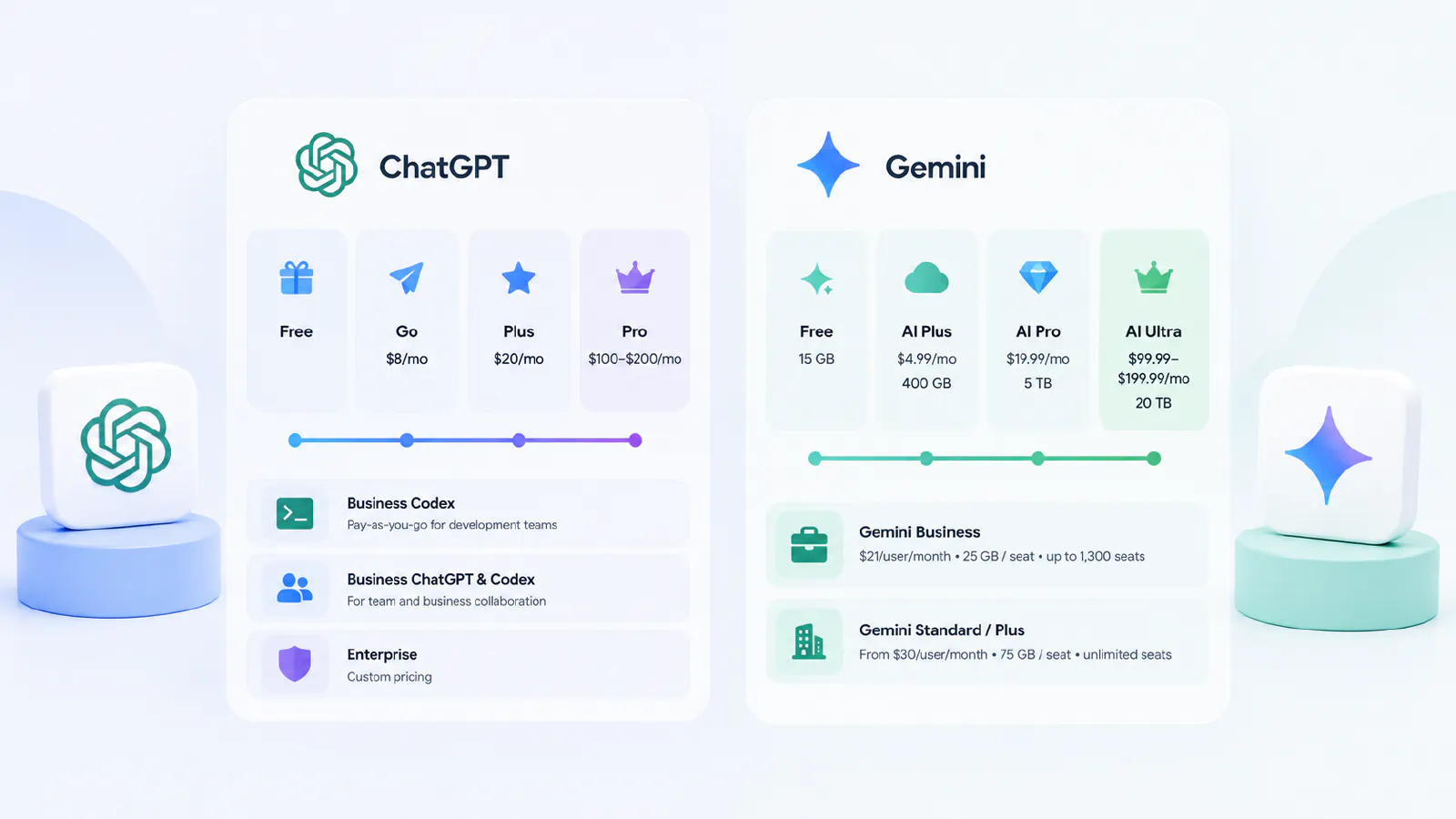
Pricing note: Plan names, quotas, storage bundles, and prices change often. Treat the details below as a snapshot and verify current pricing in your region before subscribing.
ChatGPT plans:
- Free: Limited access to GPT-5.5 Instant and tools, limited messages and uploads, slower image generation, and limited deep research, memory, and context capabilities. Access to Codex is also limited.
- Go: $8/month – expanded access to GPT-5.5 Instant, more messages, downloads, and image generation capabilities, as well as expanded memory
- Plus: $20/month – full model suite including advanced reasoning with GPT-5.5 Thinking, access to the advanced version of Codex, Agent Mode, Canvas, and memory. More accurate image generation, deep research capabilities, and context.
- Pro ($100–$200) – 5x or 20x higher usage limits, reasoning with GPT-5.5 Pro, unlimited images and file uploads, maximum research depth, memory, and context. Full access to Codex.
- Business Codex – pay-as-you-go for development teams. AI-powered development, task automation, cloud environments, multi-agent support, SSO/MFA, and enterprise security controls.
- Business ChatGPT & Codex – for team and business collaboration. Includes stronger models, app integrations, data analysis, Canvas, collaborative projects, and enterprise security/data controls. Check current pricing and data terms before rollout.
- Enterprise – custom pricing.
Gemini plans:
- Free – Access to Gemini 3.5 Flash, limited access to Gemini 3.1 Pro, image generation, Deep Research, Canvas, and Gems. Additionally, access to Google Flow - an AI-powered creative studio for creating stories and scenes with limited access to Nano Banana Pro. NotebookLM is also included. 15 GB of cloud storage.
- Google AI Plus: $4.99/month – twice the usage limits of the Free plan, video generation, and Daily Brief. Access to Gemini directly within Google apps. Access to Google Flow with access to Gemini Omni Flash and custom tool creation. More access to Nano Banana in Google Search, additional features in NotebookLM such as Audio Overview. 400 GB of cloud storage.
- Google AI Pro: $19.99/month – 4 times the usage limits of the Free plan, expanded access to Gemini 3.1 Pro, Deep Search. 1,000 AI credits for creating cinematic scenes and stories with access to Gemini Omni Flash and custom tool creation. Increased usage limits for the asynchronous coding agent, full Workspace integration. 5 TB of cloud storage.
- Google AI Ultra: $99.99–$199.99/month – 5 or 20 times more usage limits than AI Pro. Priority access to Deep Think, Gemini Spark (USA only), access to Gemini 3.5 Pro, 25,000 AI credits in Google Flow, maximum capabilities for developers with Jules and Google Antigravity (agent-based development platform). Plus: access to Genie – for generating environments on the fly, YouTube Premium, 20 TB of cloud storage.
- Gemini Business edition – $21/user/month. For small teams, no IT setup. Microsoft 365, Google Workspace, HubSpot, Jira integrations, pre-built agents, NotebookLM Enterprise, 25 GB cloud storage/seat, up to 1,300 seats.
- Gemini Standard / Plus editions – starting at $30 per user per month. For large organizations. All Business features plus Gemini Code Assist, custom agent creation via ADK, advanced security, 75 GB cloud storage/seat, unlimited seats.
Which plan is enough?
For most individual users, the mid-tier paid plans are the first upgrade to compare because they unlock more of each product. The free plans on both platforms are usable for casual tasks, and Gemini’s free tier can be especially attractive for students and Google Workspace users. Check current pricing in your region before subscribing.
For businesses, the choice often comes down to existing infrastructure: if you’re already on Google Workspace, Gemini is built in. If you’re not, ChatGPT Business provides better third-party integrations.
Gemini vs ChatGPT by Use Case
For students
Winner: Gemini
The free version of Gemini, Google AI Pro, and NotebookLM together make Gemini the best tool for most students, especially when conducting extensive research. Nevertheless, ChatGPT should also be considered while working on writing tasks and coding, since the results it generates are marginally better. Note: Both tools can effectively handle academic tasks. Using them to submit work as your own violates most academic policies at educational institutions. It’s best to use them as thinking tools and assistants. Check your institution’s policies before using either of them for graded assignments.
For Writing and Content
Winner: ChatGPT
For professional writing, marketing content, blog drafts, and structured documents, ChatGPT’s Canvas, memory, and instruction-following are ahead. Gemini is perfectly capable but on complex writing tasks, the output from ChatGPT tends to be cleaner.
For Coding
Winner: ChatGPT
ChatGPT with Codex writes cleaner code across more languages and handles multi-step debugging better. Gemini is strong for standard tasks and has tighter Google Cloud integration, but for serious development work ChatGPT leads.
For Research
Winner: Gemini
Gemini’s Google Search integration gives it a real edge: live, sourced results you can verify. For academic work, NotebookLM handles long-document research more gracefully than any other mainstream tool. ChatGPT’s Deep Research feature is also strong, but Gemini’s real-time grounding reduces hallucination risk on factual queries.
For Small Business
Winner: depends on the tools used in business
If your team uses Google Workspace, Gemini will fit better and be more economical. But if you are dependent upon tools such as Slack, GitHub, or SharePoint, ChatGPT Business is a better choice. See best AI tools for business 2026 for a deeper breakdown.
For Google Workspace Users
Winner: Gemini
If you spend most of your workday in Gmail, Docs, Sheets, and Drive, Gemini is the obvious choice. The in-app integration removes the friction of switching tools. For Workspace users, Gemini is essentially already in your subscription – the question is whether to upgrade for more Pro model access.
For People Who Want One Default AI Assistant
Winner: ChatGPT
For the broadest coverage across writing, coding, file work, automation, and integrations, ChatGPT remains the stronger single-tool default. Gemini is the better default only if Google Workspace is genuinely central to your daily work.
Prompts to Test Gemini and ChatGPT Side by Side
Try these prompts in both tools and compare the results:
- Writing quality test
“Write the first 200 words of a blog post for a small accounting firm explaining why they should care about AI in 2026. Tone: professional but not jargon-heavy.”
- Research test
“What are the current top three AI tools used in legal practice, and what are the main concerns around their use? Cite your sources.”
- Data / formula test
“I have a Google Sheet with columns: Date (A), Revenue (B), Costs (C). Write a formula for column D that calculates profit margin as a percentage, and explain what it does.”
Long document test: Upload a long PDF (report, thesis, legal doc), then ask: “Summarize the five most important findings in this document and flag any claims that seem to conflict with each other.”
Real-time fact check test
“What is the current pricing for Google Workspace Business Starter and Microsoft 365 Business Basic? Which is cheaper per user for a 20-person team?”
Gemini Pros and Cons
Pros:
- Seamless integration with Gmail, Docs, Sheets, and Drive – no need to switch between tools
- More accurate real-time information thanks to Google Search
- A context window with 2 million tokens – the largest available
- Built-in video and audio processing within a single query window
- Generous free plan compared to other AI models
- Includes NotebookLM – an outstanding research tool
Cons:
- Outside of Google Workspace, the integration advantage disappears
- The quality of its writing on complex tasks is slightly inferior to ChatGPT
- The coding is quite good, but not the best
- The custom GPT-style ecosystem is less mature than ChatGPT’s
- Like all AI tools, it can still hallucinate, especially in highly specialized fields
ChatGPT Pros and Cons
Pros:
- Overall strongest writing and editing quality
- Best coding assistant for most languages (especially with Codex)
- Broadest third-party integration ecosystem (Slack, GitHub, SharePoint, and 60+ more on Business)
- Memory and Projects make it genuinely persistent across sessions
- Canvas enables real collaborative document editing
- Agent Mode handles multi-step autonomous tasks
- GPT Store has thousands of specialized custom assistants
Cons:
- Free tier is more limited than Gemini’s
- ChatGPT supports audio and video analysis, but lags behind some competitors when it comes to handling long videos.
- Small context window (up to ~128–200k tokens)
- Can generate convincing hallucinations – requires careful verification of factual claims
- Overall, its multimodal capabilities fall short of Gemini’s
Final Recommendation: Which One Should You Use?
Choose ChatGPT if:
- Tasks most often involve writing, editing, or creating structured content
- You’re a programmer and want to get the best development experience with AI
- You use third-party tools (Slack, GitHub, Notion, SharePoint) and want to integrate AI into them
- You need persistent memory and project context across all conversations
- You create workflows or automation based on an AI assistant
- You want to choose a single AI tool for everyday tasks
Choose Gemini if:
- You’re already working within the Google ecosystem and want AI assistance within your existing tools
- Your work involves research, and you need real-time answers from the internet
- You regularly work with video, audio, or very long documents
- You’re a student looking for the best free or affordable AI option with useful built-in features
Use both if:
- You work both within the Google ecosystem and in third-party applications
- You want to categorize tasks based on their type: for example, routing research and multimodal tasks to Gemini, and writing/coding tasks to ChatGPT
- You’re in the process of choosing the best AI tool for your tasks. In that case, it’s worth analyzing your workflows and comparing how each model handles them
For a broader look at how these two compare against other tools in the market, see best AI chatbots 2026, Grok vs ChatGPT, Microsoft Copilot vs ChatGPT, and Perplexity vs ChatGPT.