Claude and ChatGPT are both strong enough that the right choice depends less on brand loyalty and more on workflow. Claude is often the better writing, long-context, and careful-reasoning partner. ChatGPT is often the better all-in-one assistant because it has image generation, apps, broader consumer features, Codex, and a larger ecosystem.
Quick answer: choose Claude for long documents, polished writing, careful editing, research synthesis, and structured business drafts. Choose ChatGPT for general productivity, images, apps, data analysis, coding workflows, voice, and teams already using OpenAI tools.
| Use case | Better default | Why |
|---|---|---|
| Long-form writing and editing | Claude | Strong tone control and coherence |
| Images and visual ideation | ChatGPT | Native image generation and multimodal tools |
| Coding agent workflows | Depends | Compare Codex vs Claude Code for your stack |
| Finance/research memos | Depends | Claude long context vs ChatGPT apps/data ecosystem |
| Everyday assistant | ChatGPT | Broader tools and consumer features |
| Brand voice and thoughtful drafts | Claude | Nuanced rewriting and instruction following |
| Business workspace | Depends | Check data controls, apps, admin, and procurement |
Source check — June 4, 2026: OpenAI’s pricing page currently separates Free, Go, Plus, Pro, Business, and Enterprise plans and lists GPT-5.5 features by tier. Claude’s plan help page lists Free, Pro, Max 5x, and Max 20x with current public prices and usage capacity. Model names, context windows, and plan limits change quickly, so this page now avoids treating any single benchmark or limit as permanent.
For narrower comparisons, see Claude vs ChatGPT for coding, Grok vs ChatGPT, and best AI chatbots.
Key Differences Between Claude and ChatGPT
Both Claude (from Anthropic 2023) and ChatGPT (from OpenAI 2022) are designed to help you write, brainstorm, and tackle a variety of different tasks and challenges. It is important to keep in mind the underlying contexts of Anthropic and OpenAI. Both companies’ flagship models are strong, and the most useful comparison isn’t “who’s best,” but which model fits your workflow. For a broader view of the AI chatbot landscape, see our review of the best AI chatbots in 2026.
To get a broad sense of the key differences between Claude and ChatGPT, let’s look at three core pillars that power the LLMs.
1. Training Philosophy—Socrates Would Approve
Admittedly, the Socratic method is not directly used as a core philosophy of LLM training, but we would be remiss not to make at least one nod to the father of modern-day argumentation while building our own. For clarification, AI training philosophy focuses on how machines acquire knowledge, process information, and evolve. Naturally, this becomes a key point when looking at data acquisition and the distinction between Claude and ChatGPT.
Claude’s philosophy leverages Constitutional AI, which guides the model using explicit principles designed to keep responses aligned with safety goals. For some useful context, Constitutional AI is a specific method of training AI systems to be helpful, honest, and harmless by following a predefined set of written rules, which is referred to as a “constitution.”
ChatGPT primarily uses Reinforcement Learning from Human Feedback (RLHF), which shapes responses based on human raters’ feedback. This machine learning technique, in which a “reward model” is trained with direct human feedback, is then used to optimize the performance of an AI agent through continued reinforcement learning. This means that the AI is trained to interpret nuanced, subjective, or complex human values, rather than relying on strictly predefined or easily quantifiable functions. In this case, the style of the output is known as the “eager personal assistant”; it tends to provide detailed, creative, and even conversational answers that feel like “talking” to an actual person.
2. Context Window:
Let’s talk context windows—basically, how much information the AI can keep in mind at once.
Claude has a context window of ~200K tokens on Sonnet 4 and Opus 4 (often described as ~200K tokens of context). That means you can throw entire books, research papers, or huge codebases at it without breaking a sweat. Additional features like “Projects” are a great option for managing large-scale, specialized, or multi-file contexts.
ChatGPT’s GPT-4.1 model supports a context window of up to 1,047,576 tokens (often described as ‘~1M tokens’), making it suitable for long-context reasoning and large document analysis.
We will go into greater detail about what these context windows mean for performance a bit later; these figures already demonstrate a key point: there is a difference in maximum inputs and outputs for both models and drawbacks to usability. Understanding the limitations of each model will help you make a more informed choice about which AI is best suited to your goal.
3. Ecosystem and Tools: First off, what do we mean by an ecosystem? For the purposes of this comparison between Claude and ChatGPT, think of an AI ecosystem as a kitchen, with the models as the chefs (in the case of ChatGPT vs. Claude, we are talking about two different chefs in two different kitchens).
ChatGPT’s Ecosystem: ChatGPT works in a fully stocked, experimental test kitchen. The chef doesn’t just cook—they pull ingredients (search/tools), use appliances (code, images, data analysis), and plate differently depending on the audience (custom GPTs and workflows). So when you “talk” to ChatGPT about something, you’re not just talking to the brain of one chef, but rather tapping into a whole kitchen setup to do things and test ideas—remixing inputs and shipping outputs. Pretty creative, right?
Claude’s Ecosystem: Claude is like a Michelin-level chef in a minimalist kitchen. This means fewer appliances and extreme focus (reading carefully, reasoning clearly, and writing beautifully and safely). Claude does not run the whole kitchen (the ecosystem); it’s there to think deeply and explain clearly, not necessarily to automate or orchestrate a large variety of tools.
That just about covers the broad picture of the two AI models. Keep reading to learn more about how they perform!
Claude vs ChatGPT Performance Comparison
Current state (2026): less about “best” and more about “best for the job.”
Even though we are early into the year, it has become clear that, when evaluating the performance of Claude AI vs. ChatGPT, we must consider specialization-based factors to better understand how to best leverage each model in 2026. Without sounding too preachy, no one model is truly “better” than the other; rather, each excels in specific professional and creative domains.
Depending on your goals—whether it’s deep reasoning, coding, or creative writing—the results you get from each model can be night and day.
So, which model actually comes out on top? Let’s get into what you should know about each model when making your decision.
Reasoning and Knowledge in Claude vs ChatGPT—Here’s What You Should Know
Claude 3.5 Sonnet and GPT-4 offer strong reasoning for everyday work, learning, and problem-solving. Claude is built to play it safe, giving you careful, measured answers that steer clear of risky territory. ChatGPT, on the other hand, likes to cast a wider net—sometimes connecting more dots, but occasionally getting a bit too confident in its answers (meaning that Claude tends to be more cautious when answering certain queries and may even refuse requests more often than ChatGPT due to strict safety guardrails).
In independent evaluations, ChatGPT often outperforms in knowledge recall and precision when the question has a factual answer. This means that when independent researchers or developers test large language models like Claude and ChatGPT, they often use benchmarks of factual, closed-ended questions. For example, questions with definite, verifiable answers (e.g., “What year did World War II end?”). On many benchmarks and exams, OpenAI’s GPT-4 model has been the gold standard, making it better at remembering and retrieving accurate information from its training data or internal knowledge base, and it is more likely to get the details right (dates, names, formulas, etc.) without making up or going off-topic.
The key takeaway? In everyday use, both models will give detailed answers to general questions. However, ChatGPT’s answers tend to run on with exhaustive, lengthy replies, whereas Claude responds in a concise, no-nonsense manner.
Coding Capabilities: Claude vs ChatGPT
If you’re a developer or just beginning to dabble in code, both Claude and ChatGPT can help you write, debug, and explain code. But the way they do it—and how easy it feels—can be pretty different when looking at each model’s performance.
Developers tend to favor ChatGPT (specifically GPT-4) for its strong coding capabilities and even use ChatGPT’s built-in code execution tool to run code.
Something to check out in Claude’s interface is the “Artifacts” feature, which can preview entire code outputs or even run simple tests within the chat itself, providing a smooth ride for debugging and verification.
So what should you go with? GPT-4 is rated slightly higher for coding challenge benchmarks. Claude provides overall more nuanced code solutions, cleaner outputs, and better error recovery. For a deeper dive into AI coding solutions, check out our guide to the best AI tools for coding.
Creative Writing Strengths of Claude and ChatGPT
Both Claude and ChatGPT can write impressively well, but their writing styles have their own personalities, strengths, and weak points that should be considered when choosing which model you will be using.
Let’s talk about ChatGPT first. We know that it’s a versatile tool, able to write like Hemingway or a vetted branding pro and produce polished, well-structured writing. Where it fails is the cheese trap (not the kind you’re thinking of). While the content has a logical, polished flow, it’s easy to spot the cheesy cliches and phrasing that flag it as AI-generated (unless you train your GPT on very specific guidance). It’s great at capturing brand voice and can be extremely creative when well prompted (writing poetic stanzas, comedy skits, and more) with great results. Curious to learn how to prompt ChatGPT better for amazing texts? Check out our blogging unit to discover how to find your niche, master tone of voice, and even monetize your blog.
In comparison, Claude’s writing tends to be warmer and naturally human. In side-by-side tests, Claude’s content was often rated as more specific and varied in sentence structure, and less “robotic” (sorry, Chat). A great example of this came from a test targeting marketing content. Claude easily avoided common cliches and buzzwords, whereas ChatGPT interpreted them as top-of-mind phrasing. Claude is great at capturing literary subtlety (think English literature graduate meets tech copywriter). Claude’s text outputs generally require less editing for tone and give you ready-to-use end results that you are happy with.
What is your best choice? If you’re working on PR or marketing, you’ll probably find ChatGPT’s ability to switch up its tone for different platforms a real asset, especially when working with multiple projects at scale. For marketing-specific workflows, you might also compare ChatGPT with specialized tools like ChatGPT vs Jasper AI to see which fits your content creation needs. But if you need to stick to strict guidelines or compliance, Claude’s steady hand is hard to beat.
Summarization and Long Text Handling in Claude vs ChatGPT
Both Claude and ChatGPT are strong at summarizing, but how they handle long, dense content is a whole different story.
Claude can often execute long-form content in a single pass thanks to its large context window (up to 200K tokens generally and up to 1M tokens in Opus 4.6 beta for supported tiers). With ChatGPT, context length depends on the model you’re using. For very large documents, you may still need chunking or file-based workflows. This means that it’s great for dissecting and summarizing shorter articles or chapters, but for some seriously weighty texts, ChatGPT may require users to break the inputs into clustered chunks, which can feel choppy in terms of workflow.
What should you choose? If your day-to-day involves wrestling with long policy documents, white papers, or research files, Claude’s huge context window is a game-changer. But if you need fast summaries, interactive overviews, or want to layer reasoning across shorter content, ChatGPT is still a top pick—especially when you add plugins or custom GPTs to the mix.
General-Purpose Tasks: Which AI Excels?
The good news is that there is no going wrong with either model; both ChatGPT and Claude AI are amazing generalists. As of this year, ChatGPT has been trained on slightly more recent data in its latest version (scoring exceptionally high on academic and professional exams like bar exams and Olympiads). It does a great job at translating languages, step-by-step reasoning, explaining concepts, and creative iteration.
On the other hand, Claude is extremely helpful with “deep” discussions and nuanced Q&A that is not (yet) offered by ChatGPT.
Your decision should also consider tone and delivery. While ChatGPT has a “think out loud” style that is generally more lengthy, Claude’s approach is more direct and calculated. As an overview:
If you want the Swiss Army knife of AI tools, with plugins, vision, voice, coding, and creative flexibility—ChatGPT is your go-to.
If your priority is trustworthy, safe, and consistent output—especially for sensitive or compliance-heavy tasks—Claude is the better fit.
So, which one should you choose? It depends on what you value more: creative flexibility and tooling (ChatGPT) or consistent, safe reasoning with minimal risk (Claude).
Does Claude’s Context Window Have an Advantage Over ChatGPT
Long story short: yes, Claude has a real edge over ChatGPT when it comes to handling longer context. Here’s why it matters.
Claude: Offers some of the largest publicly available context windows. Claude Opus 4.6 supports a context window of up to 1 M tokens. Claude can summarize entire books, research papers, or long chat threads without losing the important details.
ChatGPT: Both GPT-4 and GPT-4o offer capabilities, but for really long documents, you might have to chop things up or rely on memory tools and file uploads to keep everything organized—which can get tedious if you’re not up for training your AI to handle it.
Claude vs ChatGPT for Business and Enterprise Use
Both models have enterprise tiers:
Claude Teams / Claude Enterprise. Claude Teams costs around $25-$30 USD per user/month with a 5-user minimum, while the enterprise feature snags a higher price tag, with estimates reported by users at $60/seat/month with a 70-user minimum (roughly a $50k annual commitment).
ChatGPT Enterprise. While pricing is customized according to organization size and usage, minimum annual costs can be teeth-clenching (cited at around $60 per user per month with a minimum contract duration of 12 months and a minimum of 150 seats), averaging to around $108,000 annually.
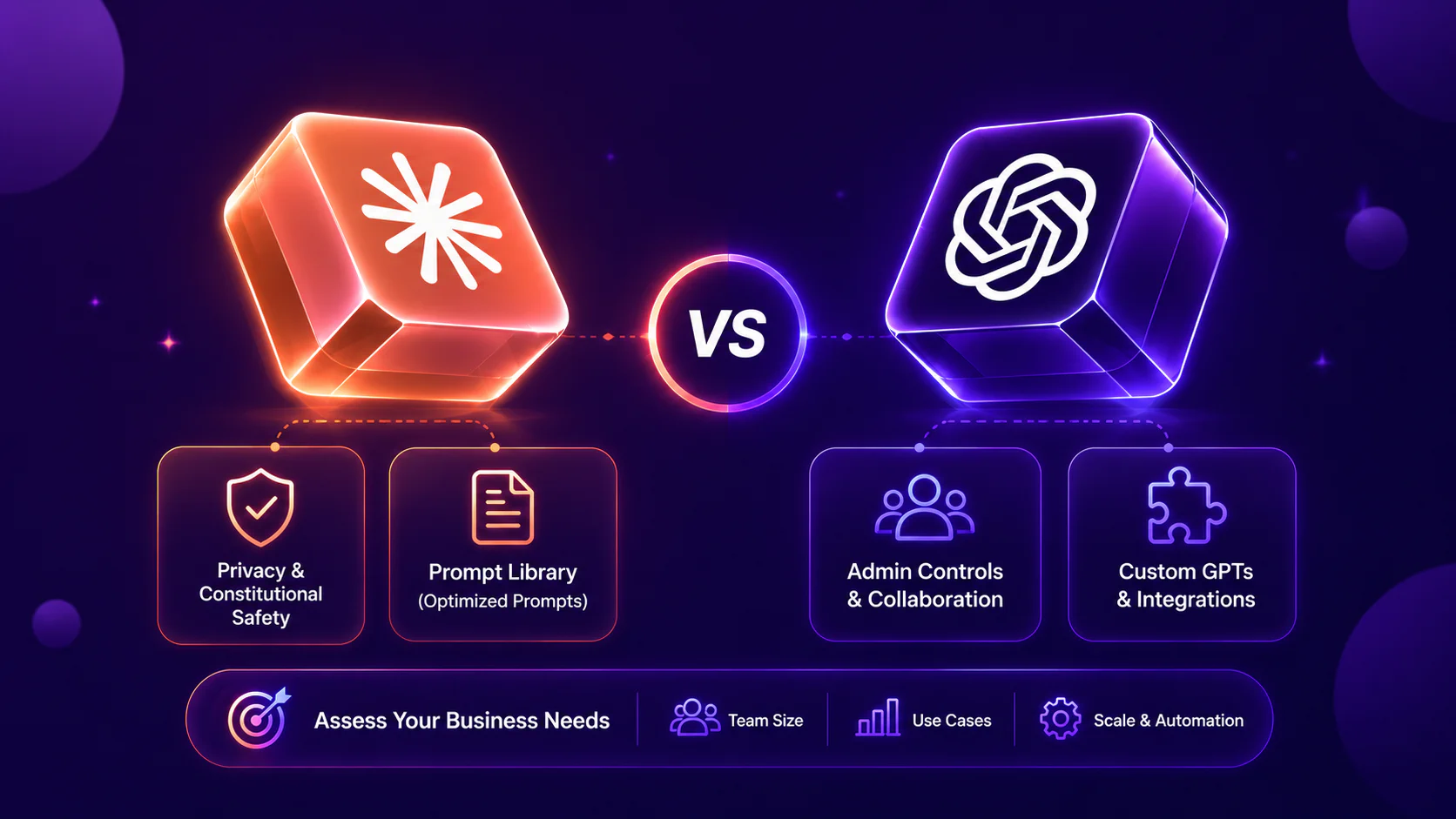
ChatGPT’s enterprise offering includes admin controls, collaboration features, and data retention policies designed for businesses. A powerful option for businesses is the ability to create custom GPTs and leverage wide-range integration, perfect for agile and cross-functional organizations.
Claude’s enterprise/teams option emphasizes privacy and constitutional safety. While Anthropic doesn’t have a “GPT” equal for businesses, there is a prompt library available with “optimized prompts” that users can access for certain tasks (like enhancing code).
The bottom line: when selecting an AI model for your business, first assess your business needs. Are you a small team or a large-scale company? How many users will you have each year? For what purposes will you be using your AI model? If scale and automation are a priority, then ChatGPT is an option worth looking into. For a broader view of enterprise AI solutions, check out our guide on best AI tools for business.
Educational Applications: Claude vs ChatGPT
There’s no question that the needs for education are evolving rapidly—the question is, which AI is able to best support students and academics? Both Claude and ChatGPT offer powerful solutions, but with different forms of user support.
ChatGPT’s Strengths: Best for Versatile Study Support
- Quick explanations
- Language Learning
- Essay Brainstorming
With features like image recognition software that allow the model to analyze charts, diagrams, and handwritten notes, and availability across the mobile app, study help is made accessible and free through the basic version.
Claude AI’s Strengths: Best for Deep Thinking
- Research Assistance
- Long Document Summaries
- Ethical Reasoning
While it excels at deep reasoning, Claude’s free tier is more limited.
Content Creation and Marketing: Claude vs ChatGPT
Claude produces content that feels more human and detailed, while ChatGPT produces polished, rapid-fire deliverables that can feel generic.
For long-form content (appropriate for SEO, blog writing, landing page copy, thought leadership pieces, etc.), Claude offers efficient, seamless integration with marketing workflows. However, if creative brainstorming or image generation is a higher priority in your marketing process, ChatGPT is better suited to your needs. In reality, marketers work across both formats (bite-sized content appropriate for social media reels, carousels, and captions AND long-form, authoritative content). Ultimately, the strategic choice of which model to select depends on your business priorities; in fact, most experienced marketers use both tools rather than working with one exclusively.
According to a study by HubSpot, nearly 3 out of 4 marketers are actively using some form of AI at work, with 43% leveraging AI for content creation, 23% using AI-enhanced productivity tools, 23% generating image assets, and 22% using text generation tools to create high-scale, high-conversion content. This shows that AI integration for content creation and marketing isn’t just a nice-to-know but is an integral part of contemporary marketing content production.
Our recommendation? Try out the free versions of both models and see which capabilities best suit your marketing needs.
Free Versions Compared: Claude vs ChatGPT
So let’s talk about what you actually get without opening your wallet.
ChatGPT’s free version can be compared to the chatty (but helpful) friend who’s always available. Message limits can vary by model availability and demand, and it’s a great go-to for quick answers and creative tasks, including image generation. The catch? The free version can handle only about 4,000 tokens of context. That’s about 3,000 words, or approximately 6-8 pages of single-spaced text.
On the other hand, with Claude, you get roughly 40-50 messages daily. Each prompt packs a mighty token punch, allowing you to upload larger volumes. This means that even on the free level, Claude users have access to specialized, self-contained workspaces that let them curate, organize, and chat with specific knowledge bases.
Paid Subscriptions: Claude Pro vs ChatGPT Plus
Both paid subscriptions cost $20 USD/month, of course, with different offerings.
ChatGPT Plus gives users access to GPT-5.2, including the GPT-5.2 Thinking variant introduced in early 2026, along with GPT-5.3-Codex—OpenAI’s latest agentic coding model designed for complex, multi-step development workflows. For more about OpenAI’s latest models, see our breakdown of GPT-5.4. The only drawback is that Custom GPTs aren’t easily shareable across teams, creating bottlenecks for collaborative work.
Claude Pro comes with its own set of goodies. The AI model offers at least 5 times the usage per session as the free tier, with usage limits resetting every 5 hours. Claude Pro users enjoy access to Claude’s most advanced models, including Opus 4.5 and Sonnet 4.5, with an extended 200,000-token context window. This means that users can upload and analyze up to 150-page reports or entire codebases in a single conversation (no chunky blocks!). Claude Pro subscribers get early-bird access to features like file creation, Project workspace, and memory capabilities, weeks or, in some cases, even months before free users. The drawback to the platform is a lack of native image generation, meaning no design, AI art, or images.
API Pricing Differences Between Claude and ChatGPT
There is no doubt that if you are building AI into your product, API (application programming interface) pricing becomes essential. Let’s unpack how Claude and ChatGPT stack up.
Claude’s Opus 4.5 costs $5 per million input tokens and $25 per million output tokens, while Claude Sonnet 4.5 runs at $3 input and $15 output per million tokens. The budget-friendly Haiku 4.5 option costs just $1 per million tokens for input and $5 per million tokens for output.
ChatGPT-4o costs $5 per million input tokens and $15 per million output tokens. As of July 2025, GPT-4o dropped to just $3 per million input tokens and $10 per million output tokens—that’s an 83% price reduction in the past 16 months alone.
Cost-Effectiveness for Developers: Claude vs ChatGPT
As in most cases, the answer depends on what you are looking for. When it comes to choosing the most cost-effective model for developers, the answer depends on whether the priority is large-context coding and superior reasoning (in which case you should go with Claude) or rapid prototyping and all-in-one tooling (in which case you can’t beat ChatGPT).
Pressed for cost? Let’s get into a quick overview for cost optimization. Both platforms now support Prompt Coaching and Batch Processing (saving up to 50% on non-urgent tasks), which seriously changes the ROI calculation. GPT-5’s developer platform provides detailed visibility into spending, allowing users to track consumption across different models and use cases, set up cost alerts, and even optimize implementations.
Claude includes some great cost-saving features that reduce spending at scale. Prompt caching cuts costs by up to 90% for repeated queries. Beyond just API access, Claude offers developers tiered subscription plans: Free, Pro ($20/month), Team ($30/user/month), and Enterprise (custom pricing).
Aside from the bottom-line costs, consider these additional food-for-thought points when choosing your AI model. Claude tends to generate more accurate code with fewer errors, saving developers time spent on debugging. Additionally, Claude’s 200k-500k context window means developers rarely need to build complex “chunking” systems for large documentation.
ChatGPT, on the other hand, boasts extensive documentation, a larger community, and better third-party integration (like Zapier and CRM tools), which speeds up overall development time.
So which one do you choose? Claude vs. ChatGPT.
If you are working on complex applications, need to refactor large files, or require high-level reasoning on hand, then go with Claude.
If you need a versatile tool for rapid prototyping, frequently browse the web for API documentation, or generate images/UI sketches as part of your workflow, then go with ChatGPT. If you’re curious about AI’s impact on development careers, check out our guide on will AI replace programmers.
How to Handle Misinformation: Claude vs ChatGPT
Hallucinations remain one of the core challenges for all LLMs, and how misinformation is handled across Anthropic and OpenAI depends on the learning principles on which the platforms are built.
Claude is built on constitutional AI principles, guiding the model to be more helpful, honest, and harmless. The result often leads the model to acknowledge its own uncertainty and avoid generating questionable content (for fun AU reads or comedy text generation, ChatGPT may be a better bet). Claude also often (but politely) explains why it cannot fulfill a request, making it a good fit for high-risk topics.
ChatGPT (including GPT-4) relies on RLHF (Reinforcement Learning from Human Feedback) and has a much broader browsing capability than Claude. It’s amazing at fact-checking via real-time search, but it’s equally likely to lead to overconfidence and the confirmation of false information.
Why is this so important? Aside from the unpleasantness of receiving inaccurate information, accuracy matters for AIs because of the value of their widespread use.
In 2025, Deloitte faced public scrutiny after government-commissioned reports in Australia and Canada were alleged to contain AI-generated errors and fabricated citations, highlighting the real-world risks of unchecked generative AI in high-stakes environments.
This underscores the underlying importance of using AI: it is a valuable partner—not an end-to-end provider. Recognizing that LLMs can create echo chambers and hallucinate unless trained repeatedly with updated information highlights just how important human-led supervision is.
To learn how you can train your AI tool for not only the optimal answers but also to help boost your productivity without hallucinations, check out our Build A Strong Portfolio with AI unit.
Ethical Alignment: Which AI Is Safer?
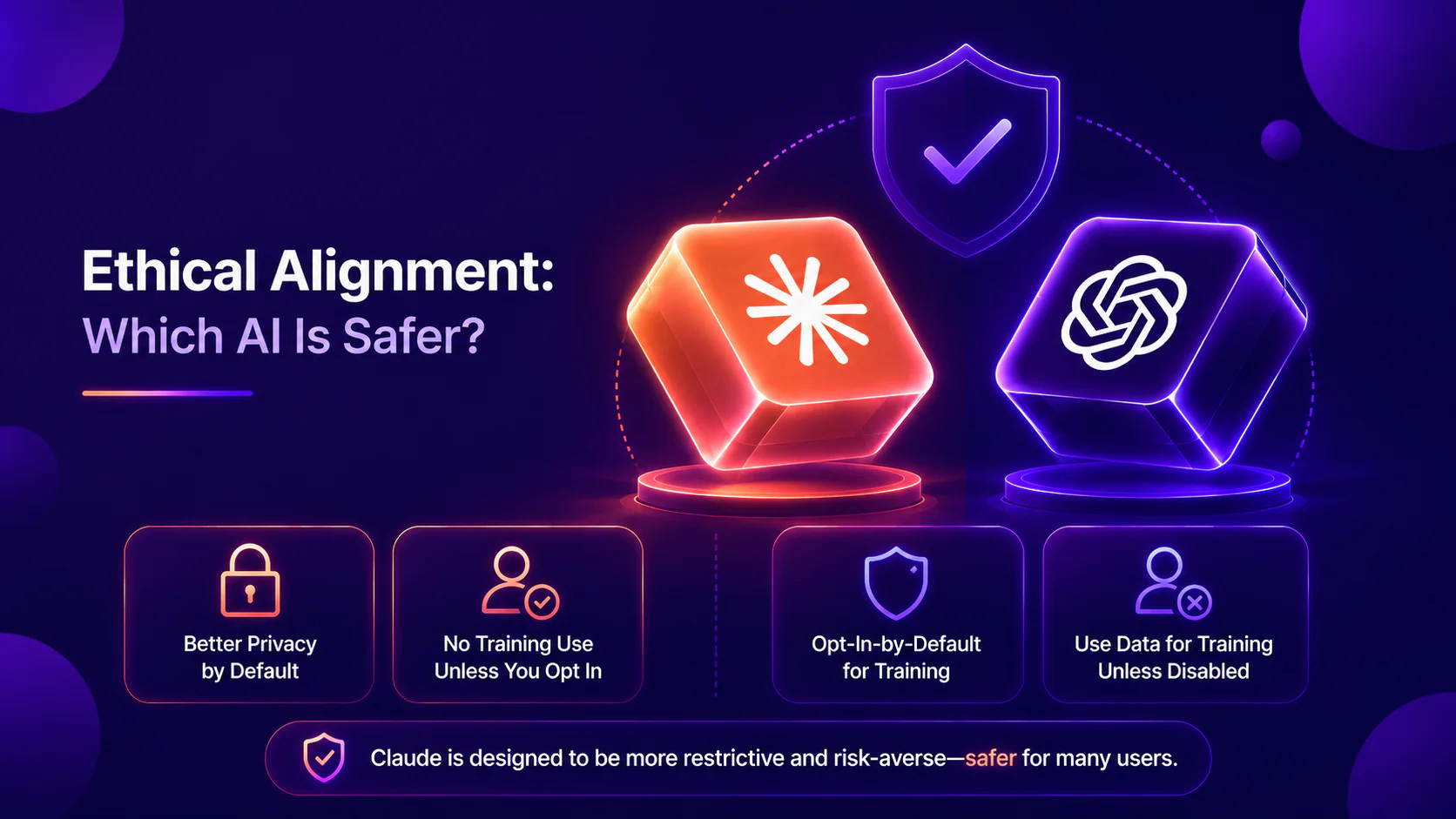
Looking strictly at settings like data privacy, user information, and training models, Claude is considered the safer choice. Claude provides better privacy by default and does not use your conversations for training unless you explicitly opt in; by contrast, ChatGPT uses an opt-in-by-default policy for training unless specifically disabled. In terms of content safety and restrictions, Claude is designed to be more restrictive and risk-averse, which is why it feels “safer” for many users, though it can sometimes be less creative than ChatGPT.
Pros and Cons of Claude AI
Pros
Large Context Window: great for analyzing and summarizing huge volumes of information in a single prompt. Human Feel: outputs feel “more human," conversational, and less robotic. Top-of-the-Line Safety: thanks to strict safety guardrails to reduce harmful content. Advanced Coding/Reasoning: Models like Opus 4.1 are powerhouses for complex tasks, debugging, and logic.
Cons
Over-Cautious: the double-edged sword of constitutional AI, safety-first design can feel frustrating when overly cautious outputs prevent desired outcomes.
No Image Generation: enough said, no native image generation, zero visual application.
Expensive Top-Tier Models: Top-of-the-line models (Opus) can be pricey; for the budget-conscious user, an alternative AI may be a better fit.
Pros and Cons of ChatGPT
Pros
Need for Speed (pun intended): But really, speed is the name of the game with this platform: ChatGPT generates text, summarizes documents, and writes code in a flash.
Versatility: ChatGPT doesn’t let its users down when it comes to diverse applications, from creative brainstorming and personal organization to writing, coding, and art generation.
Cost-Effective: Great value, even for the free tier; AI capabilities are leveraged at a personal scale without breaking the bank.
Cons
Cons
Hallucinations: Not even the fun kind. ChatGPT is known for making mistakes from time to time and can provide inaccurate or fabricated information with high confidence.
Dependency Risk: Over-reliance on any tool is never a good idea; while the model is extremely accessible, over-reliance on AI poses its own risks and consequences. Data Privacy: Be very careful when sharing personal or sensitive information.
Future Updates: What to Expect from Claude and ChatGPT
Exciting things are brewing for 2026, both for Anthropic and OpenAI. Let’s start with the latter. OpenAI released GPT-5.3-Codex on February 5, 2026, according to a blog post by OpenAI—a coding model that helped build itself, pushing the next milestone in tech development.
“The Codex team used early versions to debug its own training, manage its own deployment, and diagnose test results and evaluations—our team was blown away by how much Codex was able to accelerate its own development.”
This news marks the latest in a series of tipping points toward technological singularity, according to a source from Mashable. Some commentators framed this as another step toward more self-improving development workflows, but it also raises questions about oversight and safety.
Never one to stay behind OpenAI, right around the same time that GPT-5.3-Codex was released, Anthropic presented its very own Spring Festival gift package, introducing Claude Opus 4.6. With this drop, Claude Opus 4.6 introduces a massive 1M context window, making it easier than ever to input hundreds of pages of financial reports or thousands of words of code libraries. For office workers, the news continues to climb: Anthropic has introduced ‘Claude in Excel’ and ‘Claude in PowerPoint’ as workflow products aimed at accelerating spreadsheet analysis and slide creation.
The bonus? Anthropic is also signaling a push toward more collaborative, workflow-oriented Claude experiences for teams.
How to Integrate Claude and ChatGPT Together
Looking to combine the best of both worlds? Not only is this a smart choice, but it also allows you to experience the offerings of both models without cutting yourself off from creating a true AI engine for your needs. The best way to connect the models for your use is through third-party unified platforms like AiZolo or ChatLLM, Zapier for connecting them in workflows, or AI-powered team platforms like Slack.
When to Choose Claude Over ChatGPT and Vice Versa
By this stage in the guide, we’ve successfully covered the large overview of Claude vs ChatGPT. So which one do you go with? Both of these models are incredible partners for accelerating your work and boosting your productivity.
The question is, what do you need to use them for? If you are someone who works with huge volumes of files, writing, coding, and deep thinking, Claude is your go-to. If you are a creative marketer, a student, or even someone who wants a 24/7 available agent to support your weekly schedule with speed, agility, and versatility, ChatGPT can be an invaluable resource for you.
Still not sure where you can start? We got you covered. With our 28-day challenge, you can master AI skills through as little as 15 minutes of gamified daily learning. The best part? Your AI skills for personal productivity, business, or side hustles not only stick—they show through our accredited certificates available to learners upon completion. Join our AI-fluent community today.
Frequently Asked Questions About Claude vs ChatGPT
Is Claude better than ChatGPT in 2026?
What is the biggest difference between Claude and ChatGPT?
Is Claude or ChatGPT better for writing?
Is Claude or ChatGPT better for coding?
Does ChatGPT do things Claude cannot?
Does Claude do things ChatGPT cannot?
Which is better for business data, Claude or ChatGPT?
Should I switch from ChatGPT to Claude?