Making a holiday portrait with AI starts with a clear photo and a single prompt describing the scene, outfits, lighting, and style.
You also need one final line telling the model to keep every face untouched. Skip that constraint, and the system will generate a festive image of someone who only vaguely resembles you.
Below are 30 copy-and-paste Christmas AI photo prompts covering family portraits, couples, kids, pets, funny scenes, and printable greeting cards.
Both ChatGPT and Gemini support image generation on free plans under dynamic compute limits rather than fixed daily quotas.
How to use these prompts in 3 steps
Every prompt on this page follows a straightforward workflow: upload one photo, paste the text, and make targeted adjustments in the same thread. You can run these AI Christmas photo prompts for free on both platforms before deciding whether a paid tier is necessary.
Upload one clear photo. Pick a bright, front-facing shot where every face is unobstructed by sunglasses, hats, or hands. In ChatGPT, click the + icon in the message bar and choose Add photos & files. In Gemini, click the + icon (labelled as Add files in Google’s help documentation) and choose Upload files.
Paste a prompt and send it. Copy any prompt below, fill in the bracketed details if applicable, and submit it alongside your attached image. Every prompt already ends with an identity-locking line.
Fix the result with a follow-up. Stay inside the existing chat thread and request one specific tweak at a time. Starting a new conversation burns another upload, and ChatGPT’s free tier caps users at three file uploads per day. Review our breakdown of the ChatGPT image generation limit to avoid wasting attempts.
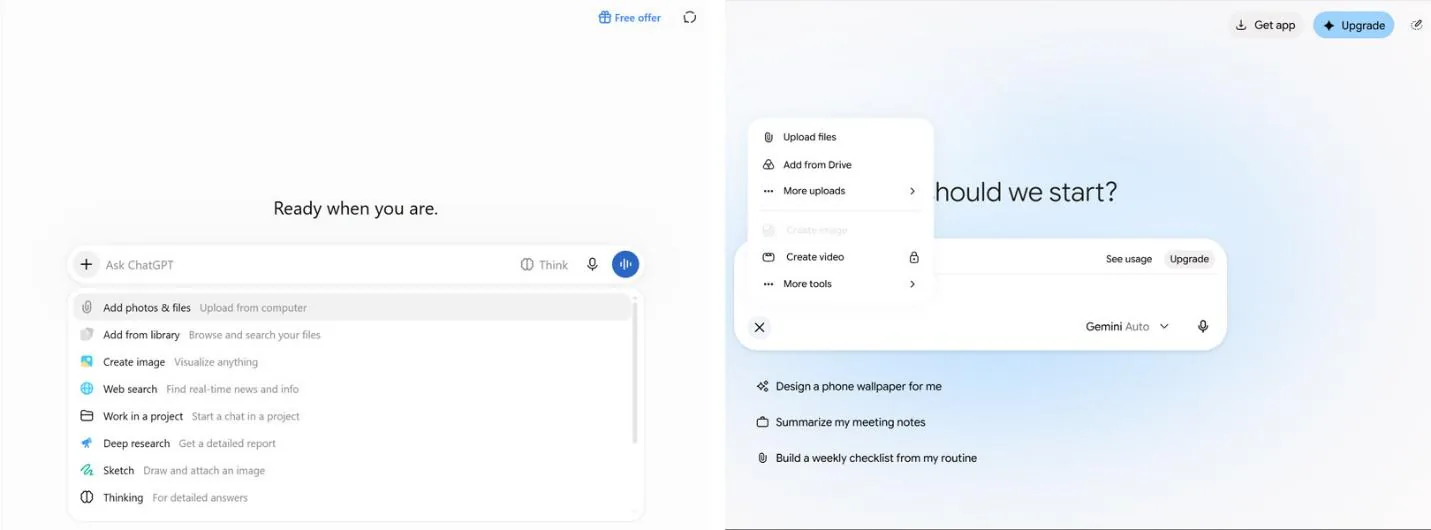
File upload menus in ChatGPT (left) and Gemini (right).
The master template with the “keep the face” line
Every prompt in this guide uses a five-part formula: scene, outfits, lighting, photographic style, and identity preservation. Once you recognize the structure, you can write your own variations from scratch.
Turn this photo into [scene]. Put [who] in [outfits]. Use [lighting] and make it look like [style]. Keep every person’s face, hair, skin tone, and age exactly the same as in my photo. Change only the clothes, background, and lighting. Don’t add or remove anyone.Those last three sentences form the core identity lock. Use the full block whenever a model starts altering facial proportions; the shorter one-line version at the end of each prompt below works well for initial runs.
Telling the model explicitly what to leave alone prevents unnecessary edits (a foundational technique covered in our guide on how to write better AI prompts).
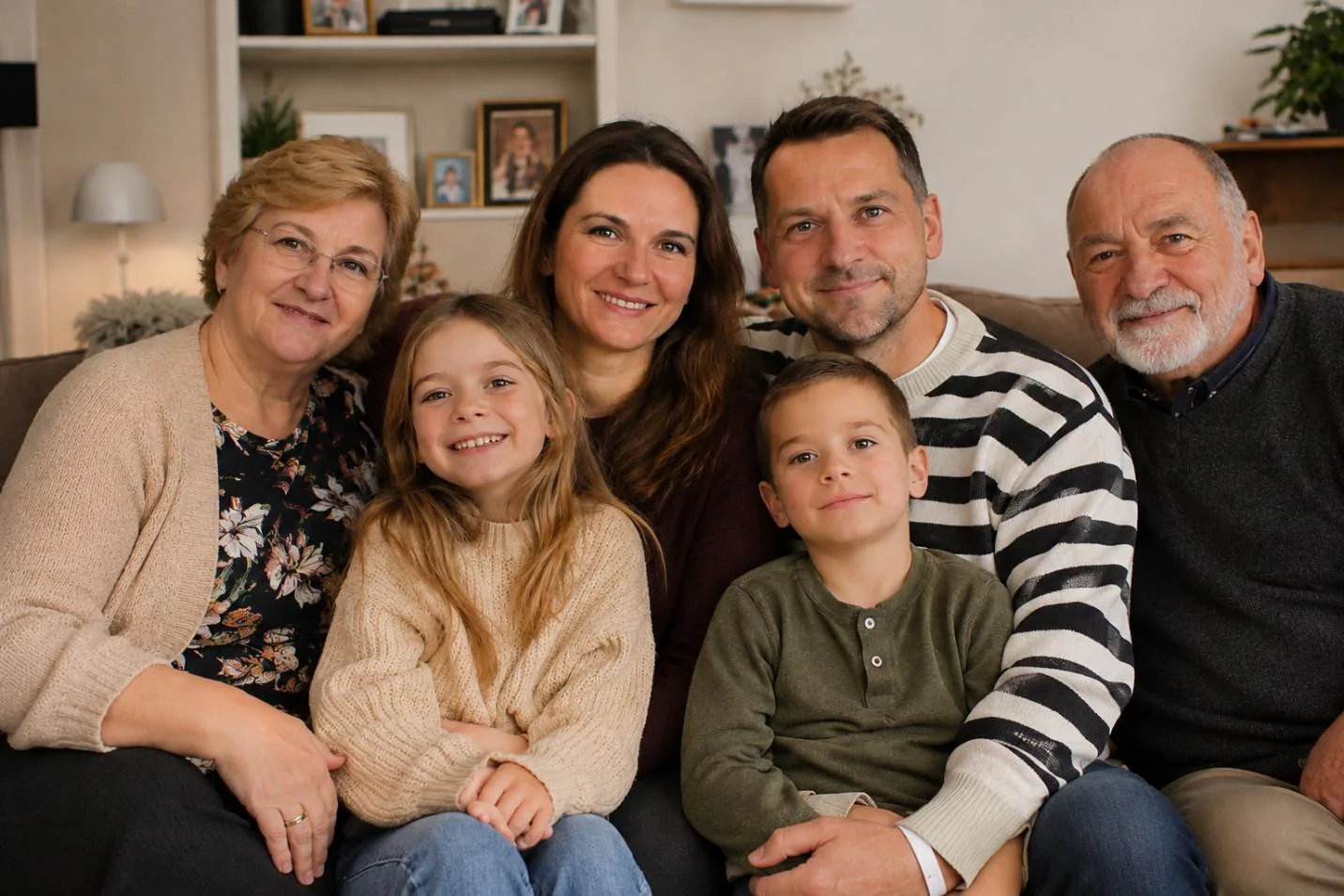
AI-generated family portrait used as the source photo for the examples below.
Pick a prompt by use
Jump straight to the category that matches your source photo and end goal.
| You want | Go to | Works best with |
|---|---|---|
| A portrait for the mantel or family group chat | Family portraits (1 to 6) | A single photo containing everyone |
| A romantic or cozy shot of the two of you | Couples (7 to 10) | A photo where both faces are similar in scale |
| Something for the grandparents | Kids and babies (11 to 14) | A sharp, front-facing picture |
| A seasonal profile or work picture | Solo portraits (15 to 19) | A clear selfie taken in natural daylight |
| Your dog or cat in holiday gear | Pets (20 to 23) | A photo showing clear fur markings and eyes |
| A humorous card or social post | Funny photos (24 to 27) | Any well-lit group shot |
| A ready-to-print greeting card | Holiday cards with text (28 to 30) | A vertical or horizontal photo with clean margins |
Family portrait prompts
Every additional person in a frame increases the chance of facial drift. These six prompts keep backgrounds uncluttered and explicitly anchor the headcount.
1. Matching pajamas
Turn this photo into a Christmas morning family portrait. Put everyone in matching red-and-green plaid pajamas, sitting on the living room floor in front of a lit tree, with warm lamp light. Realistic photo style. Keep every face exactly as it is in my photo.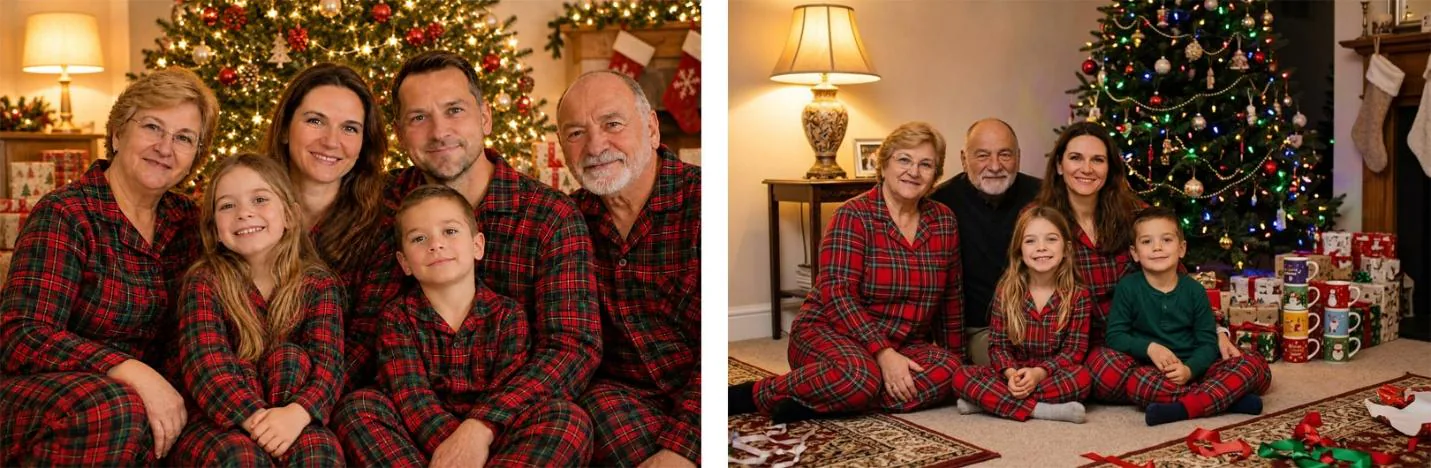
AI-generated family portraits made with ChatGPT (left) and Gemini (right).
As you can see from the image above, ChatGPT kept every family member intact and matched the plaid pajamas accurately. Gemini dropped one male adult from the group entirely, highlighting why explicit headcount constraints are necessary.
2. Fireside
Put us on a couch next to a stone fireplace with stockings on the mantel. Cozy knit sweaters in cream and dark green, soft firelight, evening. Make it look like a real photo taken on a good camera. Keep every face exactly as it is in my photo.3. Tree decorating
Show us decorating a Christmas tree together, mid-action, with one person holding the star. Casual sweaters and jeans, warm string-light glow, candid photo style. Same number of people as in my photo. Keep every face exactly as it is.4. Three generations
Make this a three-generation Christmas portrait: grandparents seated in front, parents behind them, kids on the floor. Dressy holiday outfits in deep red and navy, soft window light. Keep everyone’s real age and every face exactly as in my photo.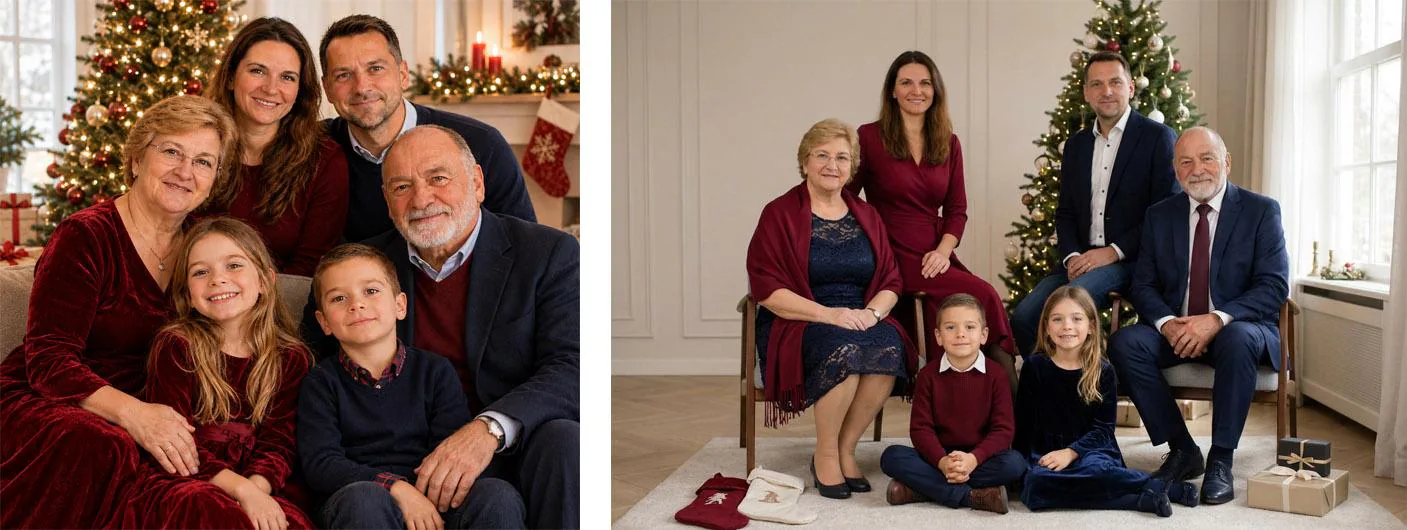
AI-generated three-generation portraits made with ChatGPT (left) and Gemini (right).
5. Snowy cabin
Move us to the front porch of a snowy log cabin at dusk, with a wreath on the door and warm light in the windows. Winter coats, scarves, and beanies, light snowfall. Realistic photo. Keep every face exactly as it is in my photo.6. Classic studio
Turn this into a classic studio Christmas portrait with a plain dark green backdrop and soft, even studio lighting. Everyone in black and white formal outfits with one red accent each. Keep every face exactly as it is in my photo.Couples prompts
With just two faces to preserve, couples prompts handle richer, multi-layered outdoor environments well. Start with a close-up where both faces are clearly lit.
7. Christmas market
Put the two of us at an outdoor Christmas market at night, holding mugs of hot chocolate, with wooden stalls and string lights blurred behind us. Wool coats and scarves. Realistic photo. Keep both faces exactly as they are in my photo.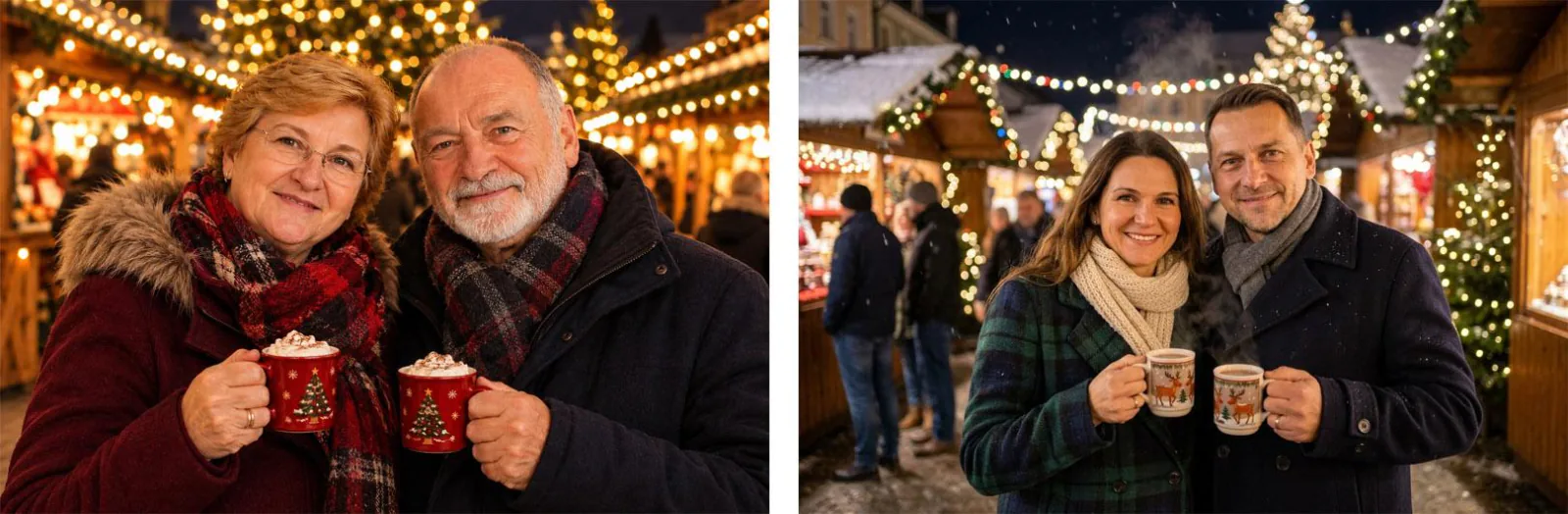
AI-generated couples’ portraits with ChatGPT (left) and Gemini (right) from a group source photo.
Feeding a big family photo into a couples prompt forces the model to decide who “us” refers to. Both tools successfully paired two partners from the same generation category, but their interpretations split cleanly: ChatGPT selected the older generation as the couple, whereas Gemini centered the middle-aged adults.
8. Tree farm
Show us at a Christmas tree farm on a cold, bright morning, carrying a tree together and laughing. Flannel shirts, puffer vests, and boots. Candid photo style. Keep both faces exactly as they are in my photo.9. Cookie night
Make this a photo of us baking Christmas cookies in a warm kitchen, flour on the counter, a tray of gingerbread in front. Matching aprons over sweaters, soft overhead light. Keep both faces exactly as they are in my photo.10. Snowy evening walk
Put us on a quiet street in the evening, snow falling, walking arm in arm under glowing string lights. Long coats and gloves, shallow depth of field. Realistic photo. Keep both faces exactly as they are in my photo.Kids and babies prompts
Image models often age toddlers up into older children if left unchecked. Each prompt below explicitly locks age alongside facial structure. Use these only with photos of your own children; any sample images shown for this category use fictional, AI-generated subjects.
11. Baby’s first Christmas
Turn this into a “first Christmas” photo. Lay the baby on a soft white blanket next to a small stocking and a few wooden ornaments, in gentle daylight. Keep the baby’s face, age, and hair exactly as in my photo.12. Letter to Santa
Show my child at a wooden desk, writing a letter to Santa by lamplight, with a plate of cookies nearby and a tree in the background. Striped pajamas. Storybook-photo feel. Keep my child’s face and age exactly as in my photo.13. Cookie helper
Put my kid in a kitchen, standing on a step stool and decorating sugar cookies, with frosting on one cheek. Red apron, warm light, candid photo. Keep the face and age exactly as in my photo.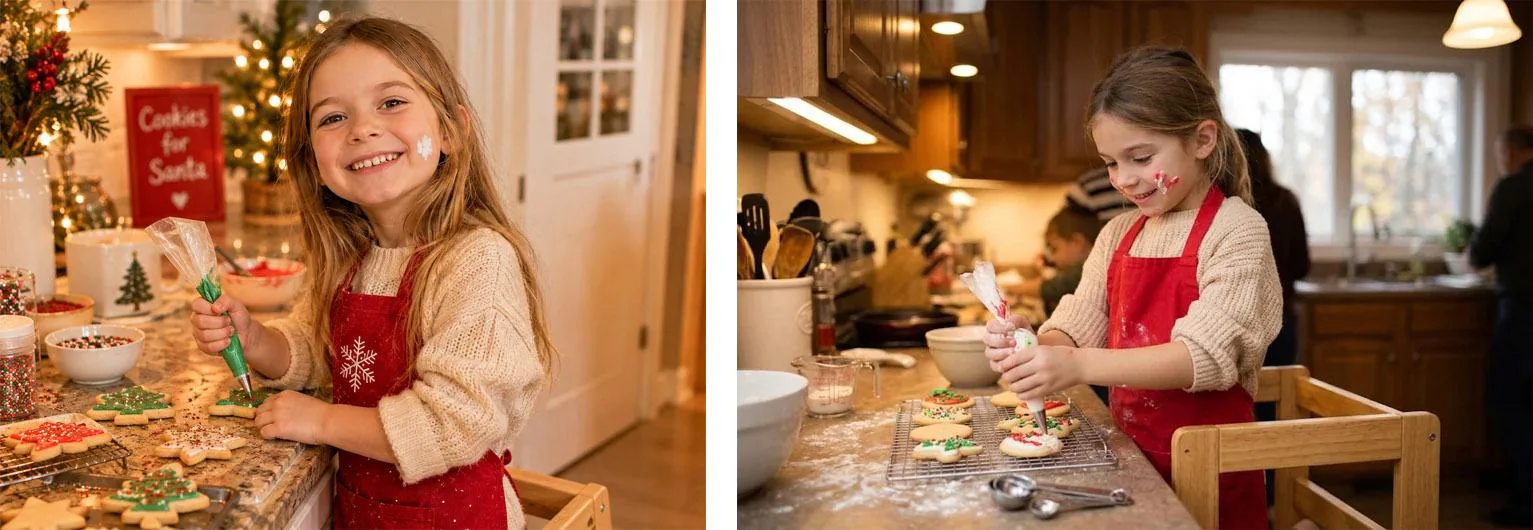
AI-generated image of a fictional child using ChatGPT (left) and Gemini (right).
Although the prompt did not specify a gender, both models consistently selected a girl for the baking scene. Whether this points to an underlying preference or model bias associating domestic tasks with female roles remains an open question.
14. Peeking at presents
Show my child at the top of the stairs in pajamas early on Christmas morning, peeking down at a glowing tree and wrapped presents. Dim, magical light. Realistic photo. Keep the face and age exactly as in my photo.Solo portrait prompts
Single-subject images make it easy to inspect how each model handles skin texture and hairline accuracy. These AI Christmas photo ideas also work well for seasonal social media avatars or company directories.
15. Cozy sweater
Give me a chunky cream knit sweater and put me in an armchair next to a lit Christmas tree, holding a mug. Warm, soft light, shallow depth of field. Keep my face, hair, and skin tone exactly as in my photo.16. Candy cane
Turn this into a playful portrait with a red-and-white striped backdrop. Put me in a red turtleneck, holding a giant candy cane over my shoulder. Bright, clean studio lighting. Keep my face exactly as it is in my photo.17. Staircase glamour
Put me on a grand staircase wrapped in garlands and warm lights. Give me an elegant emerald-green evening outfit. Soft, golden light, editorial photo style. Keep my face, hair, and body shape exactly as in my photo.18. Snowy street
Show me on a snowy city street at blue hour, with shop windows glowing behind me. Long wool coat, red scarf, snowflakes in my hair. Realistic street-photo look. Keep my face exactly as it is in my photo.19. Office holiday headshot
Make this a professional holiday headshot. Keep me in business-casual clothes, add a soft, blurred office background with a small decorated tree and warm lights. Even, flattering light. Keep my face exactly as it is, with no smoothing.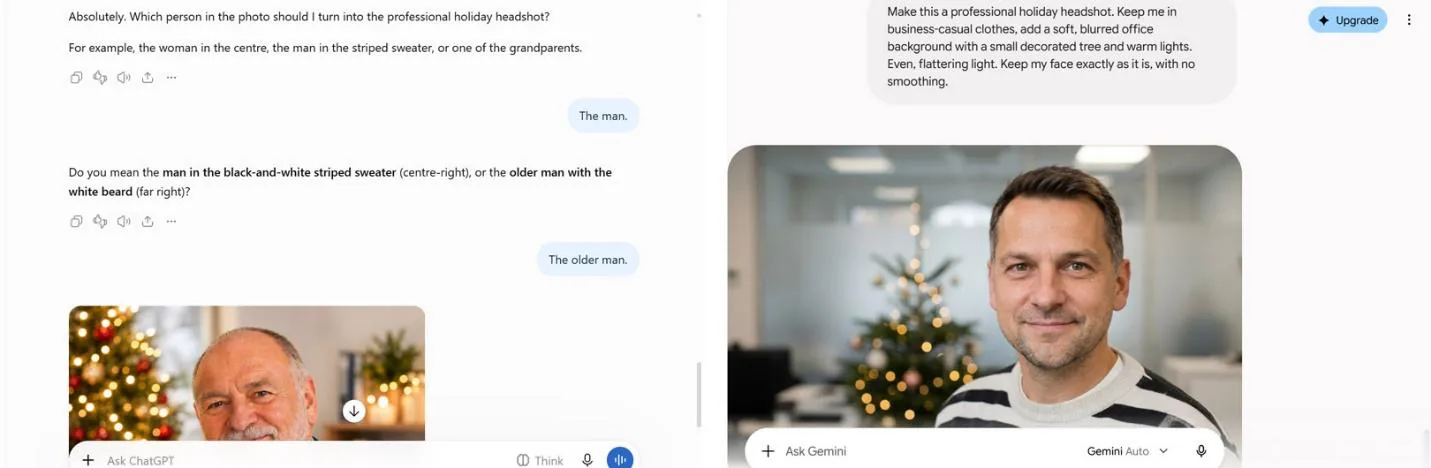
Prompt responses and AI-generated holiday headshots in ChatGPT (left) and Gemini (right).
When given a multi-person photo for a solo headshot, ChatGPT avoided guessing and paused to clarify which person to extract. Even after narrowing it down to “the man,” it double-checked which of the two male subjects to use before generating the final portrait. Gemini skipped the back-and-forth entirely and automatically picked the middle-aged father as “me”.
Pet prompts
Because models do not track animal faces the way they track human features, pet prompts must specify breed, coat color, and distinct markings. Upload a sharp photo showing your pet’s full head.
20. Reindeer antlers
Put my dog in front of a fireplace wearing soft reindeer antlers and a red collar with a bell. Cozy evening light. Realistic photo. Keep my dog’s breed, fur color, markings, and face exactly as in my photo.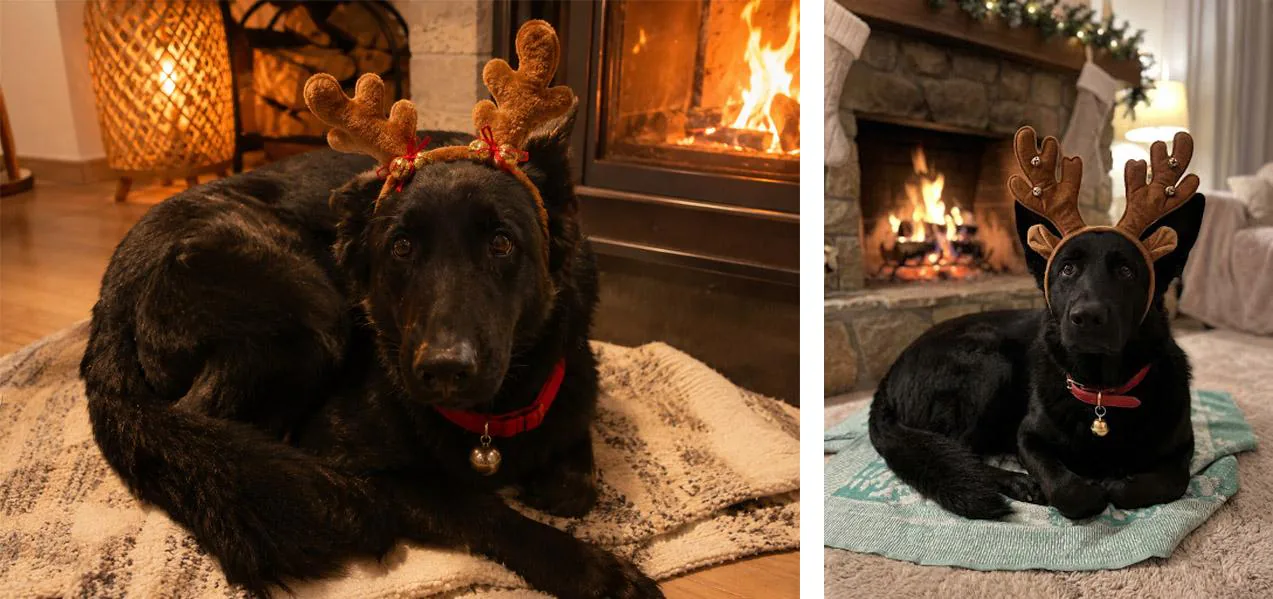
AI-generated pet portrait with ChatGPT (left) and Gemini (right).
21. Cat in a gift box
Show my cat sitting inside an open gift box under the Christmas tree, with ribbon draped over one ear. Warm string-light glow. Keep my cat’s fur color, markings, and eye color exactly as in my photo.22. Studio pet portrait
Make a studio Christmas portrait of my pet in a small Santa hat, on a plain dark red backdrop with soft lighting. Keep the fur color, markings, and face exactly as in my photo.23. Matching sweaters
Put me and my pet on the couch in matching Christmas sweaters, with a tree behind us. Warm light, candid photo. Keep my face and my pet’s markings and fur color exactly as in my photo.Funny photo prompts
Funny Christmas AI photo prompts land best when absurd staging collides with completely serious, recognizable expressions.
24. Awkward retro studio portrait
Turn this into an awkward 1980s mall studio Christmas portrait: stiff poses, loud patterned holiday sweaters, a hazy blue backdrop, soft-focus glow. Everyone looks very serious. Keep every face exactly as it is in my photo.25. Tangled in lights
Show us completely tangled in Christmas lights in the living room, lights still on, with a half-decorated tree behind us. Deadpan expressions. Realistic photo. Keep every face exactly as it is in my photo.26. Inside a snow globe
Put us inside a giant snow globe on a wooden table, standing next to a tiny cabin while snow swirls around. Winter coats, surprised expressions. Keep every face exactly as it is in my photo.27. Wrapped like presents
Show each of us wrapped up to the neck in wrapping paper with a big bow on top, lined up under the tree like gifts. Bright, cheerful light. Keep every face exactly as it is in my photo.Need a witty caption to pair with your card? The role-and-constraint patterns in our fun ChatGPT prompts guide help generate clever lines beyond standard greetings. For similar costume-style transformations, check our AI Halloween costume ideas collection.
Holiday card prompts with text
A single typo ruins a printable card. Keep text strings short and wrap them in quotation marks so the generator treats them as literal characters.
28. Classic family card
Make a vertical 5:7 Christmas card from this photo. Put us in front of a decorated tree in coordinated red and cream outfits. Add the text “Merry Christmas from the [Last name] Family” at the bottom in simple gold serif letters. Keep every face exactly as it is.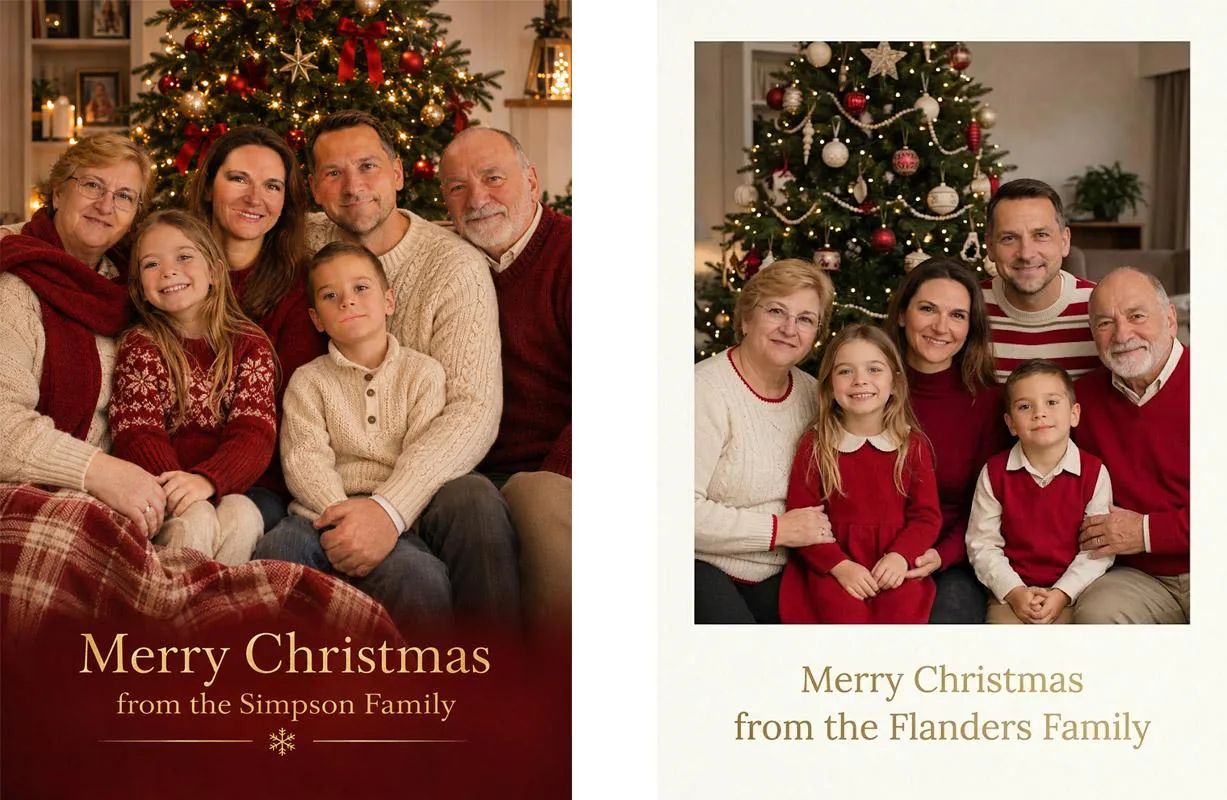
AI-generated greeting card with ChatGPT (left) and Gemini (right).
29. Small business card
Turn this team photo into a horizontal holiday card. Add a simple winter storefront background, warm lights, and matching scarves. Put the text “Happy Holidays from [Business name]” across the top in clean white letters. Keep every face exactly as it is.30. Funny photo card
Make a vertical Christmas card in a hand-drawn, 1950s American illustration style based on this photo. Add the text “Merry Chaos” at the top in bold red letters. Keep everyone recognizable, with the same faces and hair as in my photo.Both platforms support embedded typography. Google documentation notes that Nano Banana 2 improves text accuracy, while paid subscribers can select “Redo with Pro” to refine lettering with Nano Banana Pro; see our walkthrough on how to use Nano Banana Pro for details. Always proofread every letter before printing – if a word fails twice, generate a clean image without text and add typography manually.
ChatGPT vs Gemini for Christmas photos
Running identical ChatGPT Christmas photo prompts and Gemini Christmas photo prompts reveals key differences in how each platform manages upload caps, model architecture, and face persistence. The table below outlines official specifications.
| Feature | ChatGPT | Gemini |
|---|---|---|
| Current image model | ChatGPT Images 2.6 | Nano Banana 2 |
| Free access | Available across all tiers | Available without a Google AI subscription |
| Published free limit | No fixed image count (2-5/day, depending on server load); Free allows 3 file uploads/day | Dynamic compute limits refreshing every 5 hours up to a weekly cap |
| Reuse a face without re-uploading | Save photo as a named reference (@name) | Create a persistent Avatar |
| Age requirement for photo edits | Parental toggles available on linked teen accounts | 18 or older |
| Paid upgrade option | Images with thinking (Plus, Pro, Business) | Redo with Pro (Google AI plans) |
Last verified: November 11, 2026 (OpenAI, 2026; Google, 2026).
Practical comparison notes
Group portraits & face consistency: ChatGPT’s reference tagging (@name) helps lock specific identities across multiple generations without burning daily file upload quotas. Gemini’s Nano Banana 2 handles local edits smoothly when refining a single frame.
Cards with text: ChatGPT’s built-in image editor includes a Select tool for targeted text corrections, whereas Gemini relies on full-frame regeneration or “Redo with Pro” upgrades for crisp typography.
Free usage efficiency: Because ChatGPT caps free accounts at three file uploads daily, plan your source photo carefully and iterate within a single thread. Gemini’s rolling 5-hour refresh window offers more room for rapid experimentation on free accounts.
If you are new to generating visuals inside OpenAI’s interface, check our guide on whether ChatGPT can generate images to learn the basic editing controls first.
How to fix common problems
When an output misses the mark, send a single corrective follow-up inside the same thread rather than starting over:
Changed faces: Paste the full three-sentence identity lock from the master template and append: Compare the faces to my original photo and fix any that changed.
Extra fingers or odd hands: Hide hands naturally inside the scene: Give everyone mittens, or have everyone hold a mug with both hands.
Wrong number of people: Specify the exact headcount: There are exactly five people in my photo: two adults and three kids. Show all five and nobody else.
Warped text: Shorten the greeting, wrap it in quotes, and request simple block fonts. In ChatGPT, highlight the misspelled area with the editor’s Select tool and type the corrected word.
Plastic-looking skin: Request realistic surface detail: Keep natural skin texture, pores, and fine lines. No smoothing or beauty filter.
If the faces look accurate but the background needs minor object removal or color grading, switching to a dedicated tool is faster than re-rolling prompts. Our guide on how to use AI to edit photos breaks down when to use generative prompts versus standard cleanup tools.
Turning the image into a card or print
A portrait that looks sharp on a phone screen still needs proper framing before printing. Specify aspect ratios directly in your prompt (use 5:7 for standard greeting cards or 4:6 for photo prints) or adjust dimensions using ChatGPT’s aspect ratio picker.
Check for watermarks before exporting. Gemini applies a visible watermark to generated images by default, though most users can disable it under Settings > Media Watermark. Both platforms embed invisible SynthID watermarks and Content Credentials metadata, which remain invisible on physical prints.
To add borders, custom typography, or multi-photo collages, import your finished image into a layout editor. Our tutorial on how to use Canva AI explains how Magic Switch resizes one design into other formats, while our roundup of the best AI photo editors covers upscaling tools for large prints. You can also compile your seasonal portraits into a keepsake using our AI photo book workflow or browse AI gift ideas for personalized holiday presents.
Is it safe to upload family photos?
Both OpenAI and Google may use uploaded images to train future models unless you adjust your privacy settings beforehand. Upload only photos you own or have explicit permission to edit.
ChatGPT: OpenAI notes that content from Free, Plus, and Pro accounts (including uploaded photos) can be used for model improvement. Opt out by navigating to Settings > Data controls and turning off “Improve the model for everyone,” or work inside a Temporary Chat.
Gemini: When Keep Activity is enabled, Google stores uploads, uses them to train models, and may route samples to human reviewers for up to three years. Turning Keep Activity off (or using a temporary chat) limits retention to 72 hours and excludes uploads from training data.
When working with photos of children, toggle these privacy settings off before uploading and avoid sharing sensitive or private family moments.
Master clear instructions for AI
A single sentence can preserve a face across an entire portrait. Writing clear, structured instructions delivers the exact same edge at work – whether you are drafting reports, summarizing spreadsheets, or automating client emails.
If you want structured, hands-on practice, explore Coursiv’s 28-Day AI Certificate Program to build practical prompting habits through short daily lessons.
You can also review the AI Certificate Program overview to inspect the syllabus and completion certificate details.
FAQ
How do I get AI to make a Christmas photo?
What are some good prompts for a Christmas photoshoot?
What is the AI trend with Christmas photos?
How do I keep my face the same in an AI photo?
Which free AI tool is best for Christmas photos?
Can I use an AI photo on a Christmas card?
Is it safe to upload family photos to ChatGPT or Gemini?
ChatGPT and OpenAI are trademarks of OpenAI. This article is not affiliated with or endorsed by OpenAI. Google, Gemini, and Nano Banana are trademarks of Google LLC. This article is not endorsed by or affiliated with Google.