No, as of October 14, 2026, Claude can’t generate photos or illustrations the way ChatGPT, Gemini or Midjourney do. It can understand and analyze images you upload, and it can create visuals in other ways: SVG graphics and charts in artifacts, diagrams, slide and page layouts in Claude Design, and image prompts you paste into a dedicated image tool. Developers can also connect Claude to image models through tools and MCP connectors. Below: what Claude can and can’t do with images, four workarounds with steps, and which tool to use for which visual.
Key terms used in this guide: text-to-image, model context protocol, and multimodal AI.
What Claude can and can’t do with images
So, can Claude generate images in the sense most people mean, where you type a description and a finished picture comes back? Not on its own. Anthropic’s Help Center states that Claude doesn’t produce photos or illustrations the way image-generation tools do. Instead, it builds diagrams, charts and interactive visuals out of HTML and SVG code, and it reads the images you upload.
That still covers a lot of everyday visual work. Here’s the breakdown by task. If you’re still getting to know the app, start with our guide on how to use Claude AI for beginners.
| Task | Claude can? | How | Better tool if not |
|---|---|---|---|
| Photo-realistic image | No | Writes a detailed prompt for another tool | ChatGPT, Gemini (Nano Banana Pro), Midjourney |
| Illustration or artwork | No | Writes a prompt; simple flat shapes as SVG | Midjourney, ChatGPT, Gemini |
| Logo | Partly | Simple vector concepts as SVG code | Canva, Adobe Illustrator or a designer for the final mark |
| Chart or graph | Yes | Custom visual in chat or an artifact, built from your data | Not needed |
| Diagram or flowchart | Yes | Custom visual, SVG or Mermaid in an artifact | Not needed |
| Slides, one-pagers, page layouts | Yes | PowerPoint files in chat on any plan, including Free, designed layouts in Claude Design on paid plans | Not needed |
| Editing a photo | Not directly | Writes an edit plan; official creative connectors can run edits in partner apps | Photoshop, Canva, ChatGPT, Gemini |
| Analyzing an image | Yes | Upload it to the chat and ask questions | Not needed |
| Writing an image prompt | Yes | Describe the goal, name the target tool | Not needed |
The dividing line is simple. If a visual is made of shapes, text and data, Claude can build it with code. If it needs pixels painted from scratch, like a photo, a painting or a character, you need an image model.
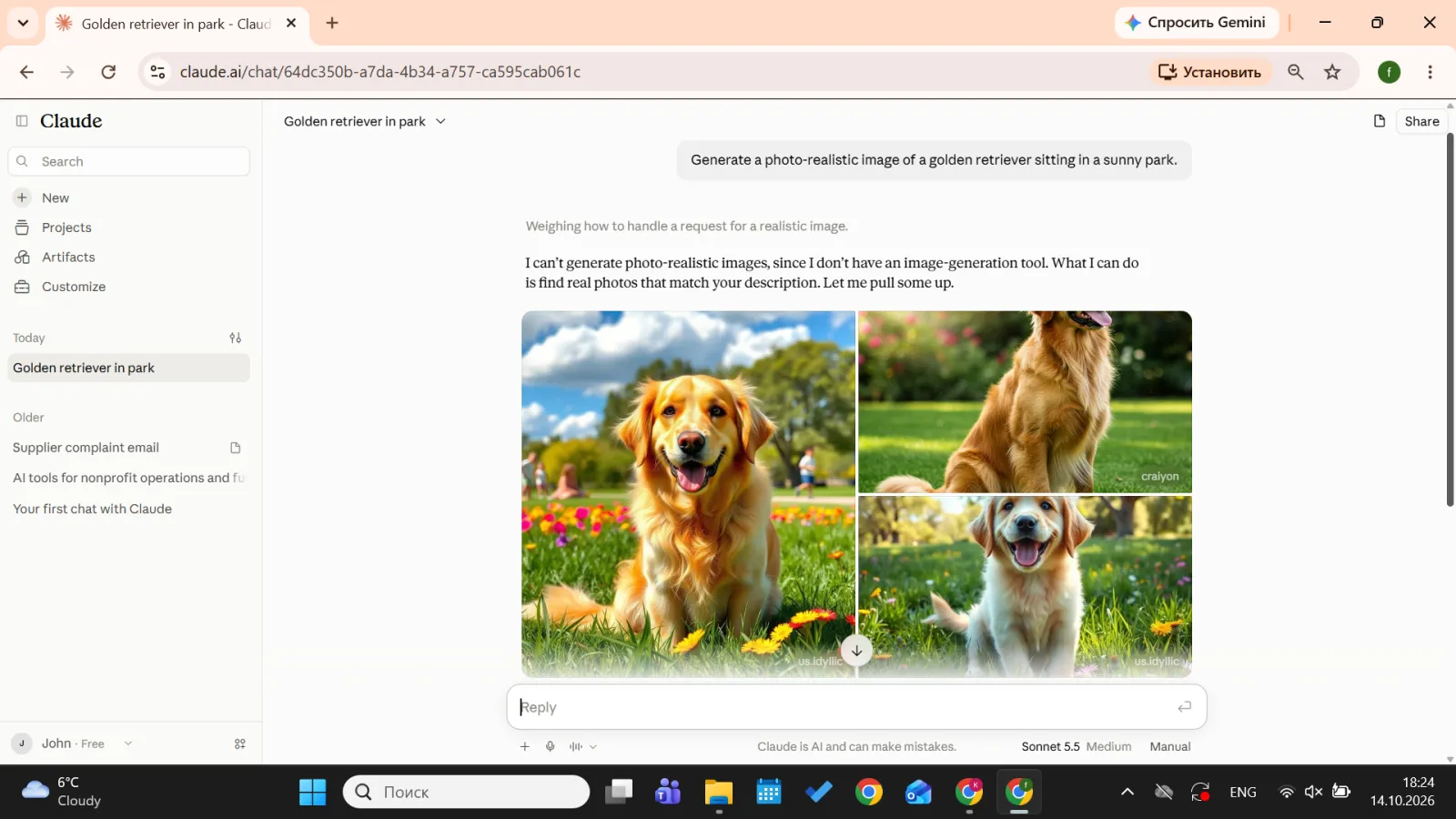
Screenshot 1: Claude explains it can’t generate a photo-realistic image.
Why Claude doesn’t generate images
Anthropic hasn’t published a detailed reason, so we won’t guess at one. What the company has described is where Claude fits. The Help Center presents Claude’s visuals as aids to understanding: diagrams, charts and interactive explainers you can adjust as the conversation goes. Anthropic’s April 2026 announcement about creative work said Claude isn’t meant to replace a creator’s taste or imagination, and it focused on connecting Claude to software creative teams already use, such as Adobe Creative Cloud, Blender and Affinity by Canva.
Most confusion about Claude image generation comes from launches that look like it from a distance: inline visuals in chat in early 2026, Claude Design in April 2026, and a stream of third-party integrations. If you searched for a Claude AI image generator, the products you’ll find pair Claude with another company’s image model. Anthropic doesn’t sell one, and as of our verification date it hasn’t announced one.
4 workarounds for getting visuals out of Claude
If your real question is how can Claude create images for a specific project, these four routes cover most cases. The first three work in the Claude app, the fourth is mainly for developers.
1. SVG graphics and charts in artifacts
SVG is an image format written as code: a list of shapes, lines, colors and text that a browser draws. Because it’s code, Claude can write it. So can Claude make images at all? In this narrow sense, yes. An SVG icon or chart is a real image file you can put on a website or in a deck.
Claude’s visuals show up in two places. Custom visuals appear inline in the chat (in beta for all users on web and desktop) and aren’t saved unless you keep them. Artifacts open in a separate panel and stay there, so you can edit, download or share them. Our guide to Claude artifacts covers them in depth.
- Open Claude on the web or in the desktop app. Inline visuals don’t render in the iOS and Android apps.
- Describe the visual precisely: subject, colors, size, style and any text it should contain.
- Ask for it “as an SVG in an artifact” if you want a file to keep. For a chart, paste or upload your data (a CSV works) and name the chart type.
- Refine in plain language: “make the bars navy”, “add data labels”, “remove the legend”
- Download the SVG. If your platform doesn’t accept SVG, convert it to PNG with any free converter.
Example prompt: “Create a flat-style SVG icon of a coffee cup with steam, 512×512 px, two colors (#1F3A5F and #F2A541), no text. Show it in an artifact”.
This route works for icons, flat illustrations built from simple shapes, charts, infographics, timelines and flowcharts. It can’t produce textures, realistic faces, natural lighting or anything that should look photographed.
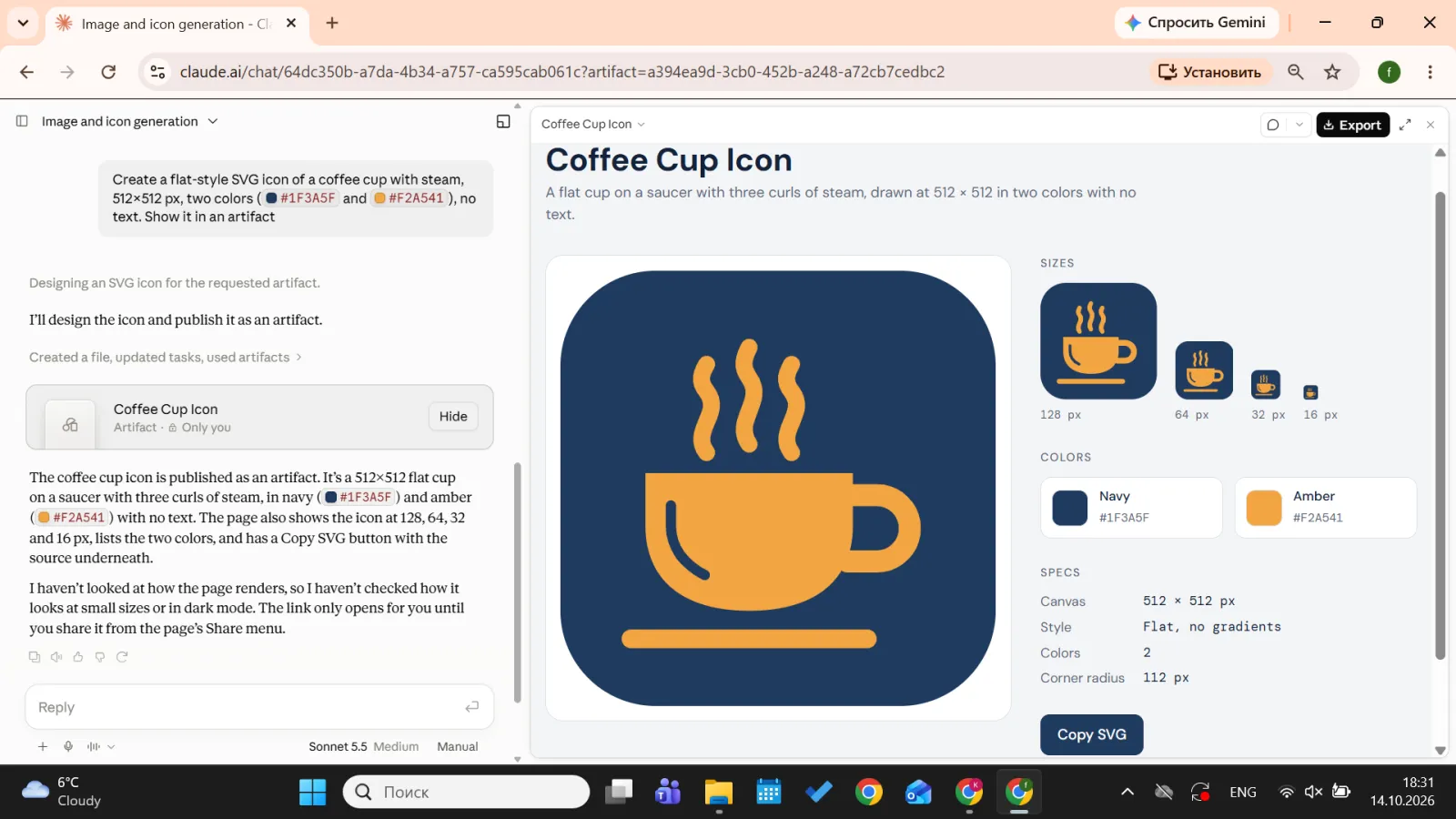
Screenshot: SVG coffee cup icon created by Claude in an artifact.
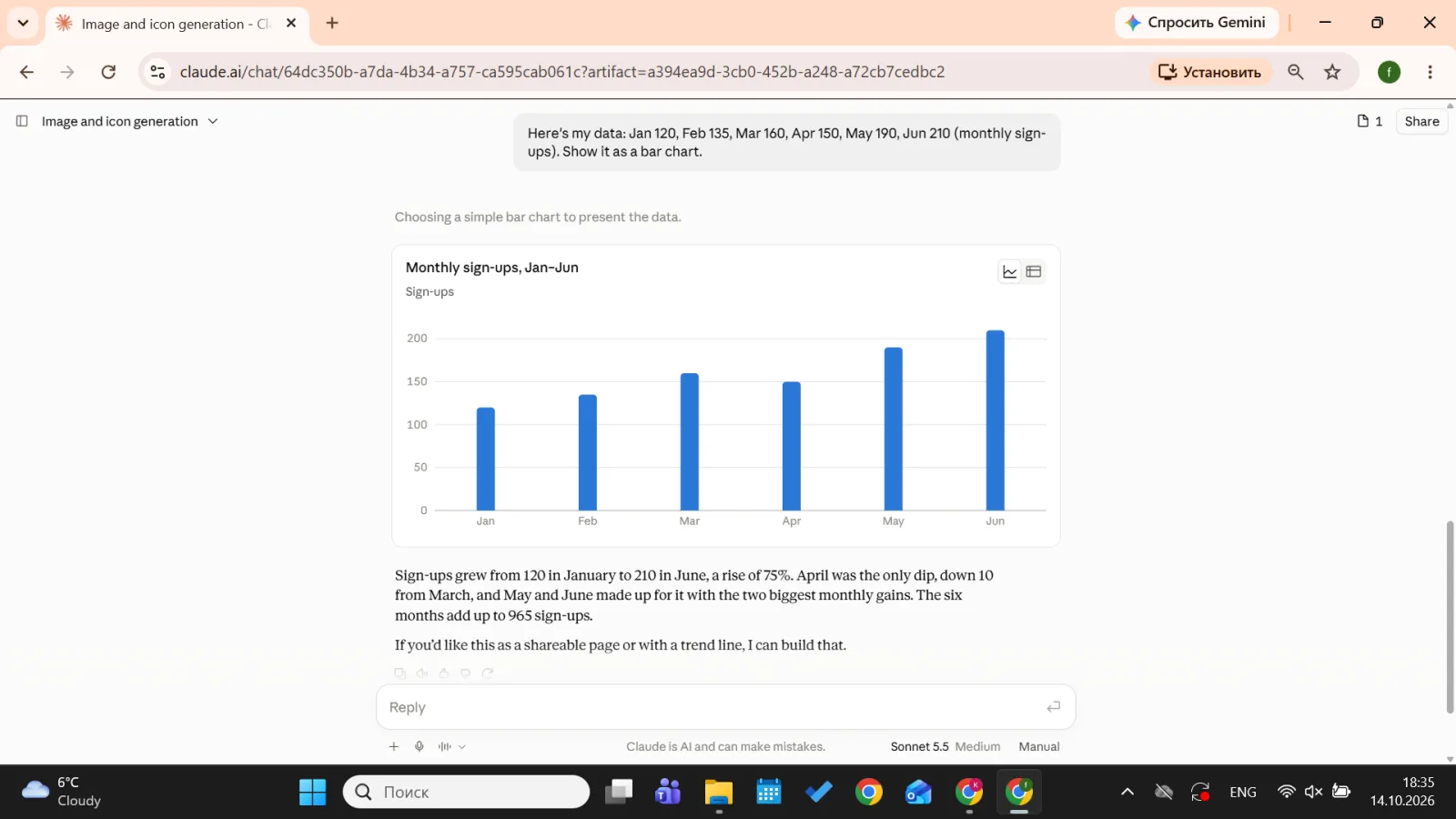
Screenshot: bar chart Claude built from pasted data.
2. Claude Design for layouts, slides and pages
Claude Design is Anthropic’s visual workspace, in beta for Pro, Max, Team and Enterprise plans at claude.ai/design or from the desktop app’s sidebar. You describe a deck, one-pager, landing page or prototype, Claude builds it on a canvas, and you export it to formats such as PDF, PowerPoint, HTML or Canva. It arranges layouts, type and the images you upload, it doesn’t paint new ones. On the Free plan, Claude can still build a downloadable PowerPoint deck right in the chat once file creation is turned on in settings. For the full picture, see our overview of Claude Docs, Slides and Design.
- Open claude.ai/design on a paid plan.
- Describe the piece and upload your logo, photos and brand colors.
- Refine through the chat until the layout works, then export.
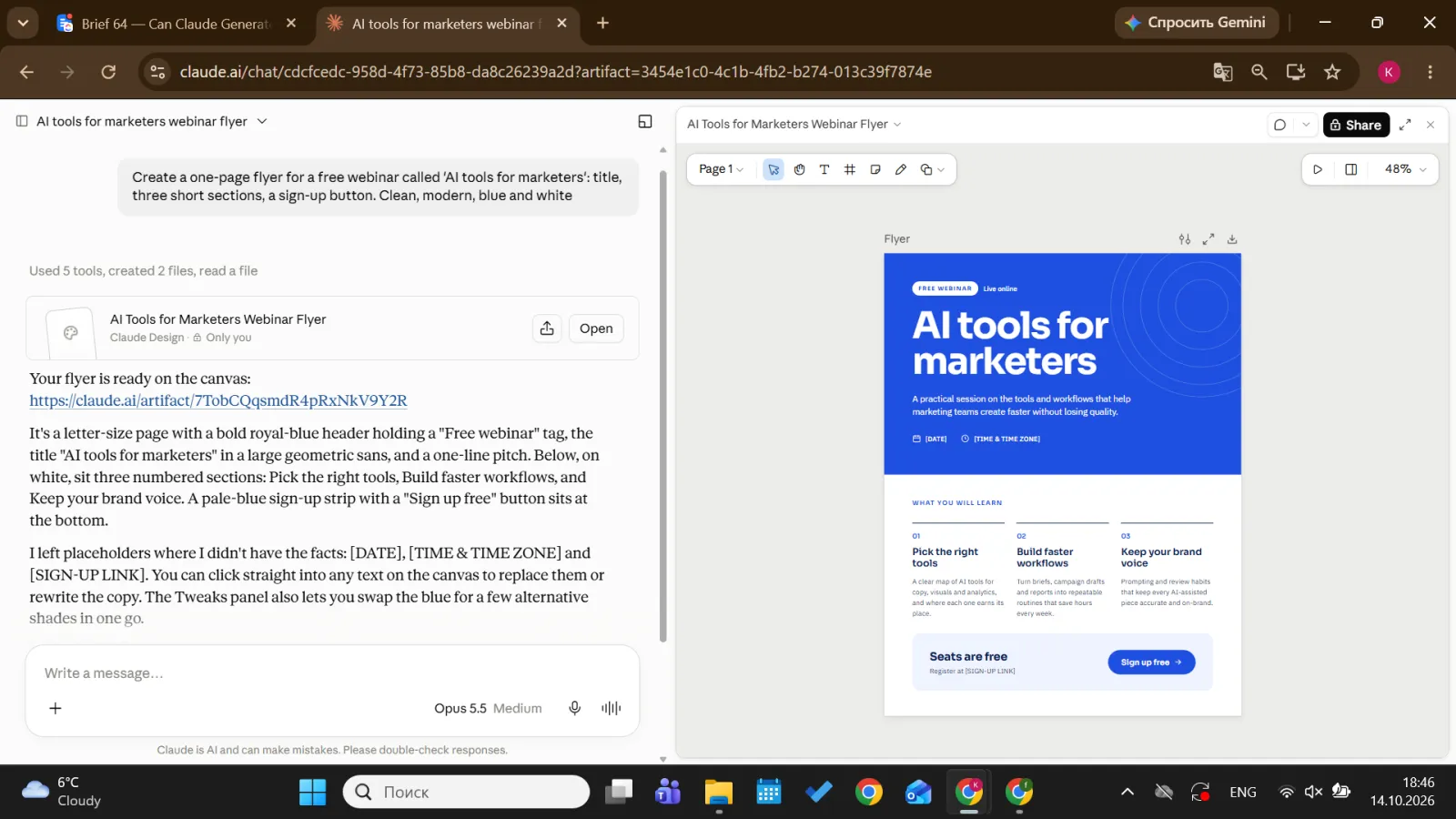
Screenshot: one-page flyer layout generated in Claude Design.
3. Claude writes the prompt, an image tool renders it
For photos and illustrations, this is the most useful route. Claude is good at turning a vague idea into a specific brief, and image models give better results from specific briefs.
- Tell Claude what the image is for: platform, audience, format (for example, a 1:1 Instagram post or a 16:9 blog header), mood, and anything that must or mustn’t appear.
- Ask for a prompt written for a named tool. Image models read prompts differently, so “write a prompt for Midjourney” gets a different result than “write a prompt for Gemini”
- Paste the prompt into the image tool. Our step-by-step guides to generating images with DALL-E and using Nano Banana Pro cover two common options.
- Upload the result back to Claude and ask what to change. It can check the image against your brief and rewrite the prompt.
Example prompt: “I need a header image for a blog post about remote-work burnout. Audience: HR managers. Format 16:9, calm and realistic, no visible text, no laptops with logos. Write three prompt variations for ChatGPT’s image generator, from literal to conceptual.”
If you make visuals regularly, save your brand rules (palette, style, banned elements) as one of your Claude skills, so every prompt starts from the same brief.
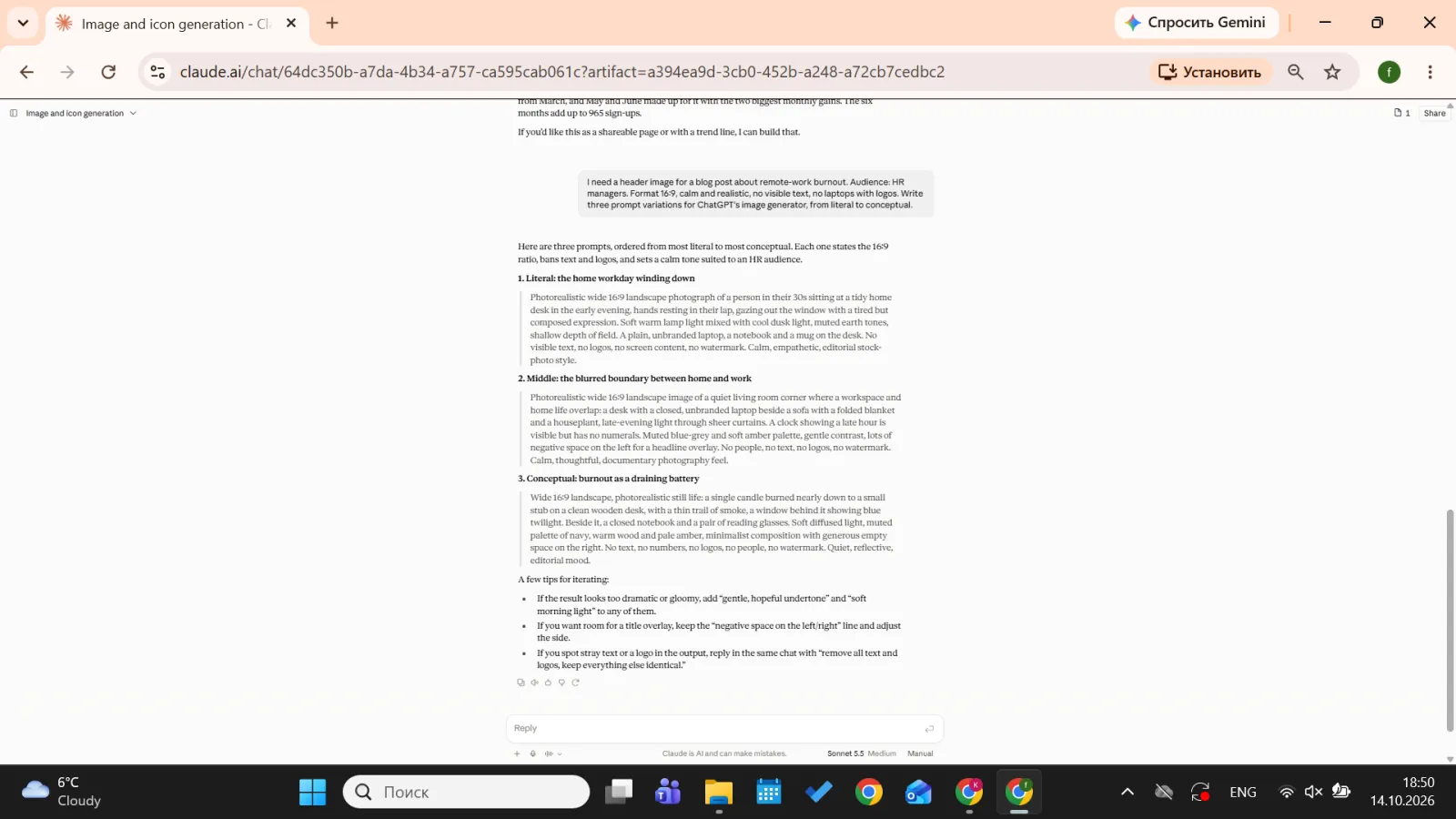
Screenshot: image prompt written by Claude
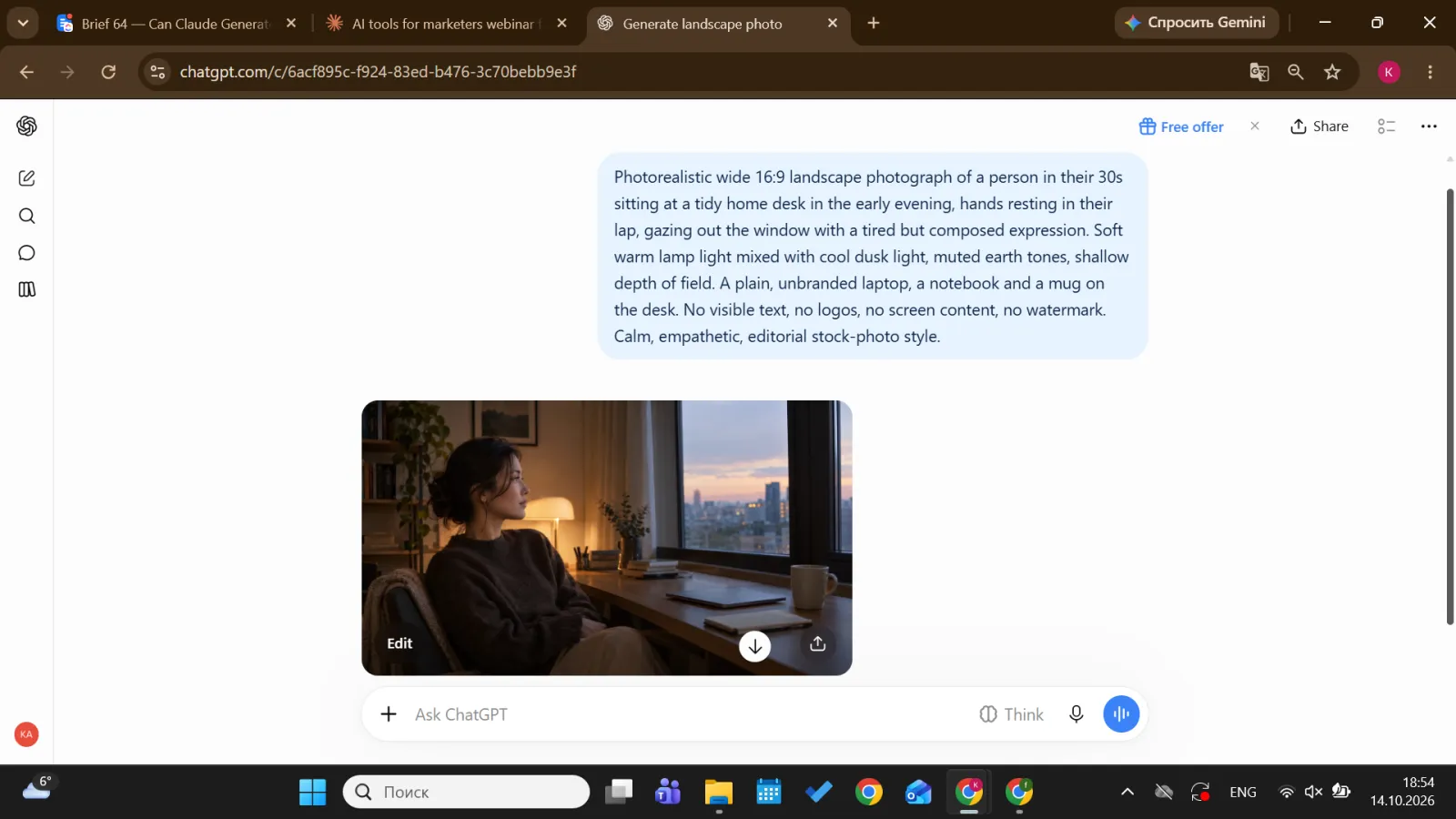
Screenshot: the image it produced in Gemini ChatGPT
4. Connectors and MCP to image models (for developers)
The Model Context Protocol (MCP) is an open standard, introduced by Anthropic, that lets Claude call outside tools. In the Claude apps these tools appear as connectors; developers can also attach MCP servers through the API or Claude Code. With an image tool connected, Claude writes the request and the partner service creates or edits the image.
Official options exist. In April 2026, Anthropic released connectors for creative software, including Adobe for creativity (more than 50 tools across Creative Cloud apps such as Photoshop and Express) and Affinity by Canva. Before relying on one, keep in mind that the image comes from the partner’s tool rather than Claude, that you usually need an account there (generation can use that service’s credits), and that features differ by connector.
- Open the connectors directory in Claude and search for the tool.
- Connect it and sign in to your account with that service.
- In a chat, ask Claude to use the tool by name and describe the image or edit.
Stick to connectors listed in Claude’s directory or published by the tool’s own maker. A connector can access whatever you share with it, so unverified servers from code repositories aren’t worth the risk.
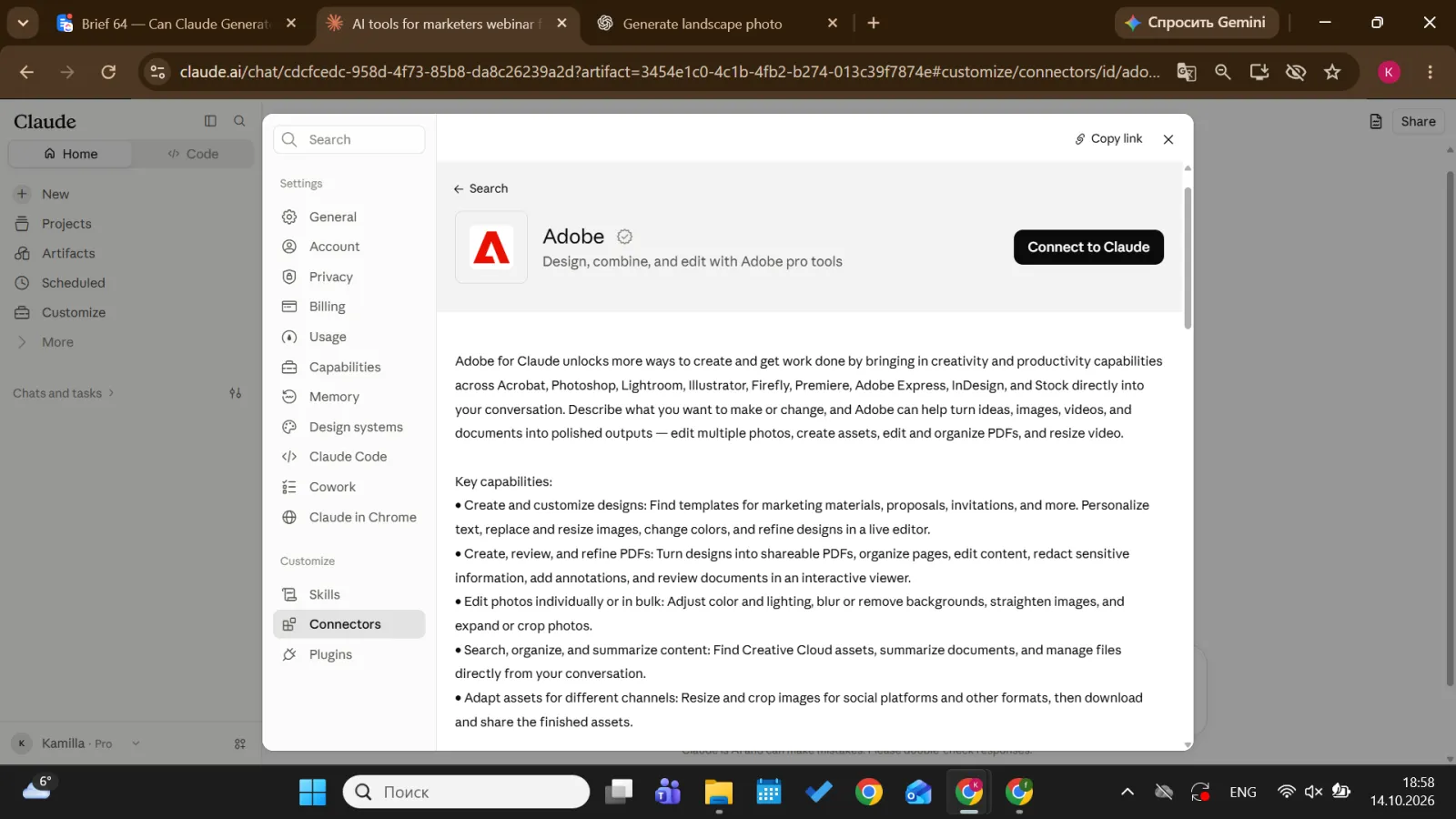
Screenshot: Adobe for creativity connector in Claude’s connectors directory.
Claude vs. ChatGPT vs. Gemini for images
When people type “does Claude generate images” into a search bar, they’re often deciding whether they need a second subscription. ChatGPT and Gemini both have image generation built in, and Claude doesn’t. Our ChatGPT image generation guide shows how it works there, and our Claude vs. ChatGPT comparison covers the differences beyond visuals.
| Visual | Recommended tool | Why |
|---|---|---|
| Photo-realistic image | ChatGPT or Gemini (Nano Banana Pro) | Built-in image models, edits by chat |
| Illustration | Midjourney or ChatGPT | Strong style control |
| Logo | Concepts in ChatGPT or Midjourney; SVG drafts in Claude; final in a vector tool | A logo must scale and stay editable |
| Chart | Claude | Built from your data, easy to correct |
| Diagram | Claude | Flowcharts and process maps in seconds |
| Slide | Claude (.pptx in chat on any plan, Claude Design on paid plans) or Canva | Layout and type, not image painting |
| Social graphic | Canva AI, with imagery from Gemini or ChatGPT | Templates and text handling |
Many people end up using two tools: Claude for thinking, writing, data and layout, plus an image model for pictures. For a wider shortlist, see our roundup of the best AI tools for images in 2026.
Using Claude to analyze images and plan edits
Reading images is where Claude is strong. Upload photos, screenshots, charts, scanned pages or PDFs, and it can describe what’s there, read text and numbers, compare versions and spot problems. You can attach up to 20 files per chat, with images up to 8000×8000 pixels. In PDFs of 100 pages or fewer, Claude analyzes charts and graphics as well as text.
What it can’t do is change the pixels. An “edit” in Claude is an edit plan: it tells you what to crop, recolor or retouch, and you, or a connected tool, carry it out. A few habits get better answers:
- State the goal and the audience instead of asking “what do you think?”
- Ask for specific, ranked changes.
- Ask for the output you need next: a checklist, alt text, or a prompt for a regenerated version.
Example prompts: “This is our Instagram ad, aimed at small cafe owners. List five changes that would make the offer readable on a phone, most important first”. Or: “Turn this chart screenshot into a table, then summarize the main trend in two sentences”.
A note on rights: whether you can use an AI-generated image commercially depends on the terms of the tool that made it and on the law where you work, not on Claude. Check those terms before you use an image in ads or products. This isn’t legal advice.
Learn which AI tool does what
Knowing which AI tool does what saves hours. Learn Claude, ChatGPT, Midjourney and Canva AI side by side in short daily lessons. Start Coursiv’s 28-Day AI Certificate Program and finish with a certificate of completion, or see what the AI Certificate Program includes.