The best Claude prompts do three things: give Claude detailed context, say exactly what the output should look like, and give it permission to disagree. The third part is the one people skip, and it matters most once you start arguing: Anthropic’s own research found Claude was more likely to agree too readily once people pushed back on its answers. That’s why the strongest prompts here ask Claude to disagree in the first message, before you push back at all: challenge my thinking, ask questions before you answer, flag what you can’t verify.
Below are 40 prompts, grouped by job: pushback on your plans, writing, work documents, research, marketing, resumes, and everyday life. Each one shows when to use it, what to paste, and how to adapt it.
Tip: dictate the context the prompt asks for. Copy a prompt into the chat, press the microphone button in the message box, and start speaking. Claude’s dictation works on the web, desktop, and mobile apps and turns your speech into text you can review and edit before you send it.
New to Claude itself? Start with our guide on how to use Claude AI for beginners, then come back for the prompts.
Last tested: November 20, 2026, on Claude Opus 5.5, Pro plan.
Pick a prompt by goal
Find your goal in the left column and jump to the prompt that fits.
Prompts for writing code sit outside this list. For those, start with our beginner’s guide to Claude Code.
Decide what data goes into your prompts
Many prompts below work best with real material: emails, meeting notes, resumes, or documents. What you can paste depends on whose data it is and which plan you use.
- Company plan (Team or Enterprise): follow your company’s AI policy. If it approves Claude for the work, paste what the policy allows.
- Your own data on a personal plan (Free, Pro, or Max): it’s your call. To keep these chats out of model training, turn off “Help Improve Claude” under Settings, then Privacy. For very sensitive material, use an incognito chat: Anthropic says incognito chats aren’t used to improve Claude, even when that setting is on.
- Clients’ or colleagues’ data on a personal plan: ask them first whether you can use their information in an AI tool, and paste it only once they agree.
Our guide, Is Claude AI Safe?, covers the main risks and safer-use practices.
The formula that works in Claude: context, task, format, pushback
Anthropic’s prompting guide compares Claude to “a brilliant but new employee” who lacks context on your norms. A strong prompt fills that gap in four parts:
- Context: who you are, who the output is for, and why it matters. The guide says a stated reason helps Claude understand your goal.
- Task: one explicit request.
- Format: length and structure. Describe what you want; the guide advises against lists of what to avoid.
- Pushback: permission to question you or admit uncertainty. This part is our addition, built on Anthropic’s advice to let Claude say “I don’t know.”
For more on context, task, and format, with weak and strong prompts side by side, see our guide to writing better AI prompts.
Write an email to my team about the deadline change.I manage a 6-person design team. Our launch moved from March 3 to March 17 because a vendor is late. Write an email telling the team. They're tired and may read this as more crunch, so be direct about what changes this week. Under 120 words, new dates as bullets. First, tell me if anything in my plan seems unclear.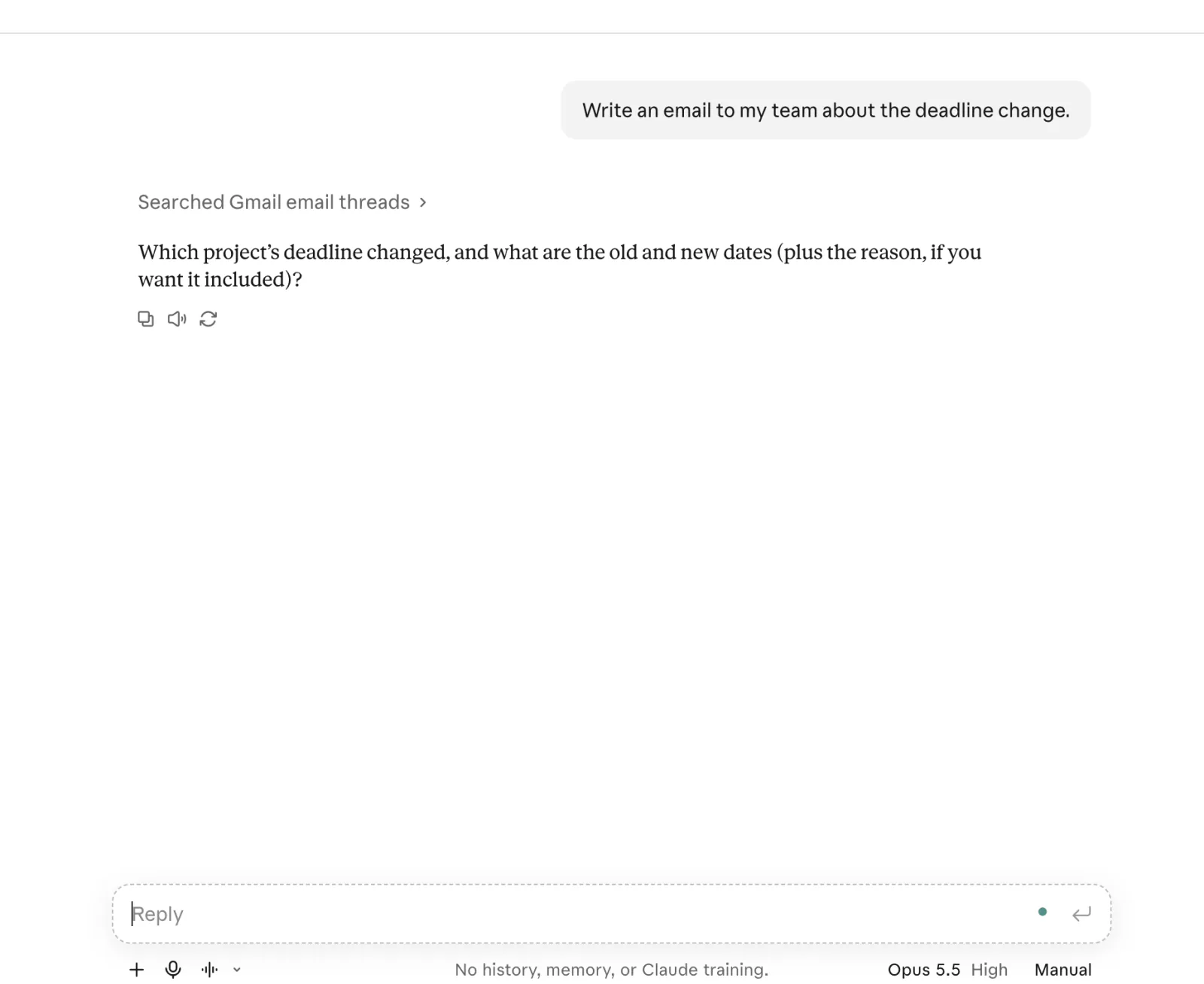
Screenshot: Claude (Anthropic)
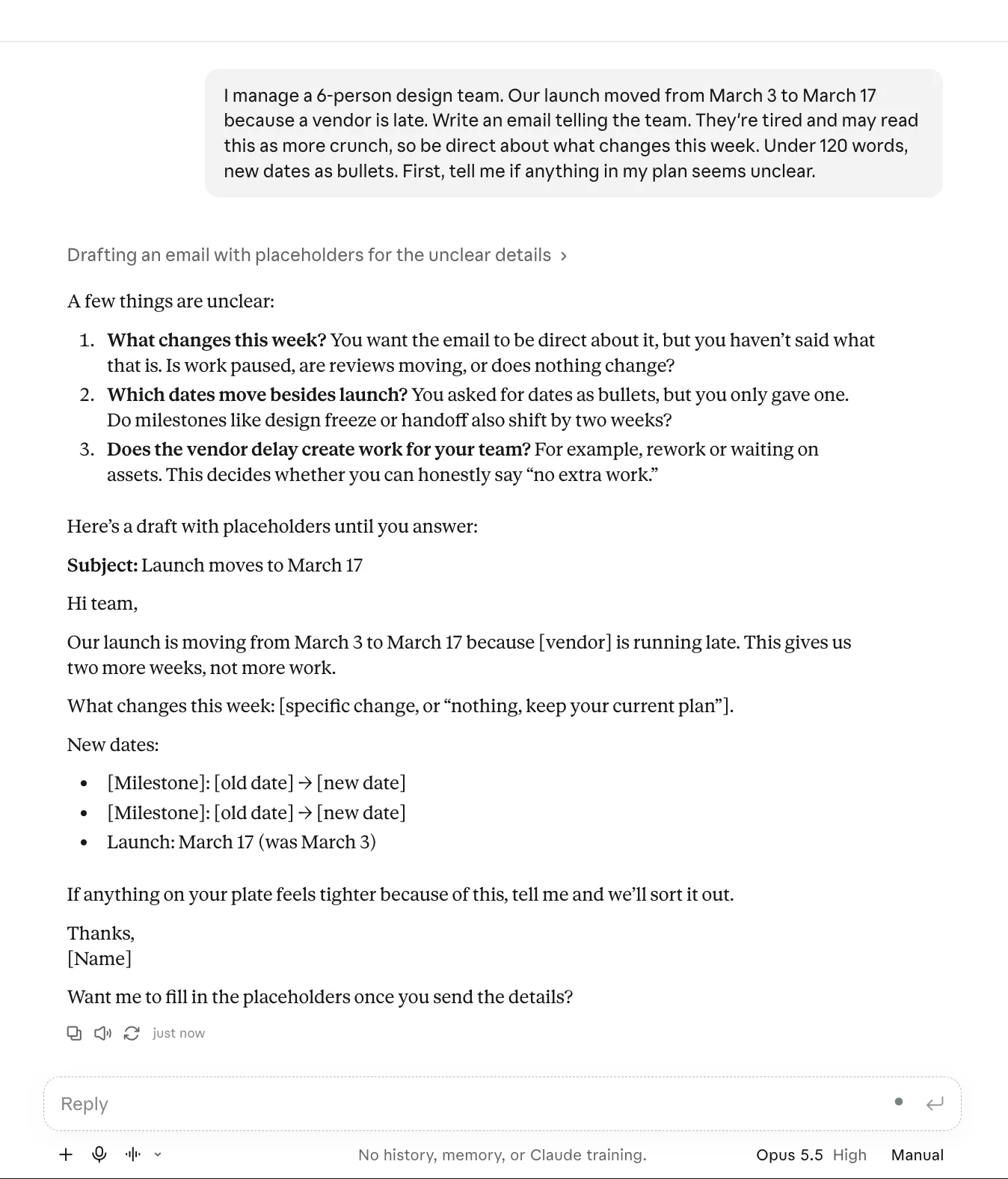
Screenshot: Claude (Anthropic)
The 5 prompts to try first
These five Claude AI prompts cover the most common jobs. Replace the parts in [brackets] with your own details before you send.
Ask me questions first
Use it when: the task depends on details only you know, such as the audience, constraints, or history.
Before you answer, ask me up to 5 questions about anything you'd need to know to do this well. Ask them all at once, wait for my answers, then do the task. Task: [describe it]Adapt it: paste it in front of any other prompt in this list.
Cut by 30%
Use it when: a draft runs long, and you’re too close to it to see what can go.
Cut this draft by about 30%. Keep every fact, number, and name. Cut repetition, warm-up sentences, and anything the reader already knows. After the new version, list what you removed so I can put anything back. Draft: [paste]Adapt it: change the percentage or give a word limit. If a part of the draft must stay word for word, such as the opening or a quote, say so in the prompt: “Leave the first paragraph unchanged.”
Notes to action list
Use it when: a meeting ends, and all you have is rough notes or a transcript.
Turn these meeting notes into an action list. Use a table: task, owner, deadline, and the line in the notes it came from. If the notes don't name an owner or a date, write "not stated" and leave it for me to fill in. Under the table, list any decisions made and any questions still open. Notes: [paste]Adapt it: notes often name people by initials or first names (“JK sends the deck”). Paste a short team list with full names and roles so Claude fills the owner column correctly instead of writing “not stated.”
Summary with page references
Use it when: you need to cite the summary or check it against the original.
Summarize the attached document in 8 bullets or fewer. After each bullet, give the page number or section heading it came from. Quote directly for any number, date, or name. Use only this document, and tell me if something I'd expect in a document like this is missing.Adapt it: ask for a version by the reader (“for legal,” “for the sales team”). Open two or three of the references yourself before you rely on the rest.
Tailor my resume to a job ad
Use it when: you send the same resume to different employers.
Here's my resume and a job ad. Rewrite my summary and my bullet points to match what this employer asks for. Use only facts from my resume: no new employers, titles, skills, or numbers. Don't copy the ad's wording into my summary or stretch my experience to look like a perfect fit; where the match is weak, keep my own phrasing. Where the ad asks for something I haven't shown, list it under "gaps" for me to handle. Resume: [paste] Job ad: [paste]Adapt it: ask for the changes as a before-and-after table so you can approve each line. Once you’ve approved them, ask for the full resume as a Word/PDF document you can download and send.
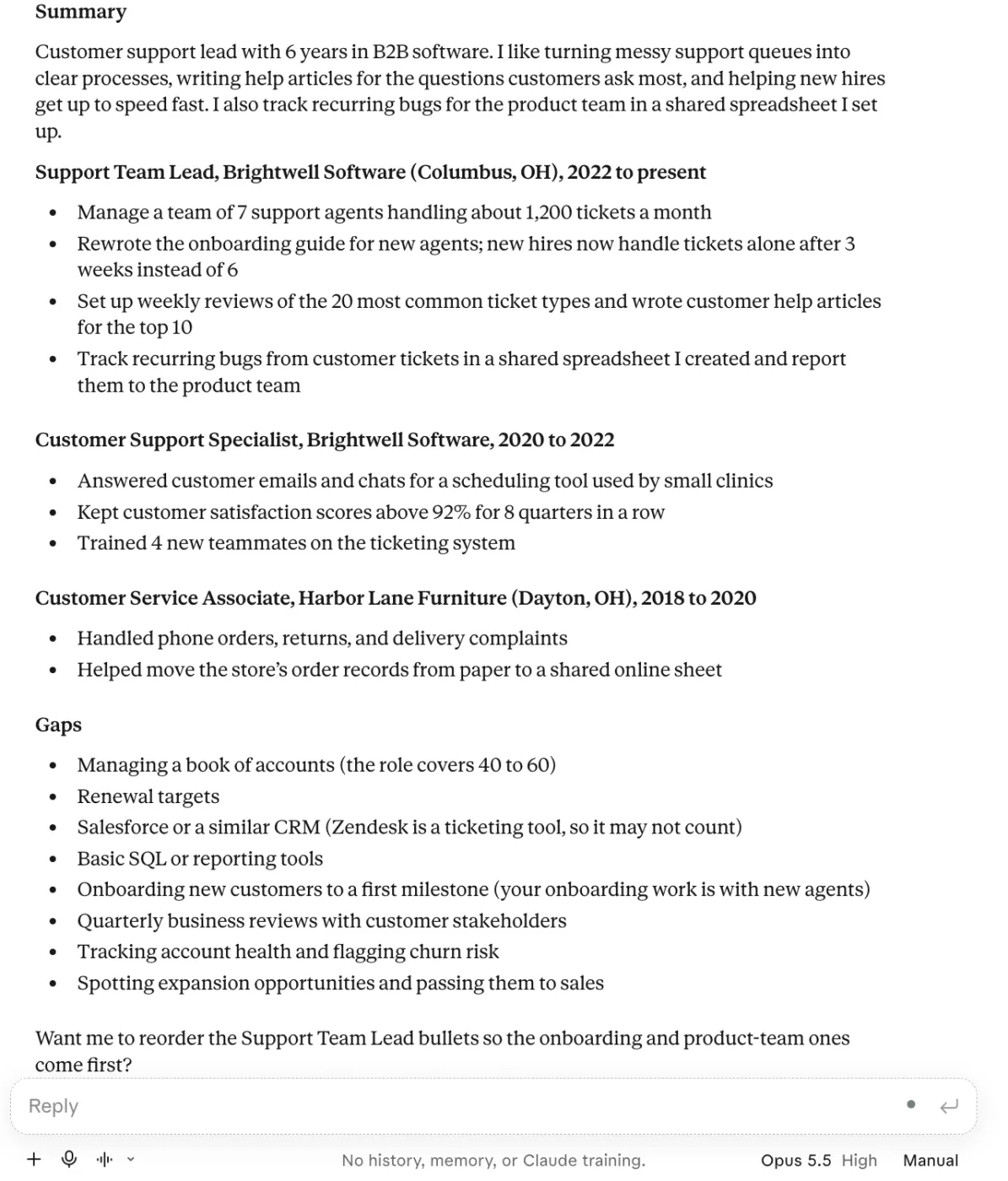
Screenshot: Claude (Anthropic)
Prompts that make Claude challenge you
To make Claude’s answers less sycophantic (telling the person what they wanted to hear), ask for criticism before you share your idea, and tell Claude what should change its mind. For legal, medical, or financial decisions, use Claude’s critique as preparation and have a qualified professional review the plan before you act.
Critical thinking partner
Use it when: you’re working through a decision and want a sparring partner.
Be my critical thinking partner on this. Disagree whenever you see a reason to. When my reasoning is weak, say so and show me why. If I push back, change your mind only when I give you new evidence or a better argument. Start with the strongest and the weakest part of this: [your idea or argument]Adapt it: shorten it to two sentences and save it as a standing instruction (see the section on saving prompts).
Argue the other side
Use it when: you’ve made up your mind before a pitch, a debate, or a decision.
I believe [position]. Make the strongest case against it, the way a smart person who disagrees would argue it. Use their best arguments and skip the weak ones. Flag any evidence you can't verify. Then tell me which of their points I should take most seriously.Adapt it: name the opponent, such as “our CFO” or “a skeptical customer.”
Pre-mortem
Use it when: you’re about to commit to a budget or time. A pre-mortem means imagining the plan has already failed and working back to the causes.
Imagine it's [date] and this plan has failed. Write the 5 most likely reasons, from most to least probable. For each one, give an early warning sign I could watch for and one thing I could do this week to lower the risk. Plan: [paste]Adapt it: change the lens: “failed because of people,” then “failed because of money.”
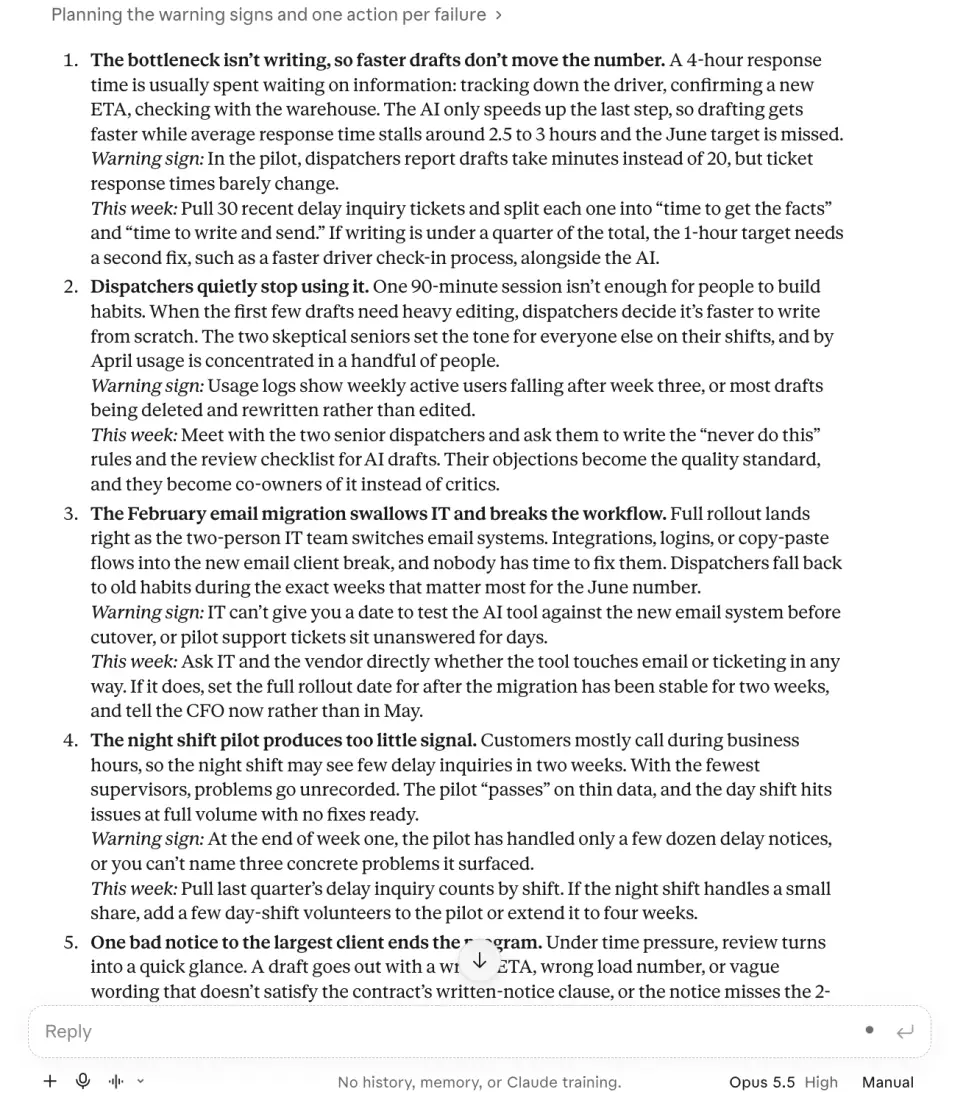
Screenshot: Claude (Anthropic)
Grade my plan harshly
Use it when: you want a verdict you can compare across versions.
Grade this plan from A to F the way a demanding reviewer would. Score it on [criteria, such as feasibility, cost, risk, and clarity], with one sentence explaining each grade. Then give me the two changes that would raise the overall grade most. Plan: [paste]Adapt it: revise the plan and rerun the prompt with the same criteria.
Find my blind spots
Use it when: a decision affects people or teams you haven’t talked to yet.
Here's my thinking on [decision]: [paste]. What am I missing? List the assumptions I'm making without saying so, the people this affects that I haven't mentioned, and the questions I should answer before I commit. Cover blind spots only.Adapt it: add your role and who approves the decision.
Prompts for writing and editing
These Claude prompts for writing work on a draft you already have.
Match my voice
Use it when: Claude’s drafts sound polished and nothing like you.
Here are three things I wrote: [paste samples]. Before you write anything, describe my voice in 5 bullets: sentence length, word choice, tone, habits, and things I never do. Then rewrite the draft below so it sounds like me. Keep my facts and my structure. Draft: [paste]Adapt it: Anthropic’s prompting guide recommends three to five examples, so add samples if the first try misses. Save the 5-bullet description and reuse it in place of the samples.
Rewrite for a non-expert
Use it when: an expert wrote the text and a customer, executive, or new teammate has to read it.
Rewrite this for [reader]. Keep the meaning exact. Swap jargon for plain words, define any term you can't avoid the first time it appears, and add one everyday example. Tell me if simplifying changed the meaning of anything. Text: [paste]Adapt it: name the reader as specifically as you can, such as “a client who has never seen a balance sheet.”
Tough editor feedback
Use it when: you want critique before a rewrite and “looks good” would waste your time.
Edit this like a tough editor who wants the piece to succeed. Skip the praise. Give me the 5 biggest problems in order of importance, quote the exact sentence for each one, and show a fixed version. Leave everything else alone. Draft: [paste]Adapt it: add the audience and the goal (“for CFOs, to get a meeting”) so the criticism has a target.
Tone check
Use it when: a sensitive message is one click from sent.
Read this message as [recipient, and their mood right now]. How will it land? Point out any line that could read as defensive, cold, or passive-aggressive, and suggest a replacement for each. Keep my meaning. Message: [paste]Adapt it: swap in whoever will read it: your manager, a job candidate, a client who is already annoyed about a delay.
Email reply from a thread
Use it when: a long thread lands in your inbox and your reply can’t miss anything.
Here's an email thread: [paste]. Tell me in 3 bullets what each person wants from me, then ask for my position before you draft anything. Once I answer, draft my reply: under 120 words, answer every open question, and end with one clear next step. Mark anything you had to guess with "(check this)."Adapt it: change the word limit and add the relationship (“she’s a new client”).
Headline options
Use it when: the draft is done, and the title is flat.
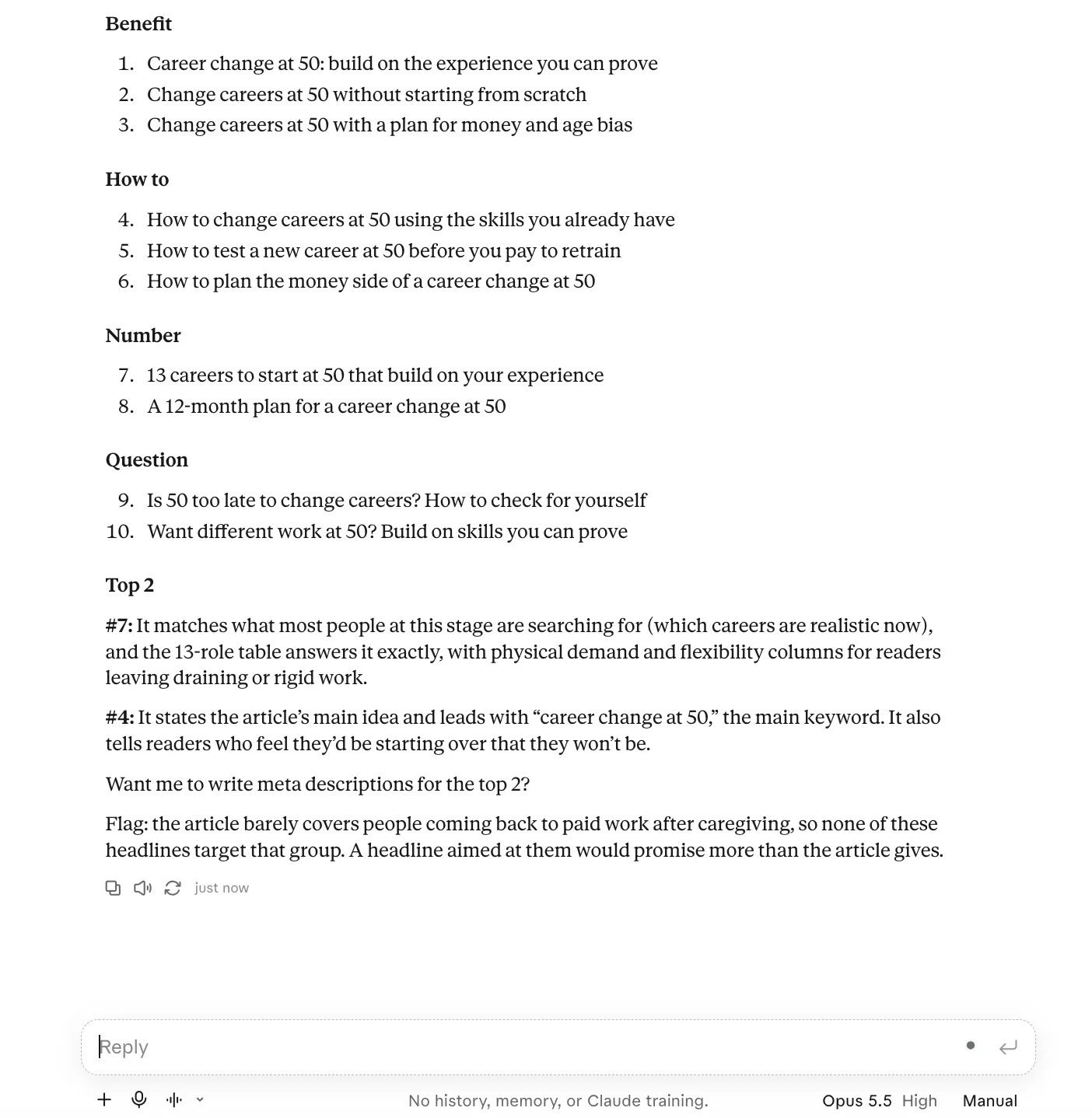
Give me 10 headline options for this piece. Audience: [who]. Mix the styles: 3 that state a clear benefit, 3 that start with "how to," 2 with a number, and 2 that ask a question. Keep each under 65 characters and promise only what the piece delivers. Then pick your top 2 and say why. Piece: [paste]Adapt it: change the styles to fit the channel: subject lines, LinkedIn hooks, or slide titles.
Screenshot: Claude (Anthropic)
Prompts for work documents and meetings
These Claude prompts for work turn raw material into documents a team can act on. If you came for Claude prompts for productivity, start here.
Status report that leads with what your manager needs
Use it when: the Friday update is due, and your material is scattered across chats and tickets.
Write a weekly status report from these notes. Sections: done this week, in progress, blocked, next week. Lead with the one thing you think my manager most needs to know. Above the report, tell me in one line why you chose it, so I can swap it if you're wrong. Under 200 words, plain language, and include only what's in my notes. Notes: [paste]Adapt it: paste last week’s report as a format example.
One-pager for a quick yes
Use it when: you need a yes from someone who has five minutes.
Write a one-page brief on [project or proposal] for [audience]. Use these headings: the problem, what we propose, what it costs, what we need from you, risks. Use only the details below, and list anything a decision-maker would ask that I haven't covered. Details: [paste]Adapt it: swap the headings for your company’s template.
Executive summary
Use it when: a long report goes up the chain.
Summarize this document for an executive who has two minutes. Give me the main point in one sentence, 3 supporting points, and the decision or action needed. Use only what the document says. Document: [paste or attach]Adapt it: name the executive’s priority (“she cares most about cost”) to decide which points lead.
Difficult email
Use it when: you have to say no, deliver bad news, or push back and keep the relationship.
Help me write a hard email. Situation: [what happened]. Reader: [who, and how they feel right now]. What I need: [outcome]. What I can't offer: [limits]. Write two versions under 150 words, one more direct and one warmer.Adapt it: add one line about your history with this person. For anything with legal or HR consequences, have HR or a lawyer review the email before it goes out.
Standard operating procedure (SOP)
Use it when: a process lives in one person’s head.
Turn this description of how I do [task] into a standard operating procedure. Format: purpose, who does it, what you need before you start, numbered steps, and what to do when something goes wrong. Where a step is unclear, ask me before you fill the gap. Description: [type or dictate it]Adapt it: ask for a one-page checklist version for daily use.
Agenda that ends in a decision
Use it when: you own the meeting and want it to end with a decision.
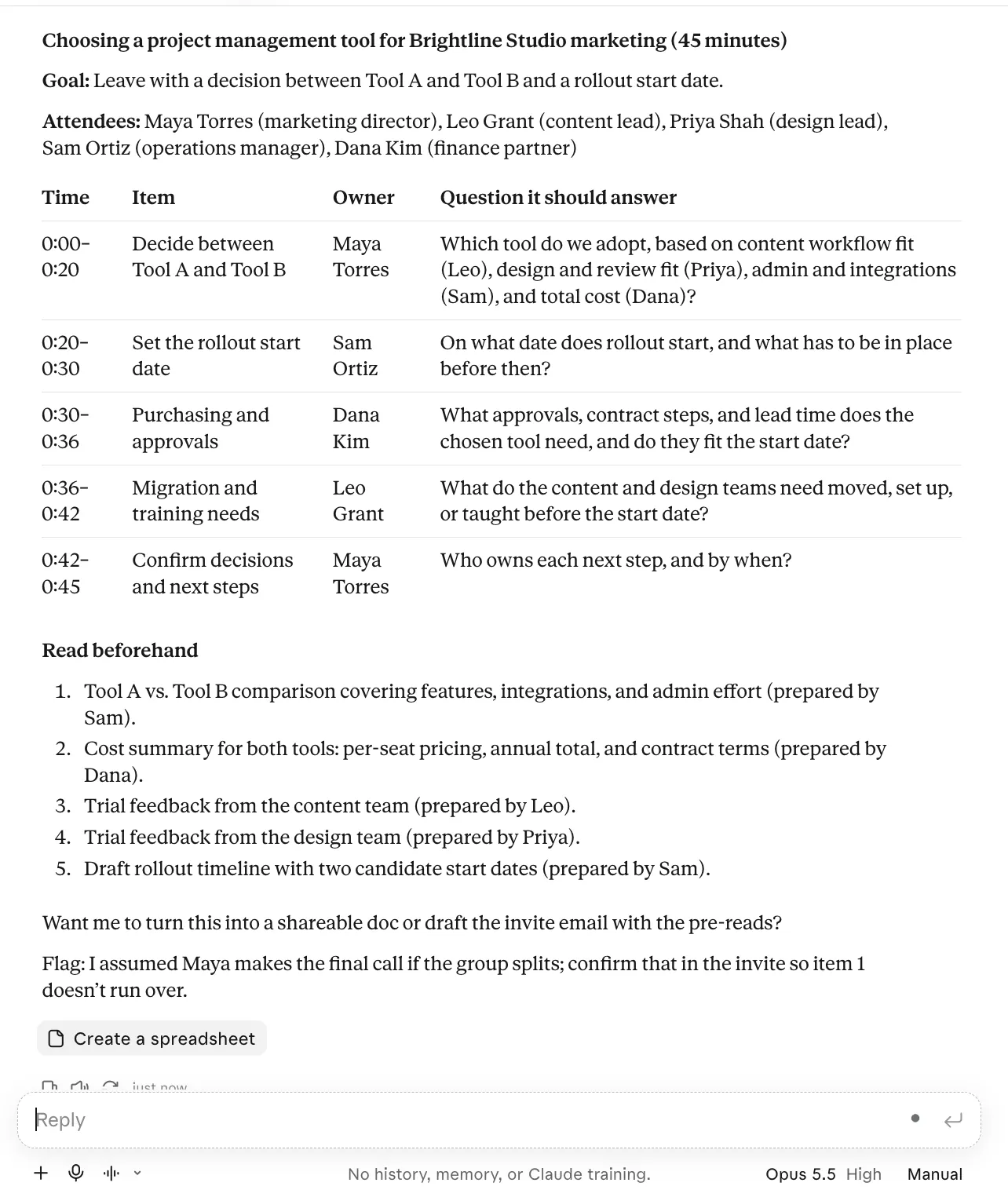
Build an agenda for a [length] meeting about [topic] with [who]. The goal is to leave with [decision or outcome]. Give each item a time slot, an owner, and the question it should answer. Put the decision items first, and list what people should read beforehand.Adapt it: for a recurring meeting, paste the last agenda and ask what to cut.
Screenshot: Claude (Anthropic)
Prompts for research and long documents
Tips for the prompts in this section:
- Put the document first and the question last. When you paste a long document into your message, put the prompt under it. Anthropic reports that this order improved response quality by up to 30% in its tests, especially with several documents at once.
- Ask for quotes before the task. The same guide suggests asking Claude to quote the relevant passages before it does the task. That is why the prompts below ask for quotes and locations.
- Check anything important against the original.
- For free plan: attach only the most important pages. A large file stays in the conversation and counts again with every message you send in that chat, so you hit your plan’s usage limit sooner. Our guide to Claude usage limits explains what else uses up your limit.
For a full research workflow, from planning the task to a source-linked brief with a verification log, see our guide to Claude for research.
Compare two documents
Use it when: you have two contract versions, two proposals, or an old and a new policy.
Compare these two documents. Make a table with three columns: topic, what document A says, what document B says. Include only the places where they differ, and quote both. Then list anything that appears in one and is missing from the other.Adapt it: name what matters most (“focus on pricing and termination terms”). For contracts or anything legal, a lawyer should review the comparison before you rely on it.
Find contradictions
Use it when: several people assembled a long document, and you’re about to send, sign, or publish it.
Read this document and find places where it contradicts itself: numbers that don't match, dates that conflict, claims that disagree. For each one, quote both passages and say where they are. If you find none, say "no contradictions found."Adapt it: attach a second document and ask for contradictions between the two.
Extract to a table
Use it when: the details you need are buried in prose and belong in a spreadsheet.
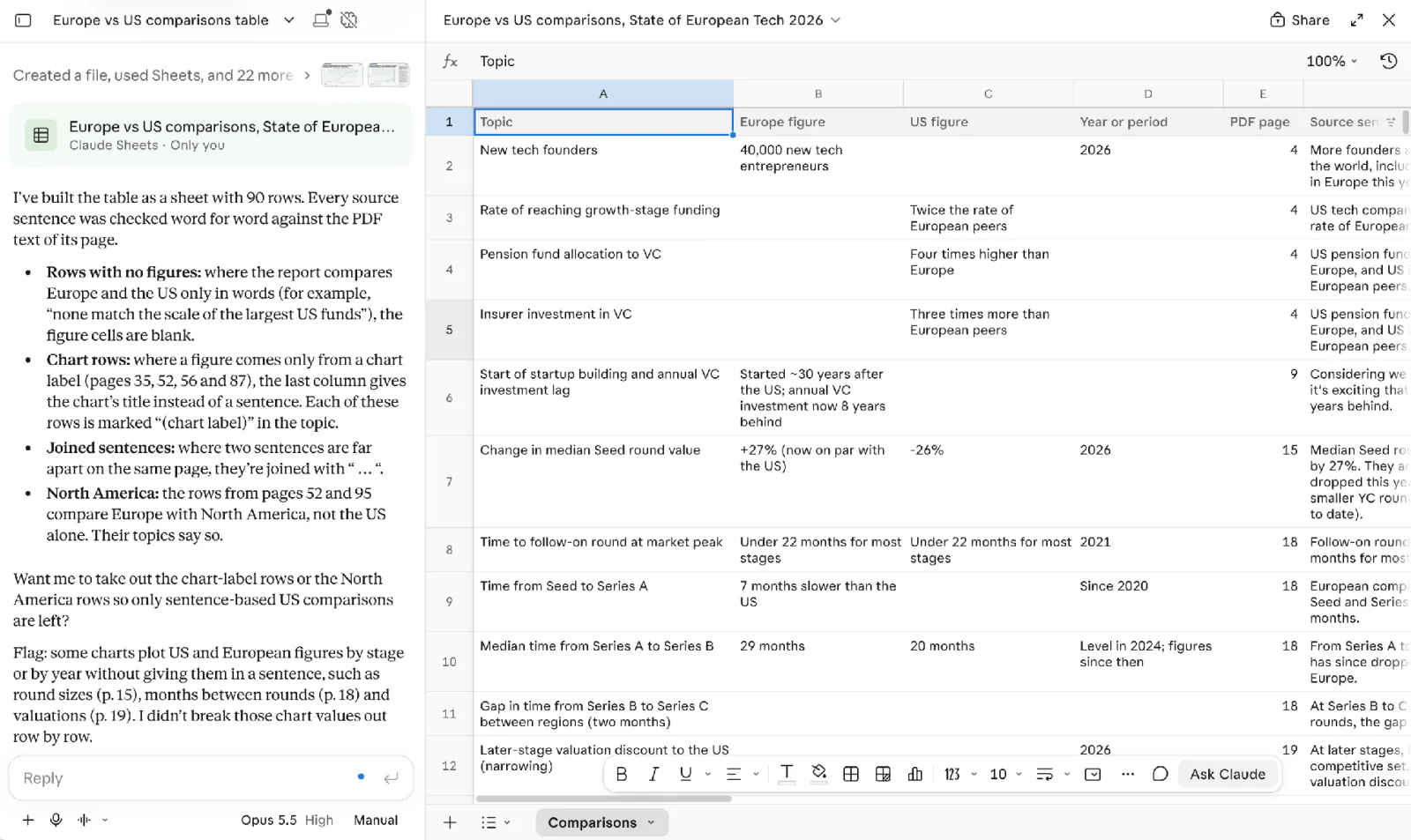
Pull every [item, such as a deadline, price, or named person] out of this document into a table. Columns: [list them]. Add a last column with the exact sentence each row came from. Leave a cell blank when the document doesn't say.Adapt it: ask for CSV output to paste into a spreadsheet.
Screenshot: Claude (Anthropic). Source document: State of European Tech 2026 (Atomico).
Find gaps in a document
Use it when: an expert will judge the document, and you want to know what they’ll ask for that isn’t there.
You're reviewing this [type of document] for [purpose]. What would an expert expect to see that's missing? List the gaps in order of importance and say why each one matters. Cover gaps only; I'll ask for feedback on the rest separately.Adapt it: name the expert, such as “a procurement manager” or “a grant reviewer.”
Prompts for marketing and sales
These Claude prompts for marketing start from material you already own: reviews, page copy, call notes. Remove customer names and contact details before you paste anything.
Customer profile from reviews
Use it when: you need customer language for copy or positioning, and you have reviews, survey answers, or support tickets.
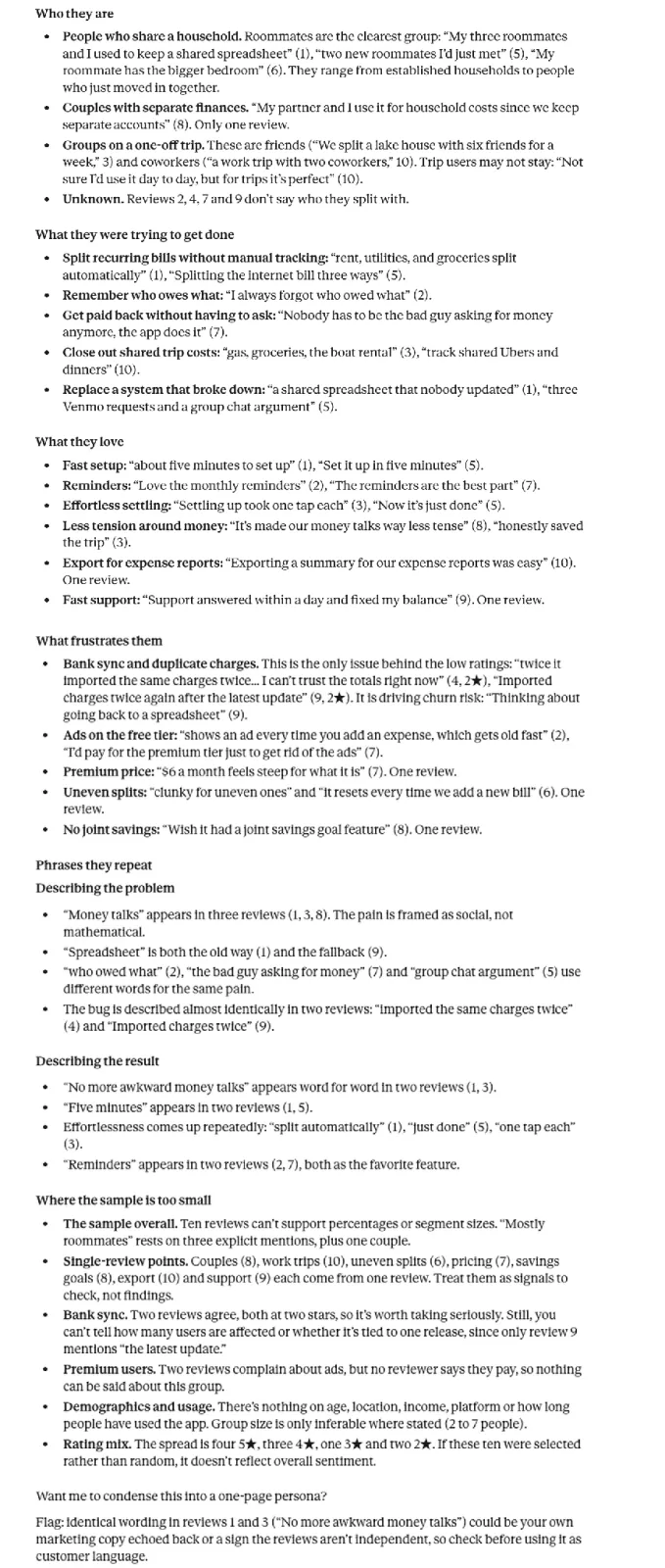
Here are customer reviews: [paste]. Build a customer profile from them: who these people are, what they were trying to get done, what they love, what frustrates them, and the exact phrases they repeat when describing their problem and the result they got. Quote a review for every point, and tell me where the sample is too small to say anything.Adapt it: split the reviews by star rating and run each group separately.
Screenshot: Claude (Anthropic)
Landing page critique
Use it when: a page gets traffic and few sign-ups, and you’ve read it too many times to see why.
Read this landing page copy as [target customer] who has never heard of us. After the first screen, can you tell what we sell, who it's for, and what to do next? List what's confusing, what's missing, and what you'd cut. Copy: [paste]Adapt it: run it once for each customer segment, such as small teams and enterprise buyers.
LinkedIn post from notes
Use it when: you have a lesson from real work and no time to shape it.
Turn these notes into a LinkedIn post. One idea only. Open with a specific moment or result, keep paragraphs to one or two lines, and end with a question people can answer from experience. Under 180 words, plain text without hashtags or emojis, and only the facts in my notes. Notes: [paste]Adapt it: paste two of your own posts as voice examples.
Subject lines
Use it when: the email is written, and the subject line is an afterthought.
Write 10 subject lines for this email. Audience: [who]. Goal: [open, reply, or click]. Keep each under 50 characters and true to what the email says, with no invented urgency. Group them by angle. Email: [paste]Adapt it: add two past subject lines that performed well for your list.
Objection handling
Use it when: you’re preparing for a sales call.
I sell [product] to [buyer]. Their most common objection is [objection]. First, tell me what concern usually sits behind this objection. Then give me 3 responses, each using a different approach, and say when each one works best. Under 60 words each, conversational. Use placeholders for any customer story or number, and I'll fill in real ones.Adapt it: paste the objection word for word from call notes or an email.
For outreach and follow-up workflows, see our guide to Claude for sales.
Claude resume prompts
Every prompt in this section tells Claude to work only from facts you supply, because a resume has to survive an interviewer’s follow-up questions.
Turn duties into results
Use it when: your resume reads like a job description.
These resume bullets describe duties. Rewrite each one to show a result, using only what I give you. Where a bullet needs a number or an outcome I haven't supplied, ask me for it and wait for my answer. Never estimate or invent figures. Bullets: [paste]Adapt it: answer Claude’s questions in one message, then ask for final bullets under 20 words each.
Find missing keywords
Use it when: you suspect your resume describes the right experience in the wrong words.
Compare my resume with this job ad. List the skills, tools, and terms the ad uses that my resume doesn't. Sort them into two groups: ones my experience supports (tell me where), and ones I can't claim based on what's here. Leave the resume itself unchanged. Resume: [paste] Job ad: [paste]Adapt it: paste three ads for the same role and ask which terms appear in all of them.
Our guide on how to use AI to write a resume covers the full workflow, including formatting for applicant tracking systems.
Write a cover letter from my resume
Use it when: the application asks for a letter, and you’d otherwise reuse an old one.
Write a cover letter for this job using only facts from my resume. Under 250 words. Open with why this role at this company, connect two of my real achievements to what the ad asks for, and close with a plain next step. Resume: [paste] Job ad: [paste] Why I want it: [one or two lines]Adapt it: add a letter you wrote yourself as a voice example.
Interview practice
Use it when: an interview is on the calendar.
Act as the [interviewer, such as the hiring manager, a recruiter doing a screening call, or a peer on the team] for this role. Ask me one question at a time, mixing behavioral and role-specific questions, and wait for my answer. After each answer, tell me what worked, what was vague, and how to tighten it using only details I gave you. After 6 questions, sum up my 3 biggest weak spots. Job ad: [paste] Resume: [paste]Adapt it: run it in voice mode, where you talk to Claude and it answers out loud, so you practice saying your answers, not typing them. Then ask for a harder second round built only on your weak spots.
Salary talk rehearsal
Use it when: an offer has arrived, and you want to practice the conversation out loud.
Help me rehearse a salary conversation. Role: [title and location]. Their offer: [amount]. My target: [amount]. My reasons: [list]. Play the hiring manager and push back realistically, one line at a time. After 5 exchanges, tell me where I gave ground too fast. Use only the figures I've given you.Adapt it: run it in voice mode so you rehearse the conversation out loud, the way it will happen. Paste pay ranges from sources you’ve checked yourself, and confirm every figure against current salary data before a real negotiation.
If you also work in ChatGPT, we keep a separate set of ChatGPT prompts for resumes.
Prompts for learning and everyday life
The last four prompts apply the same context, task, format, and pushback structure outside work.
Skill-gap audit
Use it when: you want to grow in your field and can’t tell where to start.
I'm a [role] with [number] years of experience, and I want to [goal]. Here's what I can do today: [list]. Ask me up to 5 questions about my work first. Then show me the gap: skills I have, skills I'm missing, and the 3 to learn first, with a reason for each.Adapt it: paste a job ad for the role you want and ask Claude to audit against it.
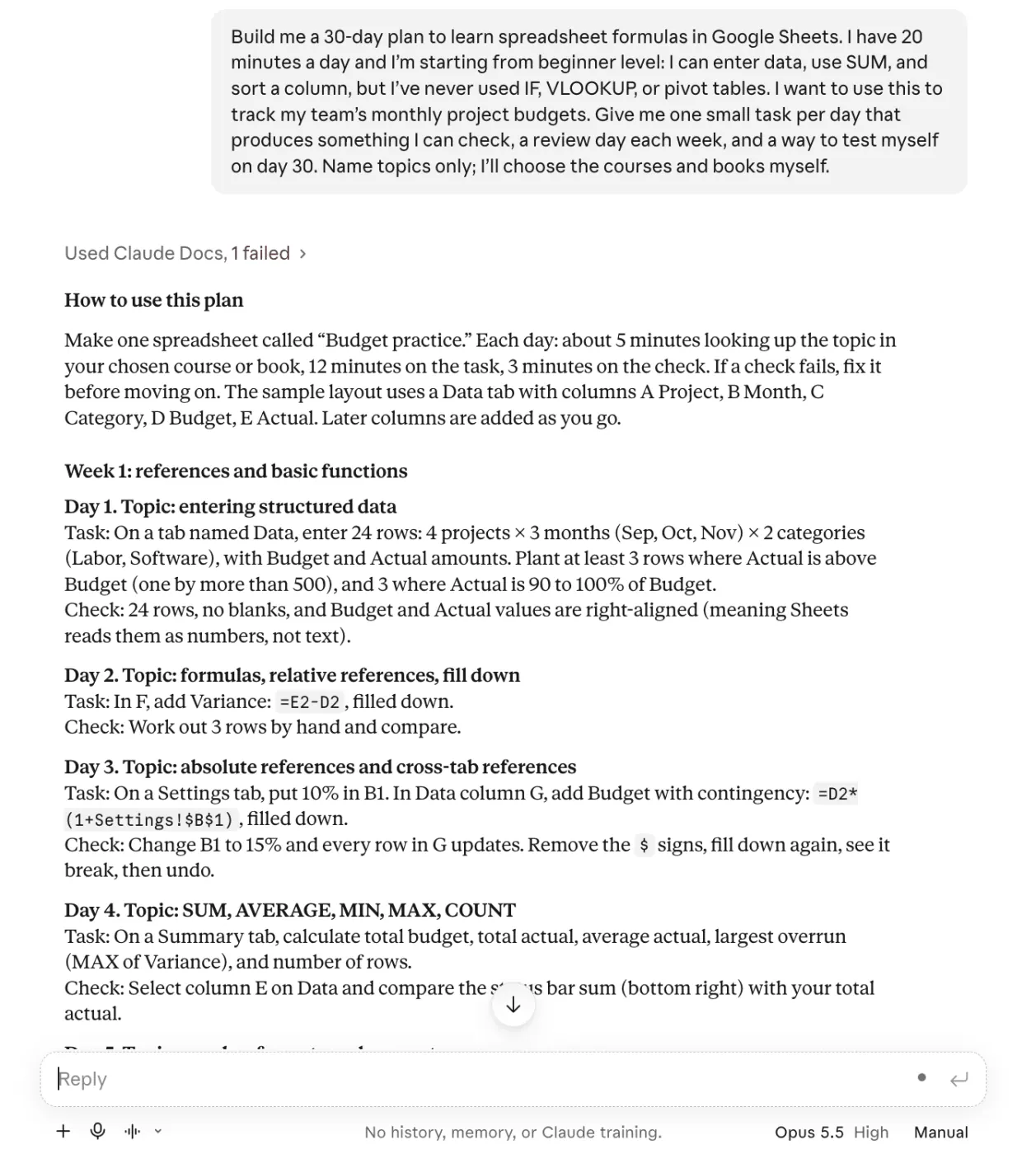
30-day learning plan
Use it when: you keep meaning to learn something and never get past week one.
Build me a 30-day plan to learn [skill]. I have [minutes] a day, and I'm starting from [level]. Give me one small task per day that produces something I can check, a review day each week, and a way to test myself on day 30. Name topics only; I'll choose the courses and books myself.Adapt it: feed in the three skills from the skill-gap audit, one plan at a time.
Screenshot: Claude (Anthropic)
Trip plan
Use it when: you have dates and a destination and no plan.
Plan a [number]-day trip to [place] for [who], with a budget of [amount] not counting flights. We like [interests] and want to avoid [dislikes]. Give me a day-by-day plan with one main activity, one backup for bad weather, and rough travel time between stops. Flag anything I should confirm myself, like opening hours and prices.Adapt it: add mobility needs, kids’ ages, or a pace (“two slow mornings”).
Meal plan
Use it when: the weekly “what’s for dinner” question wears you down.
Make a 5-day dinner plan for [number] people. We don't eat [foods]. Each dinner should take under [minutes] and reuse ingredients across the week. Give me the plan as a table, then one shopping list grouped by store section.Adapt it: add a budget or what’s already in your fridge. With a medical condition, an allergy, or a prescribed diet, have your doctor or a registered dietitian review the plan.
How to save your best prompts: Instructions, Projects, and Skills
Once a prompt works twice, save it. Anthropic’s help center describes three personalization features, and each one suits a different kind of prompt:
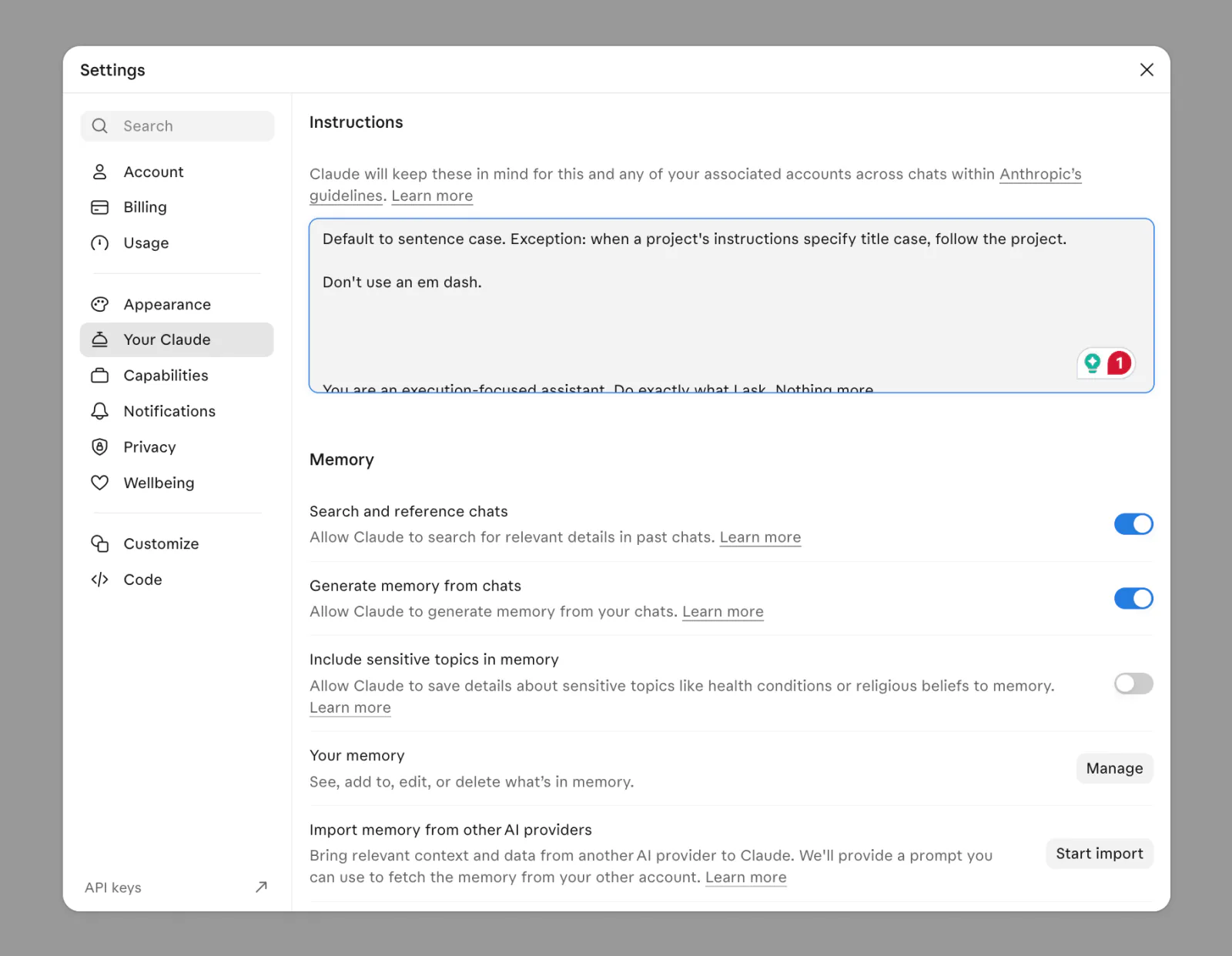
Instructions (your account-wide preferences): found under Settings, then “Your Claude,” then “Instructions,” and applied to all your conversations. Use it for standing rules, such as a short version of the critical thinking partner prompt.
Screenshot: Claude (Anthropic)
Project instructions: applied only to chats inside one project (a workspace that keeps the chats, files, and instructions for one piece of work together). Use them for prompts tied to one job, such as the status report format. Our guide on how to use Claude Projects walks through setup.
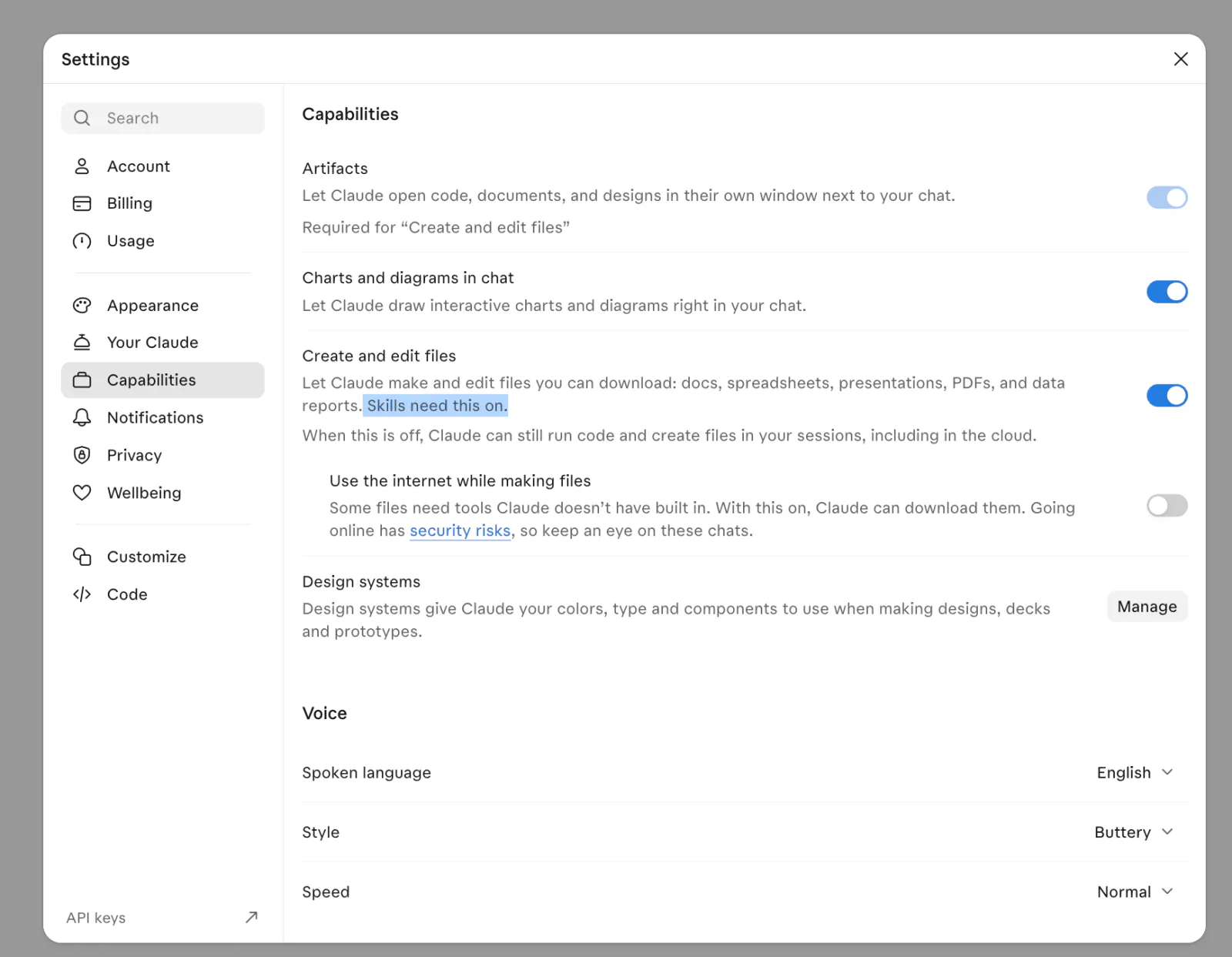
Skills: task-specific instructions that Claude loads only when they’re relevant. Skills need code execution turned on. In practice, go to Settings, then Capabilities, and turn on “Create and edit files”.
Screenshot: Claude (Anthropic)
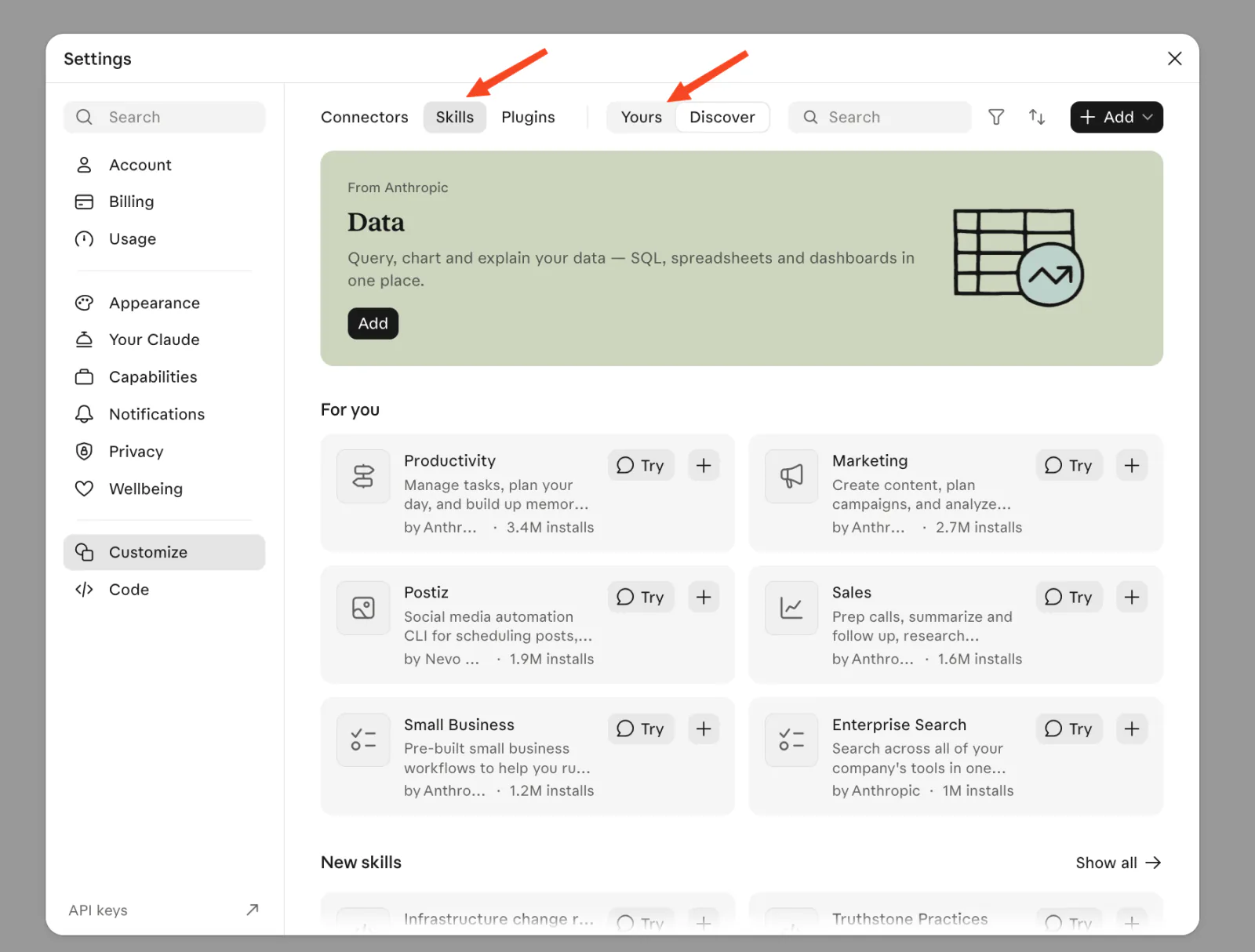
Then turn individual skills on or off under Customize, then Skills.
Screenshot: Claude (Anthropic)
Anthropic lists Skills on every plan, Free included, and limits Free accounts to five projects.
For how a skill is structured and built, see our Claude Skills guide, which uses Claude Code for its examples.
Why a prompt still gives weak results
Once your prompts carry context and a format, weak results usually trace back to how the chat is run. Regular Claude users point to the same habits:
- Patching a weak answer in the same chat. Every correction stays in the conversation, so Claude keeps building on the first draft. Ruben Hassid, an AI consultant who says he has spent more than 1,800 hours with Claude, recommends rewriting the original prompt instead. Edit your first message, add what was missing, and resend it.
- Keeping one chat going for days. Very long conversations can make Claude less effective. When it starts dropping instructions it followed earlier, ask for a short summary of the decisions so far and paste it into a new chat.
- Running every chat inside a Project. A Project brings its files and instructions into each chat. That helps when Claude needs the background and pulls answers toward old material when you want new ideas. So try a Project for context, a fresh chat for novelty.
- Vague quality words. “Make it better” or “more interesting” leaves Claude to guess what you mean. Name the change: shorter, more formal, one example per point.
- Facts without a source or research instructions. Ask Claude for numbers or citations with no document attached, and you invite invented ones.
Our Claude tips and tricks article covers 16 more habits for better results.
Keep learning Claude
If you want to understand how Claude works, keep up with its new features and changes, and learn other AI tools too, Coursiv’s 28-Day AI Certificate Program teaches them in short lessons that fit a busy schedule, on web and mobile, with practice built into each one and a certificate of completion at the end.
You can also see the full AI Certificate Program outline first.
If you’re weighing structured training options, our guide to choosing a Claude AI course lists what a useful one should teach.
This article is independent and is not affiliated with or endorsed by Anthropic.
FAQ
What are the best prompts for Claude?
The best prompts for Claude AI give context, name the output format, and invite disagreement. From this list, start with:
- Ask me questions first
- Cut by 30%
- Notes to action list
- Summary with page references
- Tailor my resume to a job ad