AI is transforming the way project managers work. Today, you no longer have to spend hours updating schedules, writing summaries, or manually rearranging task boards. All of these routines can now be automated with the help of AI.
AI project management tools won’t replace project managers. They only act as intelligent assistants that handle routine tasks and give experts more time to focus on addressing complex problems.
McKinsey’s survey revealed that 88% of organizations use AI in at least one business function. In project management specifically, the Association for Project Management’s report states that 70% of organizations already use AI in projects, up from 36% in 2023. To stay competitive, introducing AI into your workflow is rapidly becoming essential.
This article breaks down some of the best AI tools for project management that any type of project manager can benefit from.
If you want a structured training path instead of another tool roundup, see Coursiv’s ChatGPT for Project Managers course.
What Are the 4 Types of Project Managers?
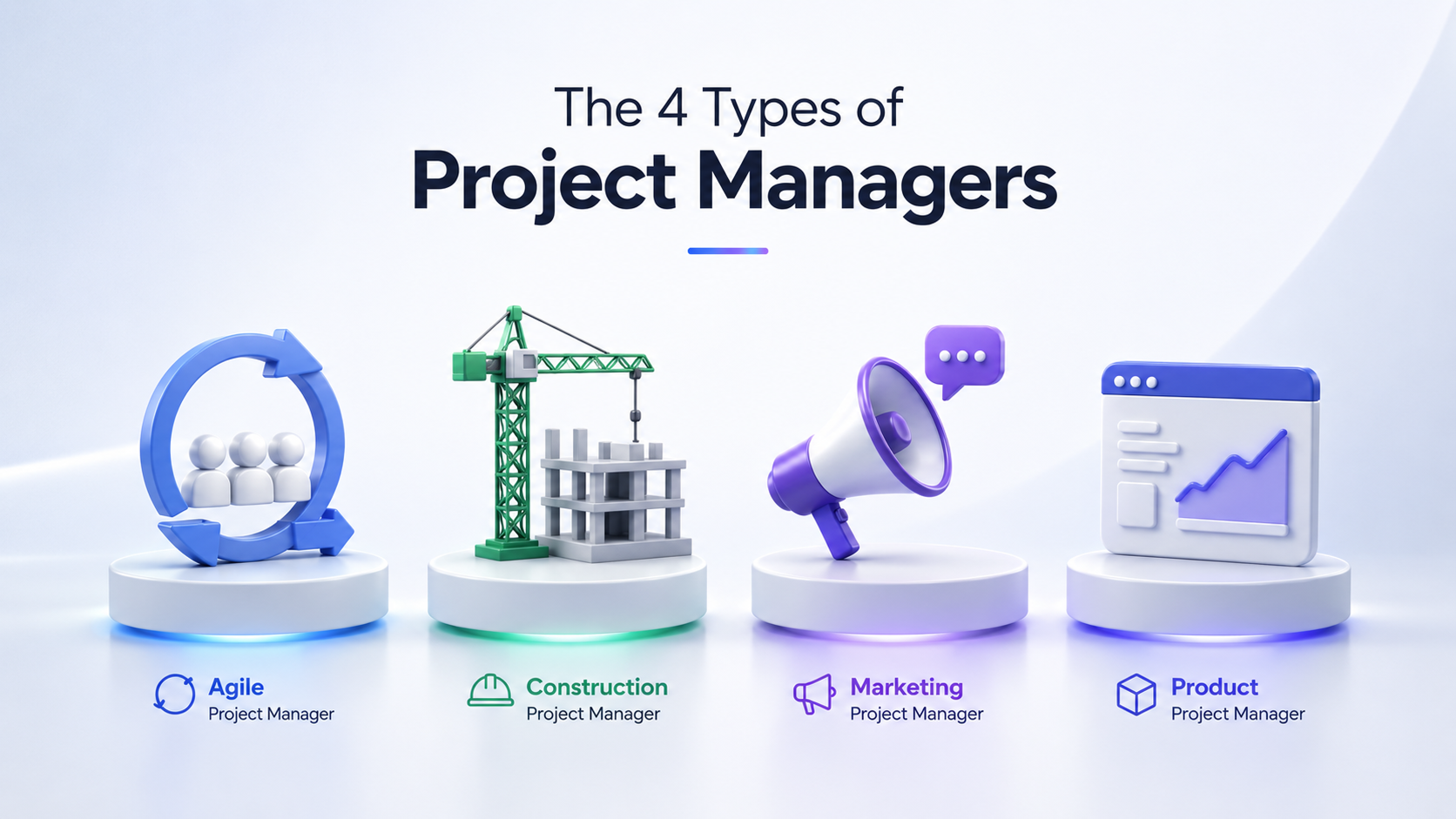
There are different types of project managers depending on the industry and many other factors. Below are the 4 most common types of project managers.
Agile Project Managers lead digital and software teams. They plan sprints and hold daily team meetings. They need to be able to quickly adjust to new situations, communicate clearly, and keep their teams motivated during big changes.
Construction Project Managers work with contractors, follow safety rules and regulations, and deal with site logistics. Their main focus is deadlines and technical details.
Marketing Project Managers typically work on campaigns and create content. They excel in both creativity and strategy, in addition to being able to adapt to any changes in audience needs or market conditions.
Product Project Managers focus on roadmaps, feature releases, and cross-functional coordination. They transform high-level business strategies into actionable tasks and prioritize features based on market needs and company objectives.
Additionally, every project manager has a different personality and leadership style. According to the Harvard Business Review, project managers can be divided into Prophets, Gamblers, Experts, and Executors. Each one of these represents a unique approach to strategy and decision-making.
Prophets focus on long-term plans and see new possibilities that fit within the company’s goals. Gamblers are best at making quick decisions and taking risks to find something new. Experts use analytical thinking to make sure that projects are accurate and reliable. Executors are very organized, manage resources well, and get things done on time.
A successful project manager combines traits from all four, using each trait based on the given scenario.
Key Differences in Their Tasks
Agile Project Managers focus on sprint planning, backlog management, facilitating stand-ups, and adapting workflows as requirements change. They track team performance, monitor progress toward a set of goals, and adjust priorities based on feedback.
Construction Project Managers deal with schedules, communicate with contractors, and manage site logistics. They ensure projects are carried out within budget, deadlines, and in compliance with safety regulations.
Marketing Project Managers run campaigns and manage content production, making sure everything runs smoothly and on time across multiple platforms. They schedule tasks, collaborate with teams, and evaluate campaign metrics daily.
Product Project Managers rely on tactics and strategy, leveraging active teamwork to get things done. They work in collaboration with different teams to meet both user needs and business objectives.
Each of these types requires specialized skills, yet all share the same goal: delivering projects effectively, on time, and with clarity.
Courses by Coursiv Useful for Project Management
Coursiv is a mobile-first AI learning platform that provides daily 15-minute lessons to teach AI skills. With fun, gamified lessons designed for busy people, Coursiv fits AI into your daily life—and helps you turn knowledge into results.
Here are some of our courses that are especially useful for project management in 2026:
- AI Essentials for Project Managers
Teaches AI-assisted project planning and team coordination using ChatGPT, Asana, Notion, and Slack.
Quickly turn goals into actionable plans, track team activity, and generate reports automatically, making project management more efficient.
Level: Beginner Time to Complete: 3 hours Best For: All types of PMs
- ChatGPT & ChatGPT 2.0
The course is divided into two parts, covering everything from the fundamentals to advanced AI workflows and custom GPTs.
Automate routine tasks, turn meeting notes into things you can do, and build AI-driven workflows that save hours weekly.
Level: Beginner Time to Complete: 6+6 hours (both courses) Best For: Agile, Marketing, Product, Construction PMs
- Turbocharge Your Productivity With AI
Multi-tool guide to AI-powered automation, document creation, and project workflows.
Use multiple AI tools effectively and boost team productivity.
Level: Beginner Time to Complete: 3 hours Best For: Digital, Marketing, Product PMs
What Are the Top 5 Project Management Tools?
The best AI project management tools have an intuitive and simple interface that allows for task tracking, scheduling, automation, and documentation. When these features work together, project managers spend less time on routine updates and more time focusing on strategy, team coordination, and decision-making.
Below is a breakdown of some of the most widely used AI tools for project management in 2026.
Motion — Best in Smart Scheduling
Pricing: No free plan; from $29 per user/month Rating: 4.1/5 ⭐ (148 reviews on G2)
What it does Motion automatically arranges tasks based on priorities, deadlines, and available work hours.
Pros
- Smart task prioritizing
- Prevents team overload
- Combines tasks and calendar scheduling
Cons
- No free plan
- Focused on scheduling, limited advanced PM features
Auto-Schedules by Priority
Motion arranges tasks based on deadlines, priority, and available work hours, removing the need for manual schedule updates. This is especially useful for project managers working on multiple projects at once.
Prevents Team Overload
Motion can identify when the schedule becomes too full. The system adjusts deadlines to a later time if someone is overloaded with tasks. In some cases, tasks can also be reassigned to other team members.
Unifies Calendars and Tasks
Project managers can see deadlines, meetings, and tasks in one place. This makes daily planning faster and keeps teams in sync even in dynamic environments.
Asana — Excels at Goal Tracking
Pricing: Free plan available; from $10.99 per user/month Rating: 4.4/5 ⭐ (13,145 reviews on G2)
What it does Asana organizes tasks, timelines, boards, and goals, helping teams connect day-to-day work to broader objectives.
Pros
- AI-assisted project setup
- Automatic task summaries
- Workflow automation
Cons
- Many advanced features require a paid plan
- No built-in time tracking
AI Goal and Project Setup
Asana’s AI assistant can generate project plans based on a short description.
Project managers describe a campaign, product launch, or initiative, and then Asana builds a fully detailed project plan with tasks, deadlines, and milestones.
Task Summaries Auto-Generated
Asana automatically generates summaries of tasks. For example, discussions, project threads, and status updates. This helps managers easily prepare stakeholder updates or weekly reports.
Workflows Built Effortlessly
Asana makes it easy to automate repetitive routine tasks like approvals or handoffs.
Tasks can now move smoothly without constant manual supervision. Marketing and content teams tend to benefit from this feature the most.
ClickUp — Powers Custom Automations
Pricing: Free plan available; from $7 per user/month Rating: 4.7/5 ⭐ (11,189 reviews on G2)
What it does ClickUp is a flexible platform that combines task management, AI-powered suggestions, and automation to streamline workflows for teams and freelancers.
Pros
- Natural-language automation setup
- AI suggestions for tasks and content
- All-in-one tool for freelancers and small teams
Cons
- Steeper learning curve than other tools
- Some users report frequent performance lag
Natural Language Automations
ClickUp allows users to build automations using simple instructions.
For example, you can create a rule like “move task to review when complete,” and the platform sets up the workflow automatically.
AI Content and Suggestions
ClickUp’s AI assistant can draft task descriptions, summarize documents, and generate project ideas.
Teams working on content production tend to use it combined with tools like Canva to enhance their visual content and streamline the design process.
Freelancer Multitool Favorite
ClickUp works for project management, documentation, and reporting — all at once. Freelancers and small agencies often prefer it because it takes the place of multiple tools.
Trello — Best for Visual Kanban
Pricing: Free plan available; from $5 per user/month Rating: 4.4/5 ⭐ (13,963 reviews on G2)
What it does Trello provides visual boards and cards that make task tracking and collaboration simple and easy to follow.
Pros
- Simple Kanban board structure
- AI-assisted brainstorming tools
- Integrates with hundreds of apps
Cons
- Limited features for complex project management
- Many features require paid power-ups
Kanban Boards Simplified
Trello organizes tasks into three columns: To Do, In Progress, and Done.
This exact structure works well, especially for marketing teams, editorial calendars, and production pipelines.
AI Brainstorming Included
Trello’s AI tools can help teams come up with ideas, write task descriptions, and get quick summaries of board activity.
Zapier Boosts Power
Zapier boosts Trello’s functionality by connecting it with thousands of apps, turning it from a simple task manager into an automated project management engine.
For example, tasks can automatically appear when a new lead arrives in HubSpot or when files are added to Google Drive.
Notion — Integrates AI Writing Aids
Pricing: Free plan available; from $10 per user/month Rating: 4.6/5 ⭐ (10,536 reviews on G2)
What it does Notion is an all-in-one workspace that allows teams and individuals to create, manage, and collaborate on notes, projects, and AI-assisted content.
Pros
- Generates summaries
- Fully customizable workspace
- Works on desktop, mobile, and web
Cons
- Some AI features require paid plans
- No built-in time tracking or advanced reporting
AI Notes and Q&A Search
Notion AI can summarize long documents and answer questions about old notes. For teams managing large knowledge bases, this reduces time spent searching for information.
Workspace Fully Customizable
Users can build dashboards, databases, and task trackers from scratch.
Some teams run entire projects inside Notion, while others combine it with Asana or ClickUp.
Extra AI Fee Applies
Notion AI used to be offered as a paid add-on, typically costing around $10 per user per month.
Today, only Business and Enterprise plans offer full access to Notion AI. Free and Plus plans typically offer only 20 AI responses as a trial before requiring an upgrade.
However, many teams consider it worth it because it speeds up documentation, reporting, and internal communication.
Motion vs. ClickUp — Scheduling vs. Versatility
These two tools are used for different purposes.
Motion organizes work based on deadlines, meetings, and task priority, focusing on automated scheduling. This works well for individuals or small teams managing multiple responsibilities.
ClickUp is far more customizable. Teams can create dashboards, set up automation rules, and build reporting systems that fit their workflow.
In practice, Motion is ideal if scheduling is your biggest challenge. ClickUp is better if you want a single platform that handles nearly every aspect of project management.
Asana vs. Notion — Structure vs. Flexibility
The main difference between Asana and Notion is their structures.
Designed for project management, Asana features a task hierarchy, deadlines, and reporting tools that help teams stay organized with basic setup.
Notion is more flexible, but it requires much more setup and personalization. Project managers can build their own workflows and dashboards from scratch.
Organizations looking for a built-in project management solution will likely choose Asana. Teams that want a customizable workspace typically prefer Notion.
Wrike vs. Monday — Automation Capabilities
Wrike
- Pricing: free plan available; from $10 per user/month
- Rating: 4.2/5 ⭐ (4,520 reviews on G2)
Monday.com
- Pricing: from $12 per user/month
- Rating: 4.7/5 ⭐ (14,979 reviews on G2)
Wrike and Monday.com both focus on workflow automation.
Wrike focuses on organized workflows and detailed reporting, which is ideal for large, complex projects. However, it has a more challenging learning curve and can feel stricter for small teams.
Monday.com provides a visual interface with simple automation rules, perfect for small to medium teams. Yet some advanced features require higher-tier plans, and it can become pricey as teams grow.
In practice, Wrike suits large-scale, structured environments, while Monday.com appeals to teams looking for quick, visual automation without a complicated setup.
FAQ